
Message Quota and Pricing
HelpKnow AI employees are billed using a message quota system. This includes the free message quota included with the SaleSmartly plan, as well as any additional message quota purchased separately.
This article mainly introduces the billing rules, free quota, quota inquiry, quota purchase and consumption records of message quota.
(Note: If your project still uses a points system, continue to purchase and use points in HelpKnow according to the original points rules. The message quota rules in this article do not apply.)
Link to this article: "Message Quotas and Pricing"
I. Billing Rules
HelpKnow AI employees are billed based on message quotas.
Each time an AI employee replies to a user, one message quota is deducted. Even if the reply is long or split into multiple messages, it is still counted as one reply in terms of message quota.
II. Free Quota
Each HelpKnow project receives a certain number of free message quota each month, the exact amount depending on the project's current SaleSmartly plan.
| SaleSmartly Packages | HelpKnow monthly free messaging quota |
|---|---|
| Free | 200 messages |
| Pro | 2,000 messages |
| Max | 5,000 messages |
The free HelpKnow messaging credit included in the package will automatically refresh on the 1st of each month. Unused free messaging credit for the current month is only valid for that month and will not carry over to the next month.
The actual amount of free message quota received by the project is subject to the information displayed on the SaleSmartly "Subscriptions" page.
For details on the pricing and benefits of each SaleSmartly plan, please refer to the SaleSmartly pricing plan .
III. Check Message Quota
You can check your HelpKnow message quota in both HelpKnow and SaleSmartly.
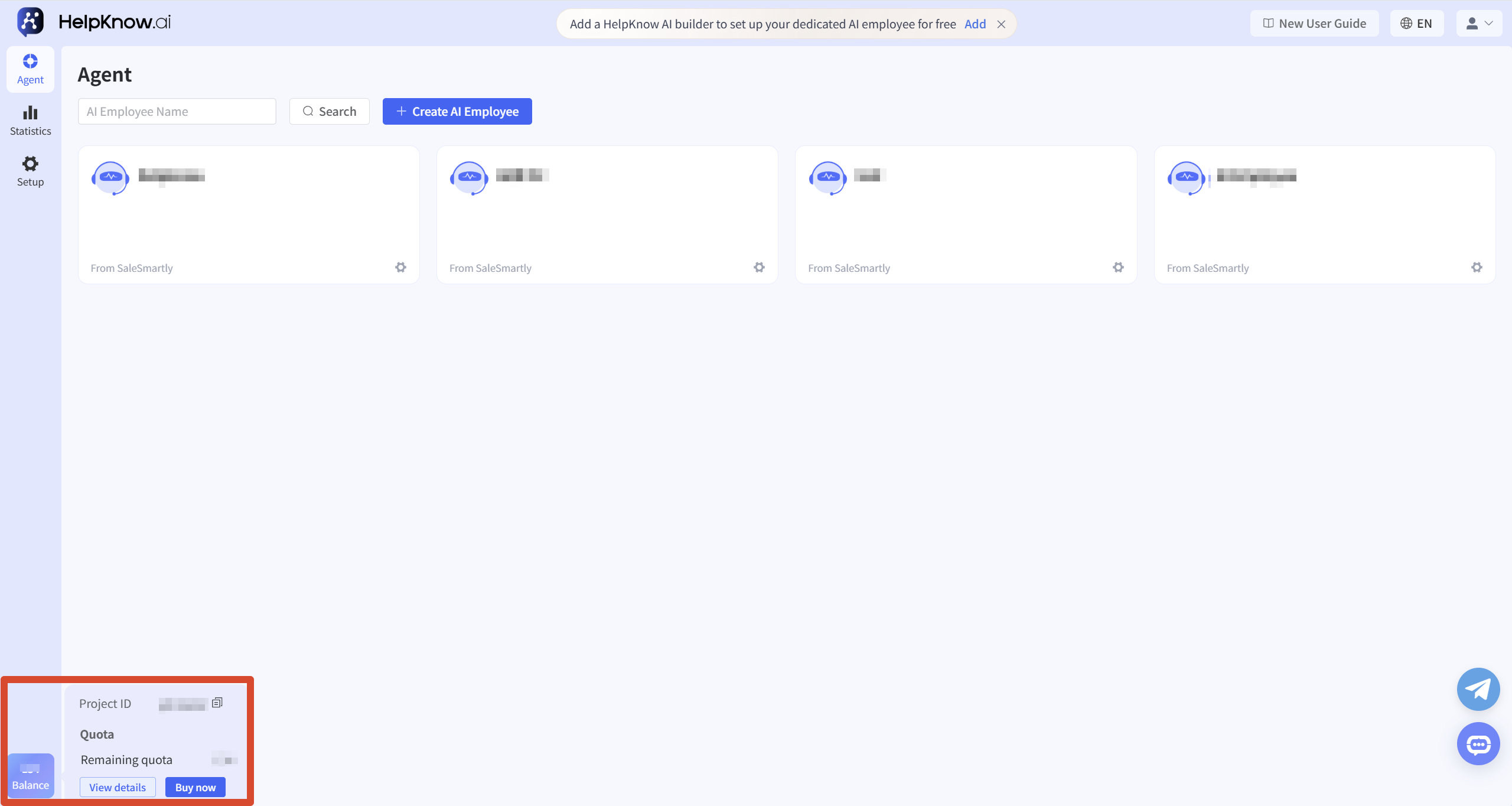
You can quickly check your current remaining message quota in the message quota area in the lower left corner of HelpKnow.
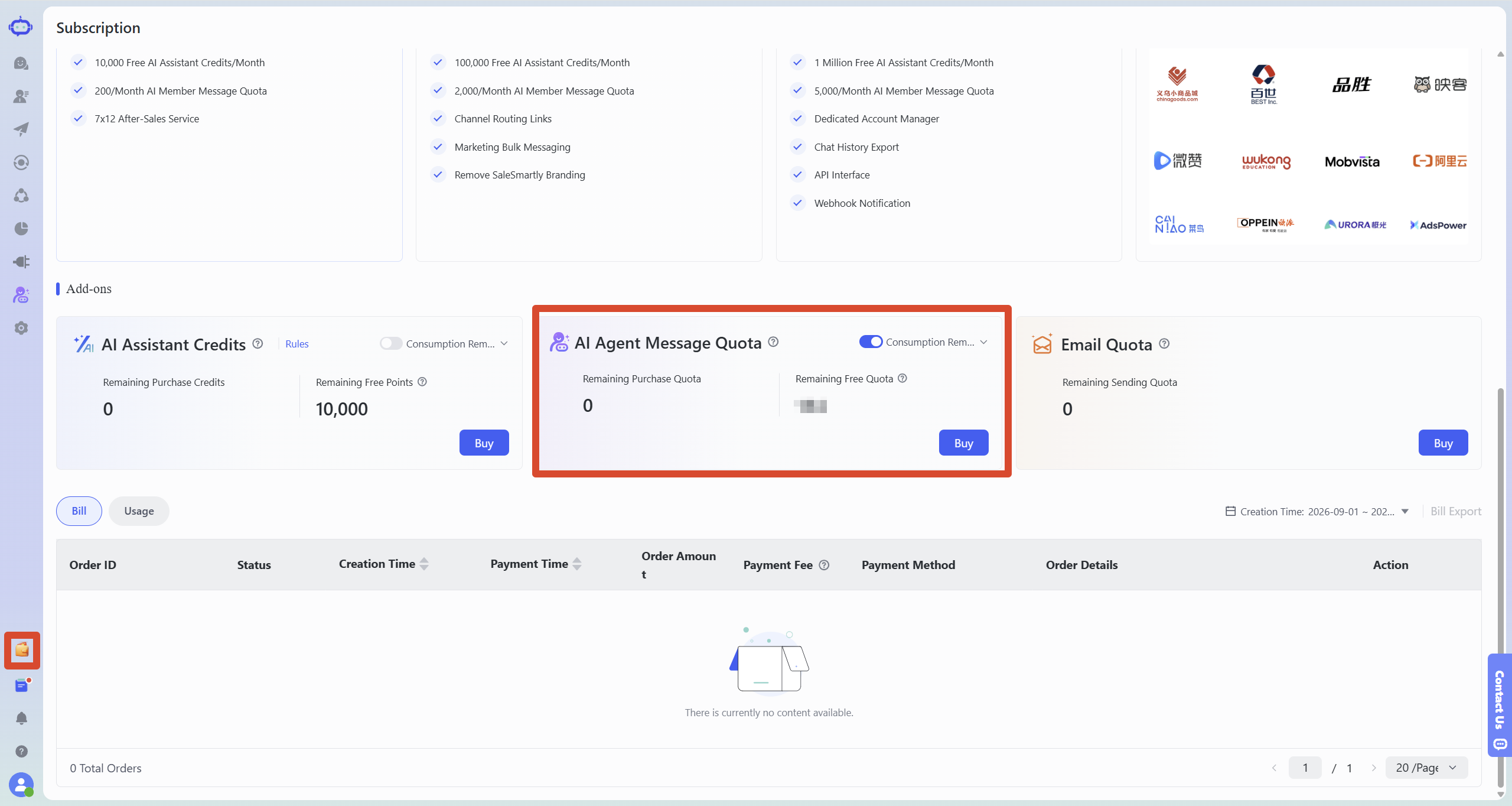
To distinguish between HelpKnow's remaining purchase quota and remaining free quota, please go to the SaleSmartly "Subscriptions" page and find "AI Member Message Quota" in "Add-ons".
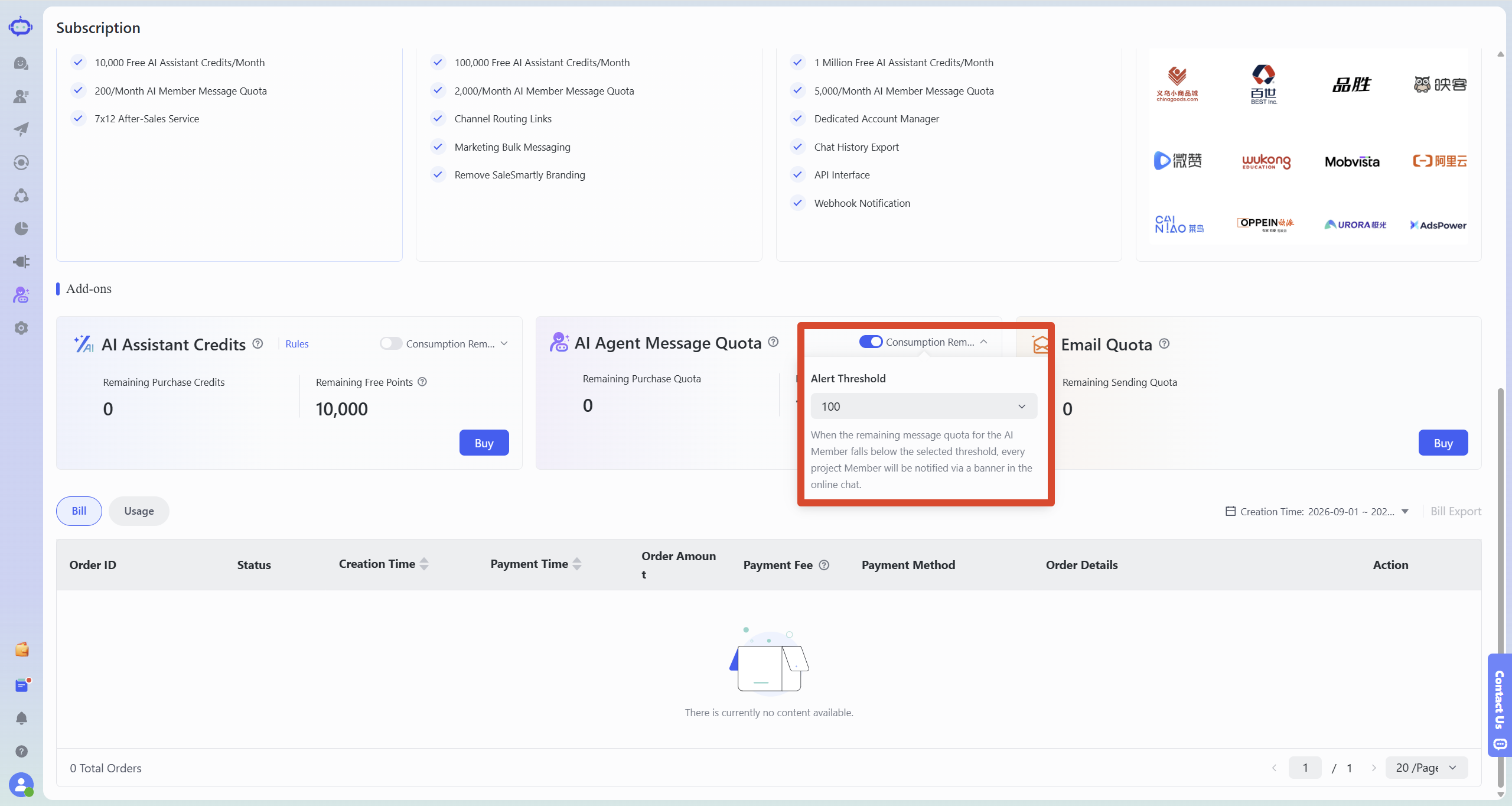
You can also enable "Consumption Reminders" and set a reminder limit. When the remaining message quota for AI members falls below the set limit, the system will send a notification to project members via online chat.
IV. Purchase Message Quota
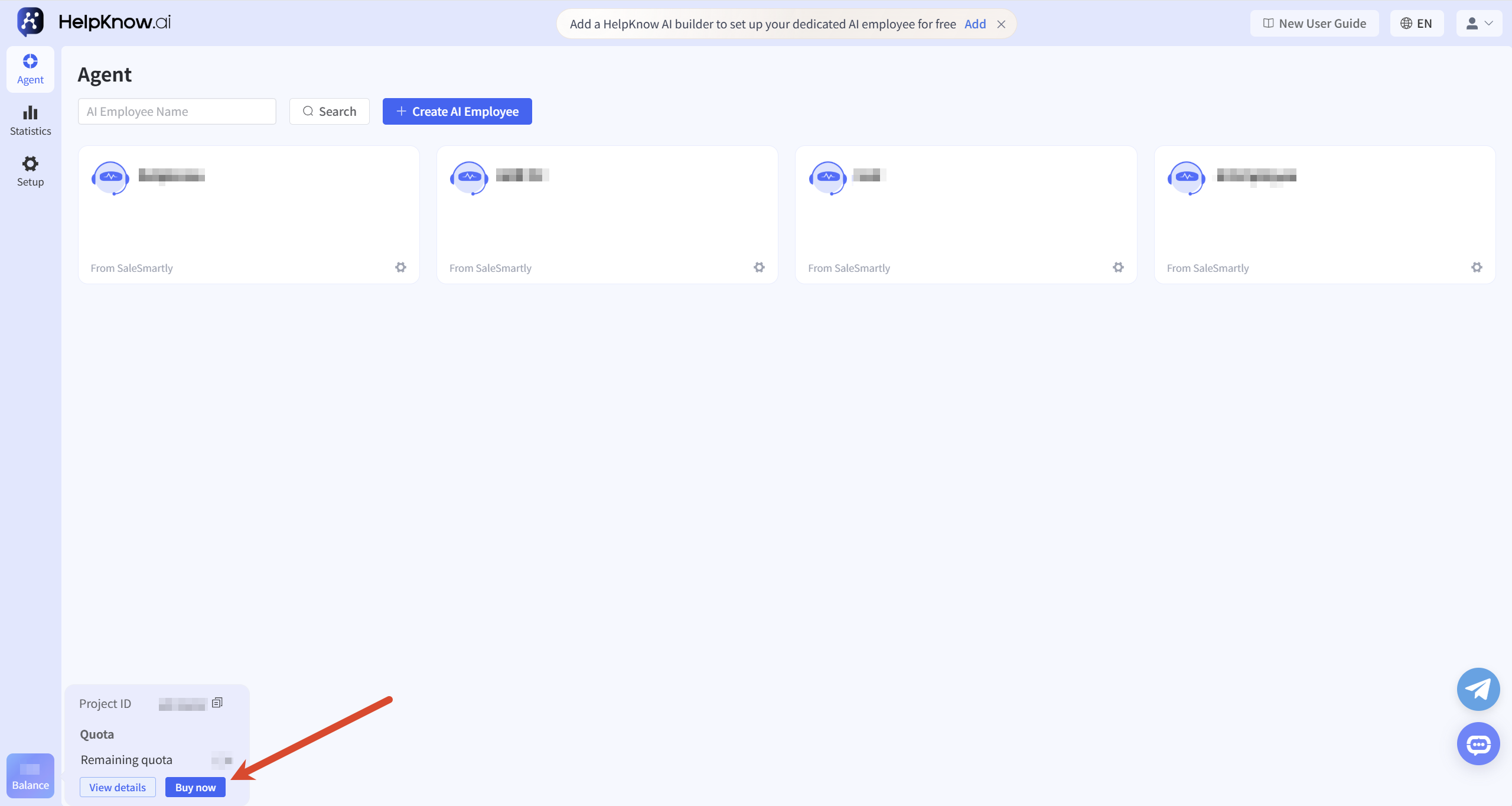
When your message quota is insufficient, click "Buy Now" in the message quota area in the lower left corner of HelpKnow. The system will then redirect you to the SaleSmartly "Buy AI Member message quota" page. Select the desired message quota, confirm the order information, and complete the payment.
The following message quota packages are currently available for purchase:
| Package amount | Original price ($) | Special offer ($) | discount |
|---|---|---|---|
| 1,000 | 10 | 10 | none |
| 5,000 | 50 | 45 | Save $5, 10% off |
| 20,000 | 200 | 170 | Save $30, 15% off |
| 50,000 | 500 | 400 | Save $100, 20% off |
| 200,000 | 2,000 | 1,500 | Save $500, 25% off |
| 500,000 | 5,000 | 3,500 | Save $1,500, 30% off |
The message quotas and prices listed above are for reference only. After selecting a message quota and payment method, the page will display the order amount, discounts, handling fees, and the amount due. Some orders may incur handling fees. The specific amount and payment method are subject to the actual display on the purchase page. After confirming that everything is correct, click "Submit Order" to complete the purchase.
V. Consumption Records
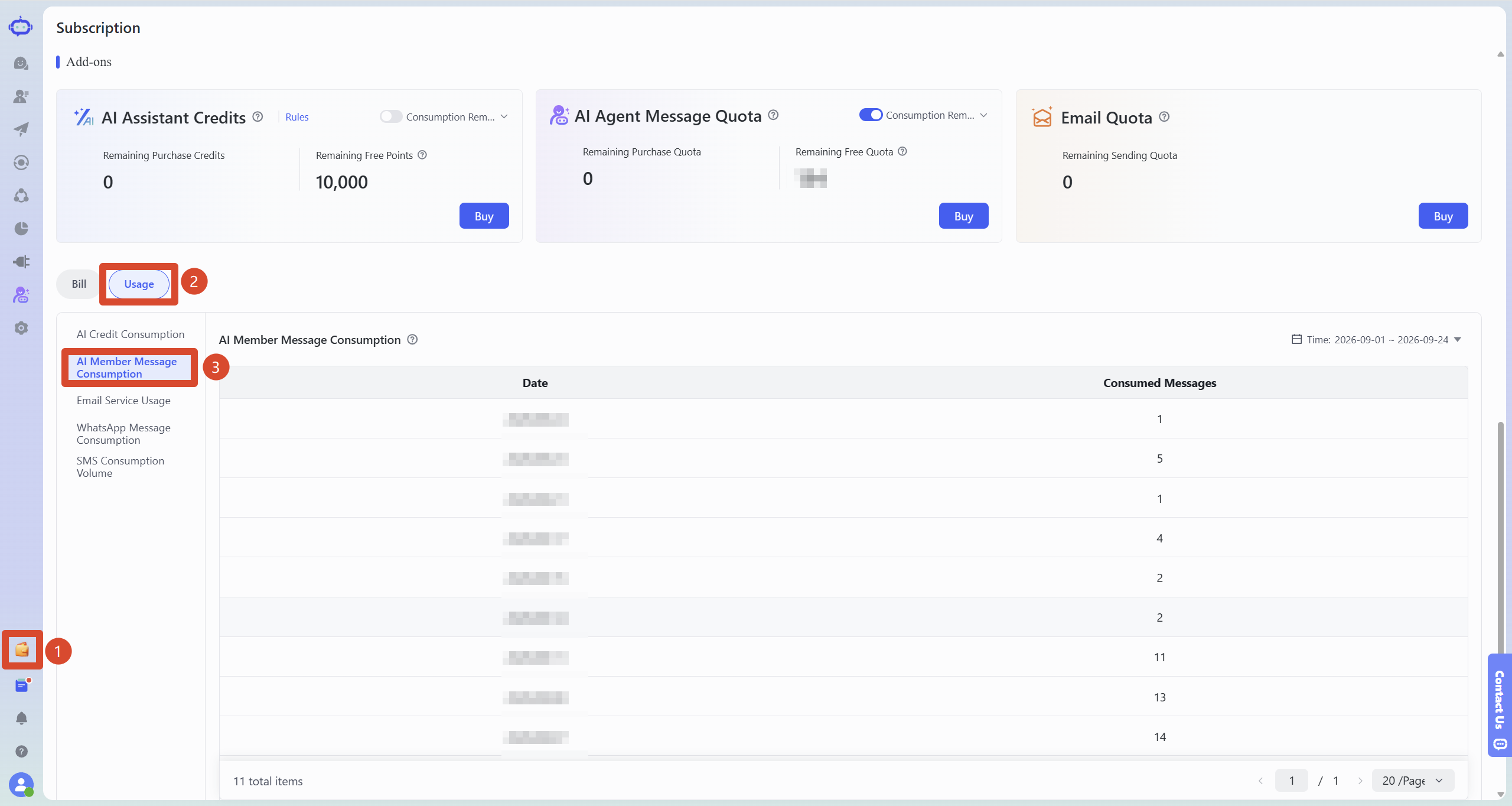
Go to the SaleSmartly "Subscriptions" page, switch to "Usage", and select "AI Member Message Consumption" on the left.
You can select a time range in the upper right corner to view the message quota consumption within the selected time range.
VI. Frequently Asked Questions
1. How many free message quota does HelpKnow offer each month?
HelpKnow's monthly free messaging allowance is based on the SaleSmartly plan currently used by the project:
- Free version: 200 messages
- Pro version: 2,000 messages
- Max version: 5,000 messages
The free messaging allowance included in the package will be automatically refreshed on the 1st of each month, and any unused free messaging allowance in a given month will not be carried over to the following month.
2. Which operations will consume message quota?
The message quota is calculated based on the reply messages generated by the AI employee . Each reply generated by the AI employee consumes 1 message quota; if a reply is split into multiple messages due to its length, it is still counted as one reply.
Speech recognition, image recognition, and plugin or tool calls do not consume message quotas individually; AI responses generated in the "Q&A Test" will also be counted towards message quotas. Whether message quotas are being consumed can be checked in HelpKnow under "Statistics > Analysis > Messages" to see if a corresponding AI response message record has been generated; if a record is generated, message quotas will be calculated.
To check the actual usage of your message quota, please visit SaleSmartly.
3. Will the AI employee still reply after the message quota is used up?
When a project runs out of message quota, AI employees will be unable to continue replying to customer messages.
You can check your current remaining message quota in the bottom left corner of HelpKnow. If your limit is insufficient, you can click "Buy Now" to go to the SaleSmartly "Buy AI Member message quota" page to purchase additional message quota.
If the AI employee suddenly stops responding to customers, you can first check if the message quota for the current project has been used up.
For other possible reasons why AI employees may not reply, please refer to: "Why doesn't the AI employee reply after the customer sends a message?"
4. Why can't I see the option to purchase message quota?
Projects using a points system will not display an entry point for purchasing message quotas; users will still need to purchase and use points in HelpKnow according to the original rules.
If the project uses message quota for billing but the purchase entry is still not displayed, please contact HelpKnow customer service and provide the project ID for assistance in finding it.
© HelpKnow. Package benefits and purchase options may be adjusted according to system changes. Actual message quotas and settlement results are subject to the information displayed on the SaleSmartly page.
;}.cls-2{fill:%230868f7;}.cls-3{fill:url(%23未命名的渐变_44);}.cls-4{fill:%23333;}%3c/style%3e%3clinearGradient%20id='未命名的渐变_8'%20x1='33.73'%20y1='100.61'%20x2='-0.03'%20y2='-1.06'%20gradientUnits='userSpaceOnUse'%3e%3cstop%20offset='0'%20stop-color='%237ae9fb'/%3e%3cstop%20offset='0.67'%20stop-color='%232b90f8'/%3e%3cstop%20offset='1'%20stop-color='%230868f7'/%3e%3c/linearGradient%3e%3clinearGradient%20id='未命名的渐变_44'%20x1='27.86'%20y1='18.67'%20x2='68.36'%20y2='22.22'%20gradientUnits='userSpaceOnUse'%3e%3cstop%20offset='0'%20stop-color='%235ac7f2'/%3e%3cstop%20offset='1'%20stop-color='%230868f7'/%3e%3c/linearGradient%3e%3c/defs%3e%3cpath%20class='cls-1'%20d='M29,28.74V81.91l-9.51-3.68v0L8.52,74A7.17,7.17,0,0,1,4,67.32V24.54A3.76,3.76,0,0,1,9.08,21Z'/%3e%3cpath%20class='cls-2'%20d='M68.09,78.07a13.15,13.15,0,0,1-17.9,12.06L29,81.91h0V28.74L50.19,37A13.17,13.17,0,0,0,68.08,25.3h0Z'/%3e%3cpath%20class='cls-3'%20d='M68.08,25.3a13.19,13.19,0,0,1-6.73,10.87A13.09,13.09,0,0,1,50.19,37L29,28.74V6A3.76,3.76,0,0,1,34.1,2.52l25.59,9.91A13.22,13.22,0,0,1,68.08,25.3Z'/%3e%3cpath%20class='cls-4'%20d='M129.06,81.76a4.33,4.33,0,0,1-3.19-1.31,4.4,4.4,0,0,1-1.31-3.24V56.86H97.65V77.21a4.36,4.36,0,0,1-1.35,3.2A4.68,4.68,0,0,1,93,81.76a4.32,4.32,0,0,1-3.19-1.31,4.37,4.37,0,0,1-1.32-3.24V27.27A4.58,4.58,0,0,1,89.83,24a4.59,4.59,0,0,1,7.82,3.27V48.15h26.91V27.27A4.58,4.58,0,0,1,125.91,24a4.59,4.59,0,0,1,7.82,3.27V77.21a4.37,4.37,0,0,1-1.36,3.2A4.65,4.65,0,0,1,129.06,81.76Z'/%3e%3cpath%20class='cls-4'%20d='M163.77,81.66c-6.57,0-11.76-1.92-15.44-5.7s-5.54-9.07-5.54-15.74a26.76,26.76,0,0,1,2.09-10.43,17.72,17.72,0,0,1,6.67-8.06,19.15,19.15,0,0,1,10.68-2.95,19,19,0,0,1,10.46,2.8,18.7,18.7,0,0,1,6.55,7.36,22.53,22.53,0,0,1,2.36,10.28A4.51,4.51,0,0,1,177,63.77H152.23a10.8,10.8,0,0,0,3.49,6.65c2,1.68,4.88,2.52,8.66,2.52a22.25,22.25,0,0,0,7.54-1.21c.74-.3,1.55-.67,2.37-1.07a3.75,3.75,0,0,1,1.84-.4,4.09,4.09,0,0,1,3,1.15,4,4,0,0,1,1.12,3,4.38,4.38,0,0,1-2.58,3.82,32.34,32.34,0,0,1-6.36,2.61A28.67,28.67,0,0,1,163.77,81.66ZM172.4,55.9a9.72,9.72,0,0,0-1.63-4.56A9.9,9.9,0,0,0,167,48a10.38,10.38,0,0,0-4.64-1.14,12,12,0,0,0-4.77,1.06,9.54,9.54,0,0,0-4.89,5.66,11.78,11.78,0,0,0-.51,2.3Z'/%3e%3cpath%20class='cls-4'%20d='M193,81.64a4.49,4.49,0,0,1-4.51-4.55V27.28A4.58,4.58,0,0,1,189.84,24a4.48,4.48,0,0,1,3.28-1.36A4.36,4.36,0,0,1,196.35,24a4.46,4.46,0,0,1,1.31,3.31V77.09a4.34,4.34,0,0,1-1.35,3.2A4.67,4.67,0,0,1,193,81.64Z'/%3e%3cpath%20class='cls-4'%20d='M263.79,81.71a5.7,5.7,0,0,1-4.2-1.74,5.76,5.76,0,0,1-1.73-4.19V27.37a4.58,4.58,0,0,1,1.35-3.27A4.59,4.59,0,0,1,267,27.37V72.53h24a4.58,4.58,0,0,1,3.27,7.82A4.66,4.66,0,0,1,291,81.71Z'/%3e%3cpath%20class='cls-4'%20d='M424.48,81.74a4.71,4.71,0,0,1-2.71-.88,5.43,5.43,0,0,1-1-1l-.07-.09-12.41-17-5.41,5v9.44a4.31,4.31,0,0,1-1.36,3.19,4.66,4.66,0,0,1-3.3,1.36A4.29,4.29,0,0,1,395,80.42a4.36,4.36,0,0,1-1.32-3.23V27.37A4.58,4.58,0,0,1,395,24.1a4.52,4.52,0,0,1,6.58.12,4.54,4.54,0,0,1,1.24,3.15V56.31l17.72-16.38.05,0a4.8,4.8,0,0,1,2.94-1.11,4.4,4.4,0,0,1,3.27,1.2,4.57,4.57,0,0,1,1.2,3.27,4.44,4.44,0,0,1-.77,2.33,7.45,7.45,0,0,1-1.43,1.65l-11,9.64,13.34,17.68a5,5,0,0,1,1,2.71,4.12,4.12,0,0,1-1.36,3.24A4.64,4.64,0,0,1,424.48,81.74Z'/%3e%3cpath%20class='cls-4'%20d='M317.93,81.76a21.5,21.5,0,1,1,21.17-21.5A21.37,21.37,0,0,1,317.93,81.76Zm0-34.1a12.61,12.61,0,1,0,12.42,12.6A12.52,12.52,0,0,0,317.93,47.66Z'/%3e%3cpath%20class='cls-4'%20d='M212.18,101.22a4.12,4.12,0,0,1-3.05-1.26,4.17,4.17,0,0,1-1.26-3.1V43.34a4.37,4.37,0,0,1,1.3-3.14,4.26,4.26,0,0,1,3.13-1.3,4.19,4.19,0,0,1,3.1,1.26,4.32,4.32,0,0,1,1.26,3.16,20.77,20.77,0,0,1,13-4.54,21.51,21.51,0,0,1,0,43,20.51,20.51,0,0,1-13-4.57V96.86a4.15,4.15,0,0,1-1.3,3.06A4.5,4.5,0,0,1,212.18,101.22Zm17.43-53.63c-6.23,0-12.93,4.11-12.93,12.72a12.73,12.73,0,0,0,25.46,0A12.71,12.71,0,0,0,229.61,47.59Z'/%3e%3cpath%20class='cls-4'%20d='M365.76,81.76a21.5,21.5,0,1,1,21.18-21.5A21.37,21.37,0,0,1,365.76,81.76Zm0-34.1a12.61,12.61,0,1,0,12.42,12.6A12.52,12.52,0,0,0,365.76,47.66Z'/%3e%3c/svg%3e)