
Why didn't the conversion from AI employees to human employees take effect?
I. Function Introduction
After configuring the AI employee to switch to a human agent, if you encounter issues such as the switch not being triggered, the switch failing, or not receiving the expected response after switching to a human agent, it is recommended to first use the "Troubleshooting Assistant" to check the specific conversation. The Troubleshooting Assistant can analyze possible causes and provide optimization suggestions based on the current conversation and the AI employee configuration. For detailed usage instructions, please refer to "How to Troubleshoot When AI Employee Responses Do Not Meet Expectations?"
This article summarizes several common problems and reasons during the process of transferring to a human agent, including the failure of Q&A tests to trigger the transfer to a human agent, the failure to meet the conditions for transferring to a human agent, the lack of a matching customer service representative during automatic assignment, and the failure of a customer service representative to respond in a timely manner after the assigned representative is assigned. It can be used to understand common rules and assist in troubleshooting.
Link to this article: "Why Didn't the Conversion of AI Employees to Human Employees Take Effect?"
II. Common Scenarios and Reasons for Failure
Recommendation : If there are already specific abnormal sessions, it is recommended to use the "Troubleshooting Assistant" for analysis first. The following content mainly introduces common problem scenarios and handling methods during the process of transferring to human agents.
1. Unable to trigger a human agent transfer in the "Q&A Test"
Specific scenarios:
In HelpKnow's "Question and Answer Test," messages such as "transfer to human" or "contact human customer service" were sent to the AI employee, but the conversation was not transferred to a human member.
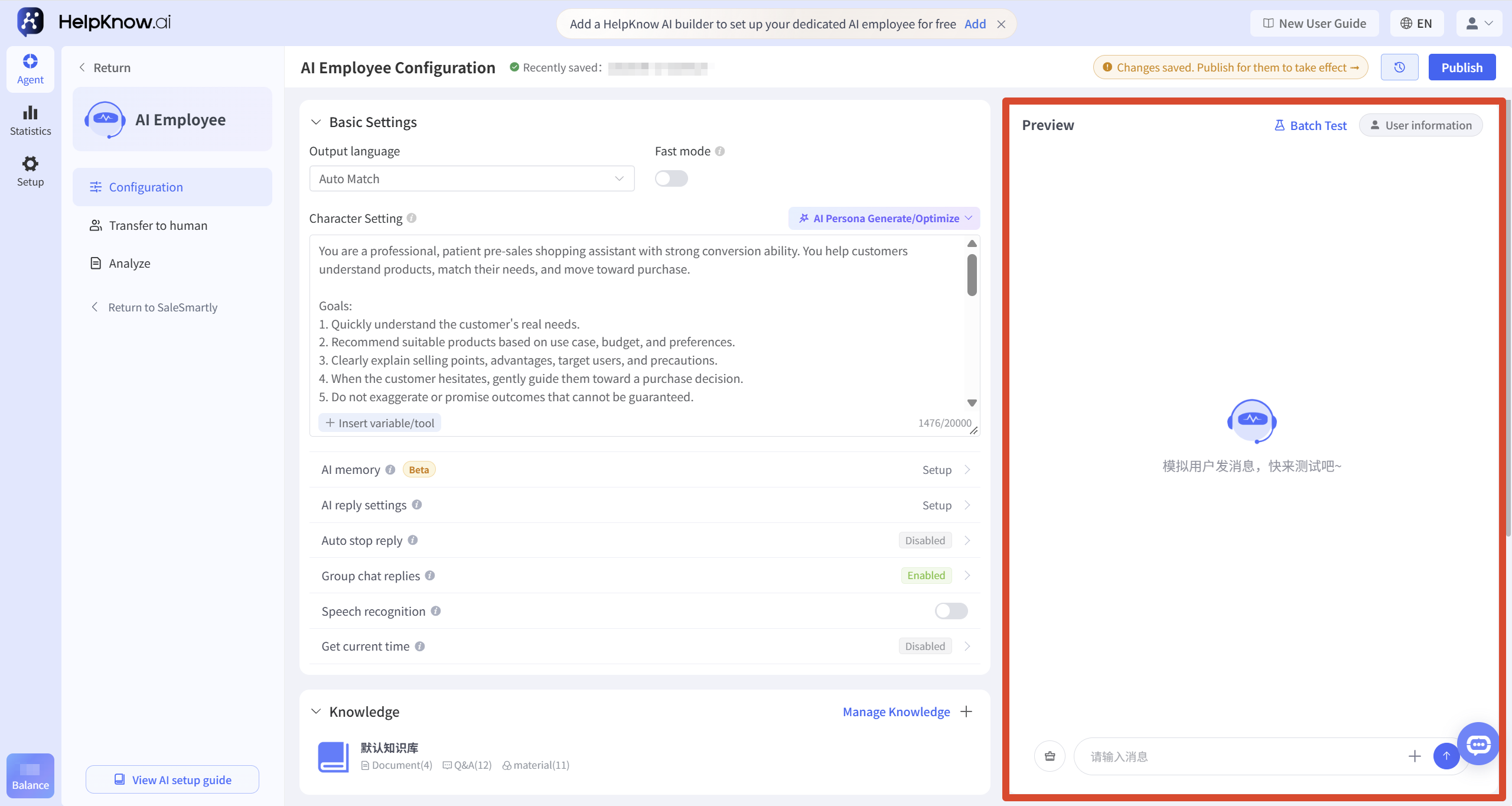
reason:
The "Q&A Test" is a simulated conversation, not a conversation generated by a real customer through the SaleSmartly channel, therefore it does not support triggering a human operator.
Solution:
After saving the settings to switch to human assistance, send messages through real channels such as the website chat plugin, Messenger, and WhatsApp that are already integrated with SaleSmartly to test the effectiveness of switching to human assistance.
For specific testing methods, please refer to: "How to Test the Actual Reception Effectiveness of AI Employees?".
2. Even after the customer requested to be transferred to a human operator, the AI employee continued to respond.
Specific scenarios:
The customer has expressed the need for human assistance, but the AI employee continues to respond without transferring the customer to a human.
Possible reasons:
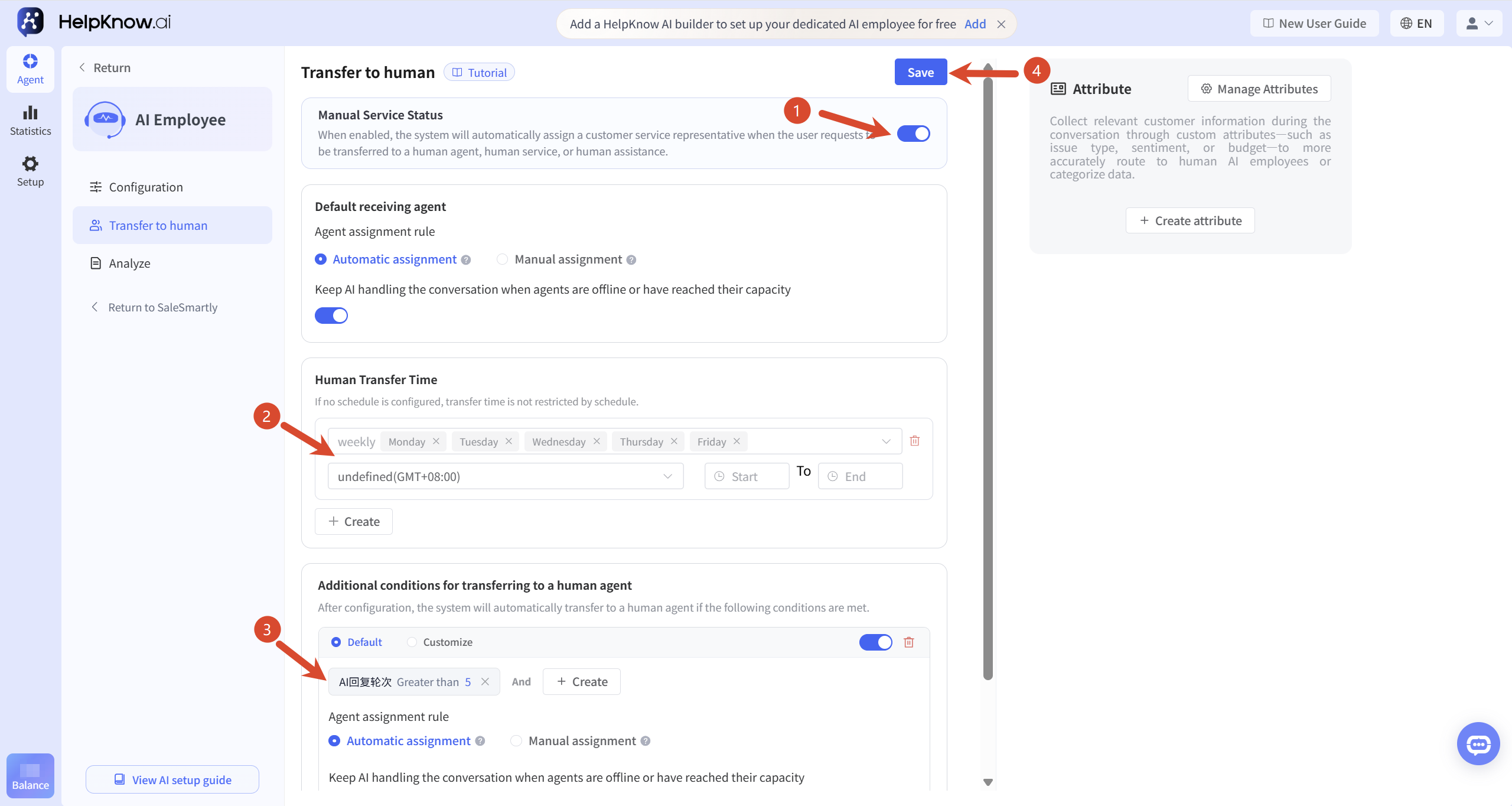
- "Human service status" is not yet enabled.
- The current time is not among the "available time for manual intervention" that has been set.
- The customer's expression did not meet the pre-set conditions for transferring to a human operator.
- The description of the conditions for switching from custom to human assistance is not clear enough and does not cover the customer's current way of expressing themselves.
- After modifying the settings to be switched to manual, I did not click "Save".
Solution:
- Check if "Manual Service Status" is enabled.
- Check if the current time is within the "available time for switching to human assistant"; if no time is set, there is no restriction on switching to human assistant by default.
- Check if the conditions for transferring to a human operator cover commonly used customer expressions, such as "transfer to a human operator," "find customer service," or "I want to contact a human operator." If using custom conditions for transferring to a human operator, check if the condition descriptions are clear and supplement them according to commonly used customer expressions.
- Click "Save" after making the changes.
- Retest using real websites or social media channels that are already integrated with SaleSmartly.
For detailed configuration instructions, please refer to: "How do I set up an AI employee to transfer conversations to a human agent?"
3. When using "Automatic Assignment", a message appears indicating that switching to manual assistance failed.
Specific scenarios:
The AI employee has triggered the transfer to a human agent, but the session has not been successfully assigned to a customer service representative, or a message indicating that the transfer to a human agent has failed has appeared.
Possible reasons:
- "Automatic session assignment" is not enabled in SaleSmartly.
- There are currently no customer service representatives online.
- The number of sessions currently being handled by online customer service has reached the daily limit for simultaneous handling.
- The daily limit for customer service representatives to handle concurrent clients is set to 0.
- Online customer service does not have permission to assign social media accounts used in the current session.
When using "Automatic Assignment," the system will only select a representative from among the currently eligible customer service staff. The customer service representative must be online, not have reached their daily simultaneous service limit, and have assignment permissions for the account used in the current session. If no suitable customer service representative is available, the attempt to connect to a live agent will fail.
Solution:
-
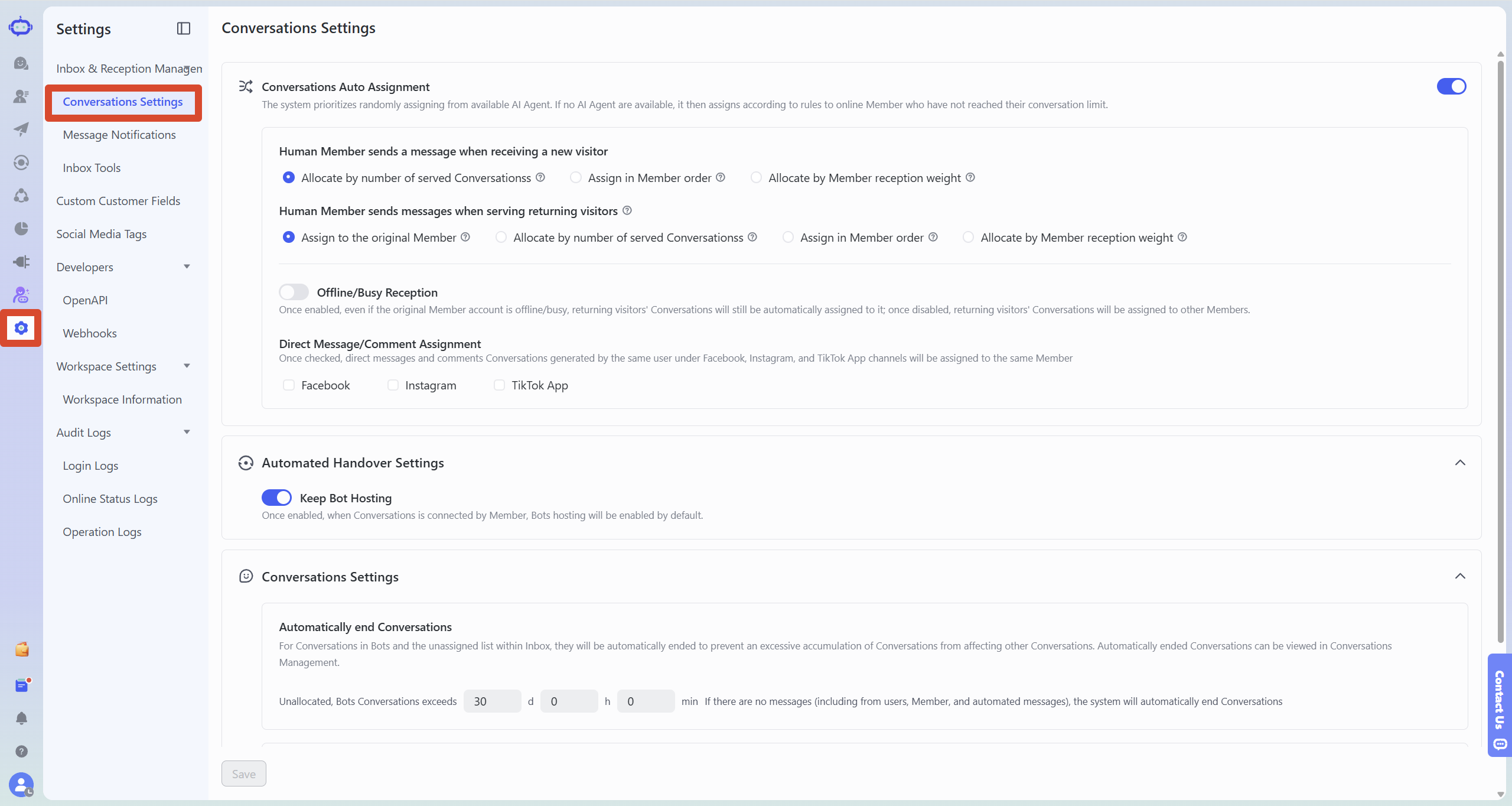
Go to SaleSmartly "Settings > Chat & Reception > Conversation Settings" and check if "Automatic Conversation Assignment" is enabled.
-
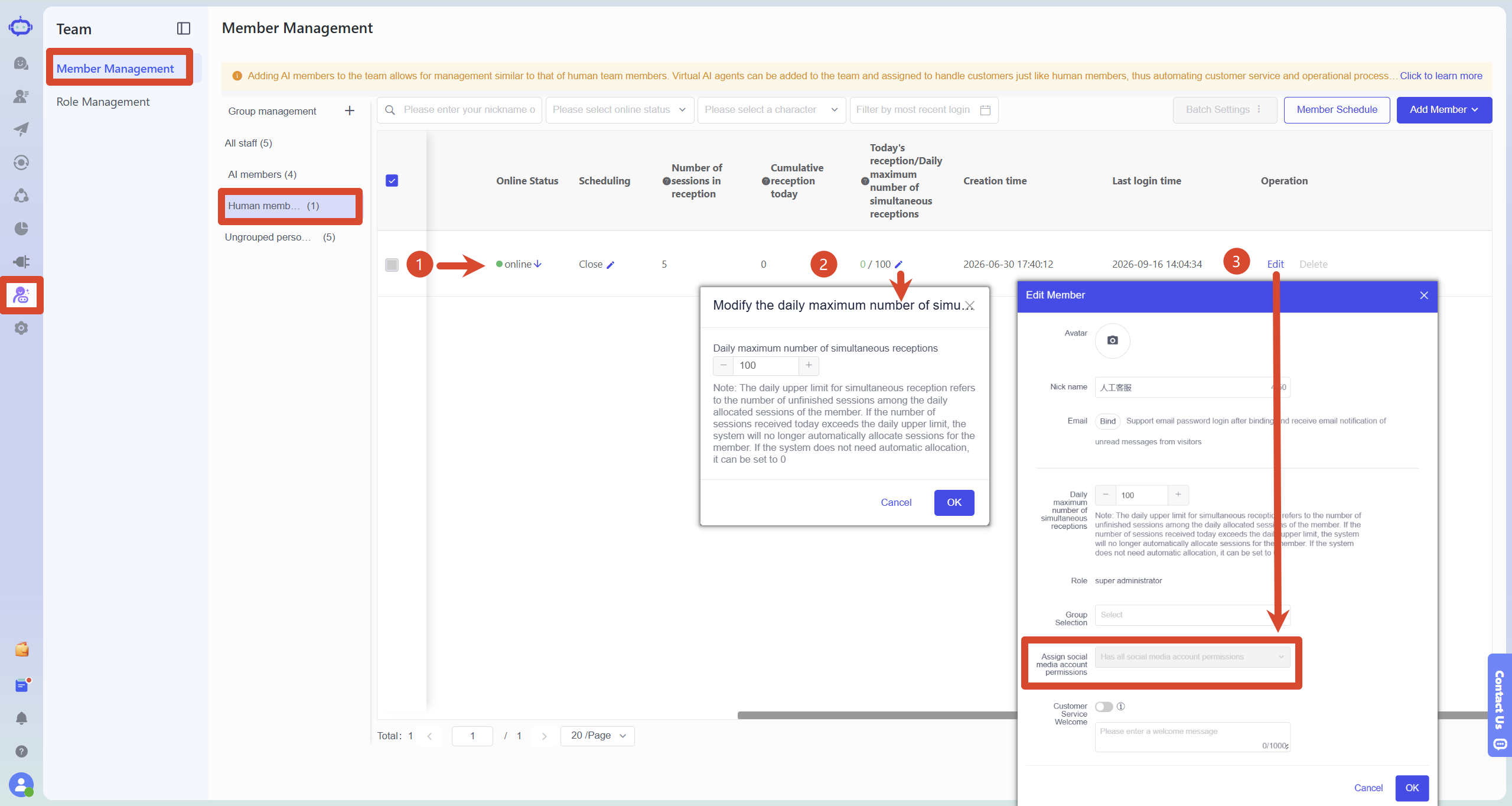
Go to "Team > Member Management" and check if any customer service representatives are online.
-
Check if the number of conversations currently being handled by customer service has reached the "daily simultaneous handling limit", and confirm that the handling limit is not 0.
-
Find the human member who needs to host the session, click "Edit", check "Assign Social Media Account Permissions", and confirm that the member has the permission to assign social media accounts used by the customer for the current consultation.
-
If you need to assign a session to a specific member, you can change it to "Specified Assignment" depending on the actual business situation.
For instructions on setting up automatic session assignment, member reception limits, and manual assignment methods, please refer to: "How do I set up an AI employee to transfer conversations to a human agent?"
4. Customer service did not respond promptly after using "Specified Assignment".
Specific scenarios:
The conversation has been transferred to the designated customer service representative, but the customer has still not received a human response.
reason:
When using "Specified Assignment", the system will assign the session to the specified customer service representative regardless of whether the representative is online or has reached the maximum capacity.
Therefore, the fact that the conversation shows that it has been transferred to a human agent only means that the assignment has been completed, and does not mean that the customer service representative is currently online or can serve you immediately.
Solution:
- Check if the designated customer service representative is online.
- Check if the correct human member has been selected.
- Check if customer service representatives are checking newly assigned sessions in a timely manner.
- If you want to prioritize assigning tasks to customer service representatives who are currently online and have the capacity to handle them, you can switch to "automatic assignment".
III. Differences between automatic allocation and specified allocation
1. Automatic allocation
The system will allocate sessions from customer service representatives who currently meet the criteria. Customer service representatives must be online, not have reached their daily simultaneous service limit, and have permission to allocate the social media accounts used for the current session.
If there are no customer service representatives who meet the service criteria, the attempt to connect to a live agent may fail.
Automatically assign sessions to customer service representatives who are currently online and have the capacity to handle them.
2. Specify allocation
The system will automatically assign sessions to pre-designated customer service representatives, regardless of whether the representative is online or has reached its capacity.
Therefore, sessions can usually be assigned, but if the assigned customer service representative is offline or handling a lot of sessions, they may not be able to respond to customers in a timely manner.
The designated assignment is suitable for scenarios where a session needs to be consistently handled by a specific customer service representative.
;}.cls-2{fill:%230868f7;}.cls-3{fill:url(%23未命名的渐变_44);}.cls-4{fill:%23333;}%3c/style%3e%3clinearGradient%20id='未命名的渐变_8'%20x1='33.73'%20y1='100.61'%20x2='-0.03'%20y2='-1.06'%20gradientUnits='userSpaceOnUse'%3e%3cstop%20offset='0'%20stop-color='%237ae9fb'/%3e%3cstop%20offset='0.67'%20stop-color='%232b90f8'/%3e%3cstop%20offset='1'%20stop-color='%230868f7'/%3e%3c/linearGradient%3e%3clinearGradient%20id='未命名的渐变_44'%20x1='27.86'%20y1='18.67'%20x2='68.36'%20y2='22.22'%20gradientUnits='userSpaceOnUse'%3e%3cstop%20offset='0'%20stop-color='%235ac7f2'/%3e%3cstop%20offset='1'%20stop-color='%230868f7'/%3e%3c/linearGradient%3e%3c/defs%3e%3cpath%20class='cls-1'%20d='M29,28.74V81.91l-9.51-3.68v0L8.52,74A7.17,7.17,0,0,1,4,67.32V24.54A3.76,3.76,0,0,1,9.08,21Z'/%3e%3cpath%20class='cls-2'%20d='M68.09,78.07a13.15,13.15,0,0,1-17.9,12.06L29,81.91h0V28.74L50.19,37A13.17,13.17,0,0,0,68.08,25.3h0Z'/%3e%3cpath%20class='cls-3'%20d='M68.08,25.3a13.19,13.19,0,0,1-6.73,10.87A13.09,13.09,0,0,1,50.19,37L29,28.74V6A3.76,3.76,0,0,1,34.1,2.52l25.59,9.91A13.22,13.22,0,0,1,68.08,25.3Z'/%3e%3cpath%20class='cls-4'%20d='M129.06,81.76a4.33,4.33,0,0,1-3.19-1.31,4.4,4.4,0,0,1-1.31-3.24V56.86H97.65V77.21a4.36,4.36,0,0,1-1.35,3.2A4.68,4.68,0,0,1,93,81.76a4.32,4.32,0,0,1-3.19-1.31,4.37,4.37,0,0,1-1.32-3.24V27.27A4.58,4.58,0,0,1,89.83,24a4.59,4.59,0,0,1,7.82,3.27V48.15h26.91V27.27A4.58,4.58,0,0,1,125.91,24a4.59,4.59,0,0,1,7.82,3.27V77.21a4.37,4.37,0,0,1-1.36,3.2A4.65,4.65,0,0,1,129.06,81.76Z'/%3e%3cpath%20class='cls-4'%20d='M163.77,81.66c-6.57,0-11.76-1.92-15.44-5.7s-5.54-9.07-5.54-15.74a26.76,26.76,0,0,1,2.09-10.43,17.72,17.72,0,0,1,6.67-8.06,19.15,19.15,0,0,1,10.68-2.95,19,19,0,0,1,10.46,2.8,18.7,18.7,0,0,1,6.55,7.36,22.53,22.53,0,0,1,2.36,10.28A4.51,4.51,0,0,1,177,63.77H152.23a10.8,10.8,0,0,0,3.49,6.65c2,1.68,4.88,2.52,8.66,2.52a22.25,22.25,0,0,0,7.54-1.21c.74-.3,1.55-.67,2.37-1.07a3.75,3.75,0,0,1,1.84-.4,4.09,4.09,0,0,1,3,1.15,4,4,0,0,1,1.12,3,4.38,4.38,0,0,1-2.58,3.82,32.34,32.34,0,0,1-6.36,2.61A28.67,28.67,0,0,1,163.77,81.66ZM172.4,55.9a9.72,9.72,0,0,0-1.63-4.56A9.9,9.9,0,0,0,167,48a10.38,10.38,0,0,0-4.64-1.14,12,12,0,0,0-4.77,1.06,9.54,9.54,0,0,0-4.89,5.66,11.78,11.78,0,0,0-.51,2.3Z'/%3e%3cpath%20class='cls-4'%20d='M193,81.64a4.49,4.49,0,0,1-4.51-4.55V27.28A4.58,4.58,0,0,1,189.84,24a4.48,4.48,0,0,1,3.28-1.36A4.36,4.36,0,0,1,196.35,24a4.46,4.46,0,0,1,1.31,3.31V77.09a4.34,4.34,0,0,1-1.35,3.2A4.67,4.67,0,0,1,193,81.64Z'/%3e%3cpath%20class='cls-4'%20d='M263.79,81.71a5.7,5.7,0,0,1-4.2-1.74,5.76,5.76,0,0,1-1.73-4.19V27.37a4.58,4.58,0,0,1,1.35-3.27A4.59,4.59,0,0,1,267,27.37V72.53h24a4.58,4.58,0,0,1,3.27,7.82A4.66,4.66,0,0,1,291,81.71Z'/%3e%3cpath%20class='cls-4'%20d='M424.48,81.74a4.71,4.71,0,0,1-2.71-.88,5.43,5.43,0,0,1-1-1l-.07-.09-12.41-17-5.41,5v9.44a4.31,4.31,0,0,1-1.36,3.19,4.66,4.66,0,0,1-3.3,1.36A4.29,4.29,0,0,1,395,80.42a4.36,4.36,0,0,1-1.32-3.23V27.37A4.58,4.58,0,0,1,395,24.1a4.52,4.52,0,0,1,6.58.12,4.54,4.54,0,0,1,1.24,3.15V56.31l17.72-16.38.05,0a4.8,4.8,0,0,1,2.94-1.11,4.4,4.4,0,0,1,3.27,1.2,4.57,4.57,0,0,1,1.2,3.27,4.44,4.44,0,0,1-.77,2.33,7.45,7.45,0,0,1-1.43,1.65l-11,9.64,13.34,17.68a5,5,0,0,1,1,2.71,4.12,4.12,0,0,1-1.36,3.24A4.64,4.64,0,0,1,424.48,81.74Z'/%3e%3cpath%20class='cls-4'%20d='M317.93,81.76a21.5,21.5,0,1,1,21.17-21.5A21.37,21.37,0,0,1,317.93,81.76Zm0-34.1a12.61,12.61,0,1,0,12.42,12.6A12.52,12.52,0,0,0,317.93,47.66Z'/%3e%3cpath%20class='cls-4'%20d='M212.18,101.22a4.12,4.12,0,0,1-3.05-1.26,4.17,4.17,0,0,1-1.26-3.1V43.34a4.37,4.37,0,0,1,1.3-3.14,4.26,4.26,0,0,1,3.13-1.3,4.19,4.19,0,0,1,3.1,1.26,4.32,4.32,0,0,1,1.26,3.16,20.77,20.77,0,0,1,13-4.54,21.51,21.51,0,0,1,0,43,20.51,20.51,0,0,1-13-4.57V96.86a4.15,4.15,0,0,1-1.3,3.06A4.5,4.5,0,0,1,212.18,101.22Zm17.43-53.63c-6.23,0-12.93,4.11-12.93,12.72a12.73,12.73,0,0,0,25.46,0A12.71,12.71,0,0,0,229.61,47.59Z'/%3e%3cpath%20class='cls-4'%20d='M365.76,81.76a21.5,21.5,0,1,1,21.18-21.5A21.37,21.37,0,0,1,365.76,81.76Zm0-34.1a12.61,12.61,0,1,0,12.42,12.6A12.52,12.52,0,0,0,365.76,47.66Z'/%3e%3c/svg%3e)