
What is AI memory? How can we help AI employees maintain context in customer communications?
I. Function Introduction
Once AI memory is enabled, AI staff can continue to serve customers by combining their historical communication information, maintaining contextual continuity during multiple consultations and reducing the need to repeatedly ask customers for information that has already been provided.
AI memory automatically organizes important information from customer-AI employee communications, forming a memory summary, and helps the AI employee understand the customer's background in subsequent conversations.
The AI memory function is currently in beta testing. To experience it, please contact HelpKnow customer service to apply for activation.

II. How AI Memory Works
AI staff will organize information that will be helpful for subsequent services based on the communication between the customer and the AI, and generate an AI memory summary.
When a communication session temporarily ends, if the customer does not send any more messages, the system will automatically organize the content of the communication after a certain period of time and update the customer's AI memory.
When customers consult again later, the AI employee can continue the communication based on its existing memory.
AI memory will be continuously updated with new communication content, including:
- Add new customer information;
- Update information that has changed;
- Remove resolved issues;
- Retain the matters that require continued follow-up.
III. Content Recorded by AI Memory
AI memory doesn't simply save all historical chat content; instead, it organizes important information that can be helpful for subsequent services, including:
- Customer needs and goals : The problems or concerns that customers hope to solve.
- Customer preferences and restrictions : Customer preferences, special requirements, or restrictions.
- Confirmed Information : Important information that the client has clearly provided.
- Communication progress : The communication content and results that have been completed so far.
- Key decisions : Choices or matters that the client has already confirmed.
- Pending items : Unresolved issues or matters requiring follow-up.
You can view the AI-generated memory summary in "Analysis - Session Details".
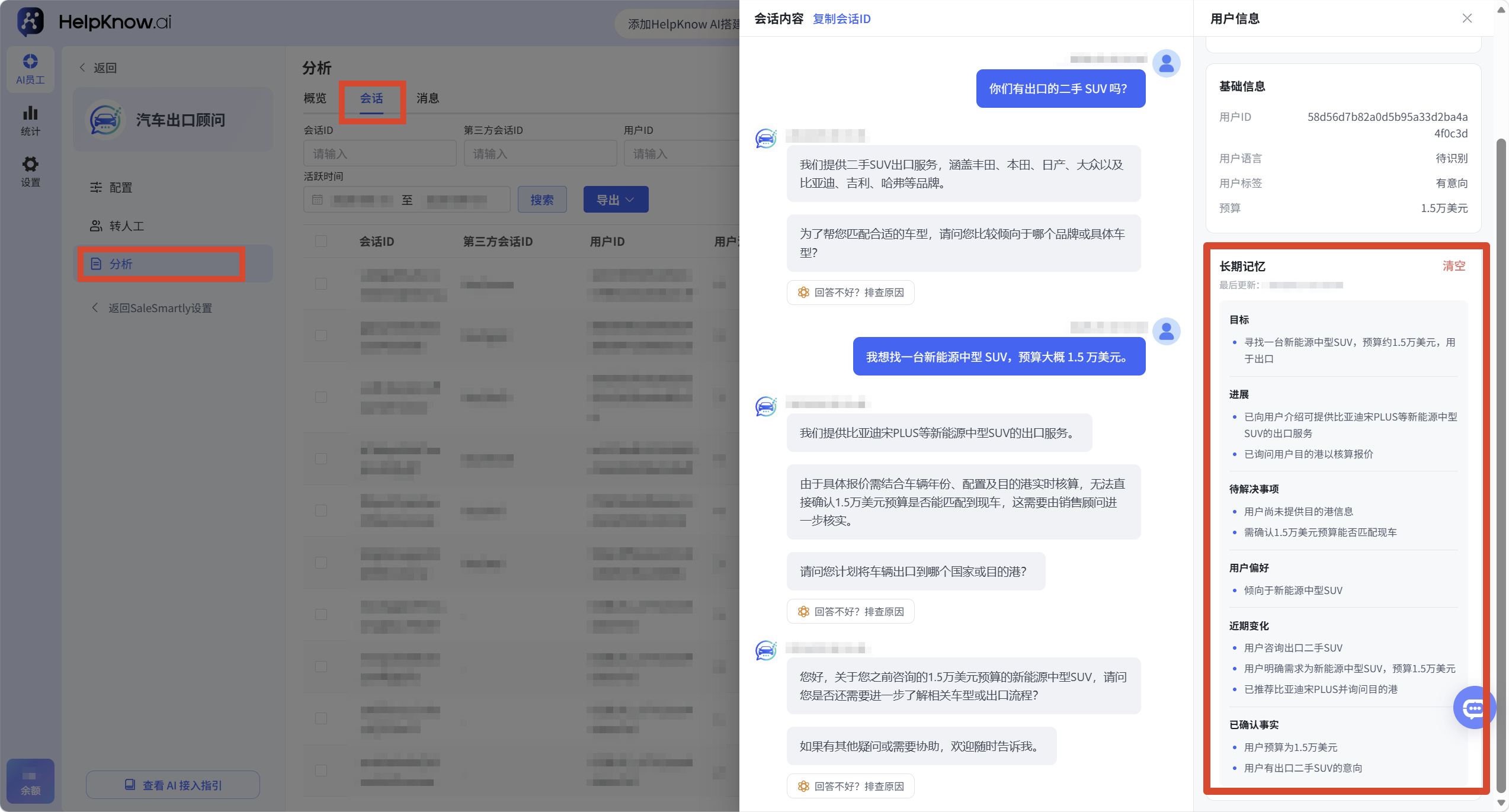
IV. Scope of Application of Long-Term Memory
1. Use across sessions
Long-term memory is not cleared when the current session ends.
When the system can identify the same customer under the same project, the AI employee can continue to use the AI memory that the customer has accumulated in subsequent conversations.
2. Cross-AI employee use
Within the same project, different AI employees can use the AI memories that have already been accumulated by the client.
Currently, employees across AI systems share pre-generated long-term memories.
V. The Difference Between AI Memory and Customer Information
AI-generated memories and customer information, along with customer tags, are used in various scenarios.
| AI Memory | Customer Information/Tags | |
|---|---|---|
| effect | Help AI understand customers' past communications and continue the conversation. | Store structured customer data for customer management and business processes. |
| content | Customer needs, preferences, communication progress, pending matters, etc. | Contact information, budget, customer type, tags, etc. |
| source | AI organizes data based on communication content. | Based on configuration or manual maintenance |
| Use cases | Helping AI continue receiving guests more naturally | Used for business scenarios such as customer screening and rule judgment. |
VI. Precautions
- AI memory is used to organize important customer communications, not to save all historical messages in their original form.
- Long-term memory is used on a project and client-specific basis; client memories are not shared between different projects.
- Long-term memory is constantly updated based on new communication content; new information may replace information that has changed.
- If you need to save specific customer fields or tags, it is recommended to configure them through functions such as "Collect Customer Information" and "Update Customer Tags". For details, please refer to: "How to Set Up AI Employees to Collect Customer Information?" and "How to Set Up AI Employees to Update Customer Tags?"
- Question-and-answer tests also utilize the long-term memories of the current test user. If you need to simulate a new user for the test, you can click "Reset" in "User Information" and then retest.
VII. Frequently Asked Questions
1. When are AI memories generated?
When a communication session temporarily ends, if the customer does not send any more messages, the system will automatically organize the content of the communication and update the customer's long-term memory.
2. How long will AI memories be retained?
AI memory is continuously updated based on new communication content to help AI employees maintain customer context.
;}.cls-2{fill:%230868f7;}.cls-3{fill:url(%23未命名的渐变_44);}.cls-4{fill:%23333;}%3c/style%3e%3clinearGradient%20id='未命名的渐变_8'%20x1='33.73'%20y1='100.61'%20x2='-0.03'%20y2='-1.06'%20gradientUnits='userSpaceOnUse'%3e%3cstop%20offset='0'%20stop-color='%237ae9fb'/%3e%3cstop%20offset='0.67'%20stop-color='%232b90f8'/%3e%3cstop%20offset='1'%20stop-color='%230868f7'/%3e%3c/linearGradient%3e%3clinearGradient%20id='未命名的渐变_44'%20x1='27.86'%20y1='18.67'%20x2='68.36'%20y2='22.22'%20gradientUnits='userSpaceOnUse'%3e%3cstop%20offset='0'%20stop-color='%235ac7f2'/%3e%3cstop%20offset='1'%20stop-color='%230868f7'/%3e%3c/linearGradient%3e%3c/defs%3e%3cpath%20class='cls-1'%20d='M29,28.74V81.91l-9.51-3.68v0L8.52,74A7.17,7.17,0,0,1,4,67.32V24.54A3.76,3.76,0,0,1,9.08,21Z'/%3e%3cpath%20class='cls-2'%20d='M68.09,78.07a13.15,13.15,0,0,1-17.9,12.06L29,81.91h0V28.74L50.19,37A13.17,13.17,0,0,0,68.08,25.3h0Z'/%3e%3cpath%20class='cls-3'%20d='M68.08,25.3a13.19,13.19,0,0,1-6.73,10.87A13.09,13.09,0,0,1,50.19,37L29,28.74V6A3.76,3.76,0,0,1,34.1,2.52l25.59,9.91A13.22,13.22,0,0,1,68.08,25.3Z'/%3e%3cpath%20class='cls-4'%20d='M129.06,81.76a4.33,4.33,0,0,1-3.19-1.31,4.4,4.4,0,0,1-1.31-3.24V56.86H97.65V77.21a4.36,4.36,0,0,1-1.35,3.2A4.68,4.68,0,0,1,93,81.76a4.32,4.32,0,0,1-3.19-1.31,4.37,4.37,0,0,1-1.32-3.24V27.27A4.58,4.58,0,0,1,89.83,24a4.59,4.59,0,0,1,7.82,3.27V48.15h26.91V27.27A4.58,4.58,0,0,1,125.91,24a4.59,4.59,0,0,1,7.82,3.27V77.21a4.37,4.37,0,0,1-1.36,3.2A4.65,4.65,0,0,1,129.06,81.76Z'/%3e%3cpath%20class='cls-4'%20d='M163.77,81.66c-6.57,0-11.76-1.92-15.44-5.7s-5.54-9.07-5.54-15.74a26.76,26.76,0,0,1,2.09-10.43,17.72,17.72,0,0,1,6.67-8.06,19.15,19.15,0,0,1,10.68-2.95,19,19,0,0,1,10.46,2.8,18.7,18.7,0,0,1,6.55,7.36,22.53,22.53,0,0,1,2.36,10.28A4.51,4.51,0,0,1,177,63.77H152.23a10.8,10.8,0,0,0,3.49,6.65c2,1.68,4.88,2.52,8.66,2.52a22.25,22.25,0,0,0,7.54-1.21c.74-.3,1.55-.67,2.37-1.07a3.75,3.75,0,0,1,1.84-.4,4.09,4.09,0,0,1,3,1.15,4,4,0,0,1,1.12,3,4.38,4.38,0,0,1-2.58,3.82,32.34,32.34,0,0,1-6.36,2.61A28.67,28.67,0,0,1,163.77,81.66ZM172.4,55.9a9.72,9.72,0,0,0-1.63-4.56A9.9,9.9,0,0,0,167,48a10.38,10.38,0,0,0-4.64-1.14,12,12,0,0,0-4.77,1.06,9.54,9.54,0,0,0-4.89,5.66,11.78,11.78,0,0,0-.51,2.3Z'/%3e%3cpath%20class='cls-4'%20d='M193,81.64a4.49,4.49,0,0,1-4.51-4.55V27.28A4.58,4.58,0,0,1,189.84,24a4.48,4.48,0,0,1,3.28-1.36A4.36,4.36,0,0,1,196.35,24a4.46,4.46,0,0,1,1.31,3.31V77.09a4.34,4.34,0,0,1-1.35,3.2A4.67,4.67,0,0,1,193,81.64Z'/%3e%3cpath%20class='cls-4'%20d='M263.79,81.71a5.7,5.7,0,0,1-4.2-1.74,5.76,5.76,0,0,1-1.73-4.19V27.37a4.58,4.58,0,0,1,1.35-3.27A4.59,4.59,0,0,1,267,27.37V72.53h24a4.58,4.58,0,0,1,3.27,7.82A4.66,4.66,0,0,1,291,81.71Z'/%3e%3cpath%20class='cls-4'%20d='M424.48,81.74a4.71,4.71,0,0,1-2.71-.88,5.43,5.43,0,0,1-1-1l-.07-.09-12.41-17-5.41,5v9.44a4.31,4.31,0,0,1-1.36,3.19,4.66,4.66,0,0,1-3.3,1.36A4.29,4.29,0,0,1,395,80.42a4.36,4.36,0,0,1-1.32-3.23V27.37A4.58,4.58,0,0,1,395,24.1a4.52,4.52,0,0,1,6.58.12,4.54,4.54,0,0,1,1.24,3.15V56.31l17.72-16.38.05,0a4.8,4.8,0,0,1,2.94-1.11,4.4,4.4,0,0,1,3.27,1.2,4.57,4.57,0,0,1,1.2,3.27,4.44,4.44,0,0,1-.77,2.33,7.45,7.45,0,0,1-1.43,1.65l-11,9.64,13.34,17.68a5,5,0,0,1,1,2.71,4.12,4.12,0,0,1-1.36,3.24A4.64,4.64,0,0,1,424.48,81.74Z'/%3e%3cpath%20class='cls-4'%20d='M317.93,81.76a21.5,21.5,0,1,1,21.17-21.5A21.37,21.37,0,0,1,317.93,81.76Zm0-34.1a12.61,12.61,0,1,0,12.42,12.6A12.52,12.52,0,0,0,317.93,47.66Z'/%3e%3cpath%20class='cls-4'%20d='M212.18,101.22a4.12,4.12,0,0,1-3.05-1.26,4.17,4.17,0,0,1-1.26-3.1V43.34a4.37,4.37,0,0,1,1.3-3.14,4.26,4.26,0,0,1,3.13-1.3,4.19,4.19,0,0,1,3.1,1.26,4.32,4.32,0,0,1,1.26,3.16,20.77,20.77,0,0,1,13-4.54,21.51,21.51,0,0,1,0,43,20.51,20.51,0,0,1-13-4.57V96.86a4.15,4.15,0,0,1-1.3,3.06A4.5,4.5,0,0,1,212.18,101.22Zm17.43-53.63c-6.23,0-12.93,4.11-12.93,12.72a12.73,12.73,0,0,0,25.46,0A12.71,12.71,0,0,0,229.61,47.59Z'/%3e%3cpath%20class='cls-4'%20d='M365.76,81.76a21.5,21.5,0,1,1,21.18-21.5A21.37,21.37,0,0,1,365.76,81.76Zm0-34.1a12.61,12.61,0,1,0,12.42,12.6A12.52,12.52,0,0,0,365.76,47.66Z'/%3e%3c/svg%3e)