
How to Make AI Respond More Like a Real Person?
I. Function Introduction
AI response settings allow you to adjust how your AI employees respond. You can use human-like responses, AI-delayed response times, message-split responses, and fallback responses to make the AI's responses more like those of a real customer service representative and the rhythm of a conversation.
For example: when human-like replies are enabled, the AI's tone will be more natural; when delayed replies are set, the AI will not reply immediately after the user sends a message; when message split replies are enabled, longer replies can be sent as multiple messages, just like in a real chat.
Link to this article: "How to Make AI Respond More Like a Real Person?"
II. Functional Description
1. Enable anthropomorphic replies
Anthropomorphic responses are used to make the AI employee's replies sound more like those of a real customer service representative.
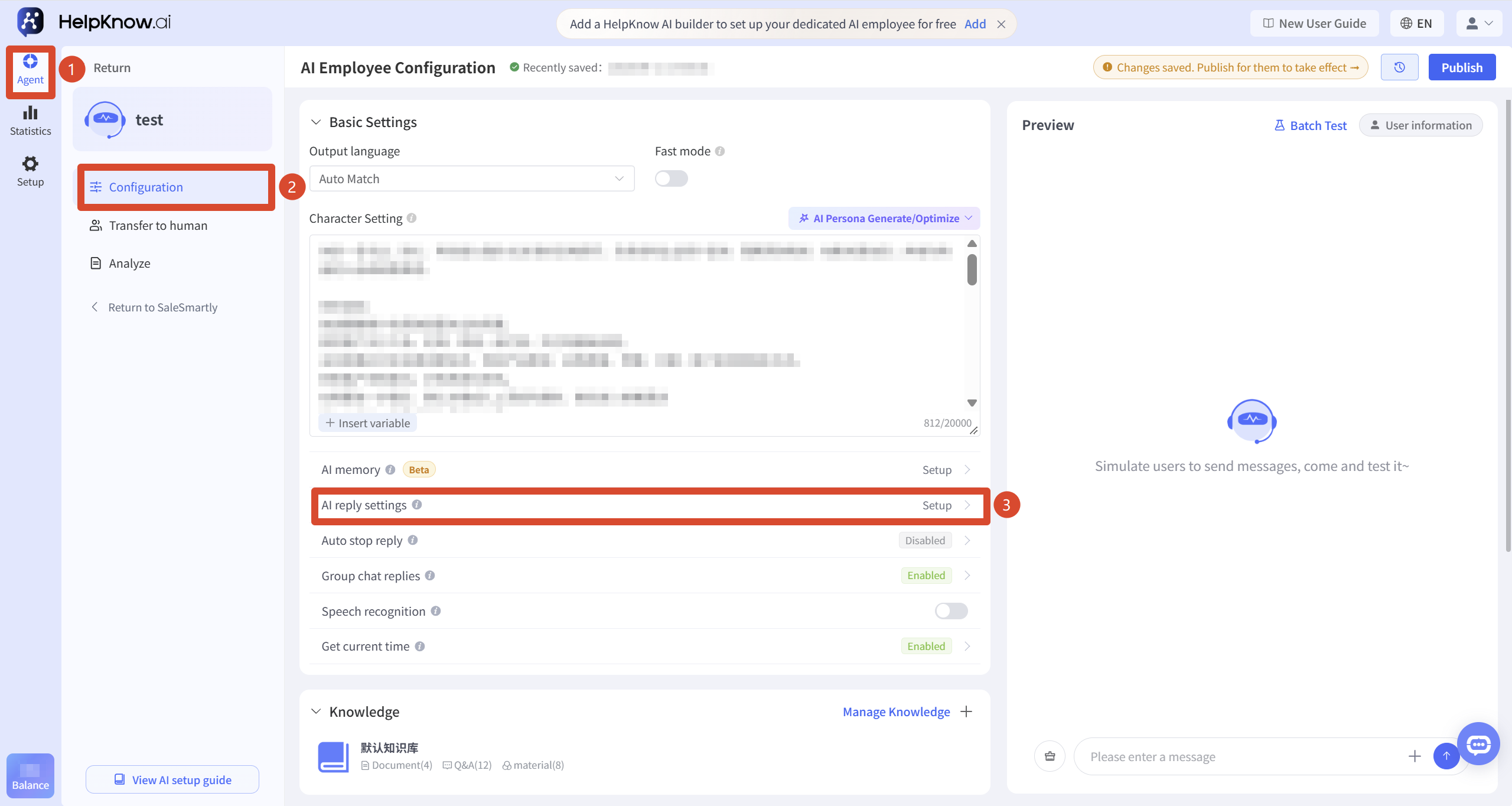
Access point: Go to the AI employee configuration page, find "AI Response Settings", and click "Settings" on the right.
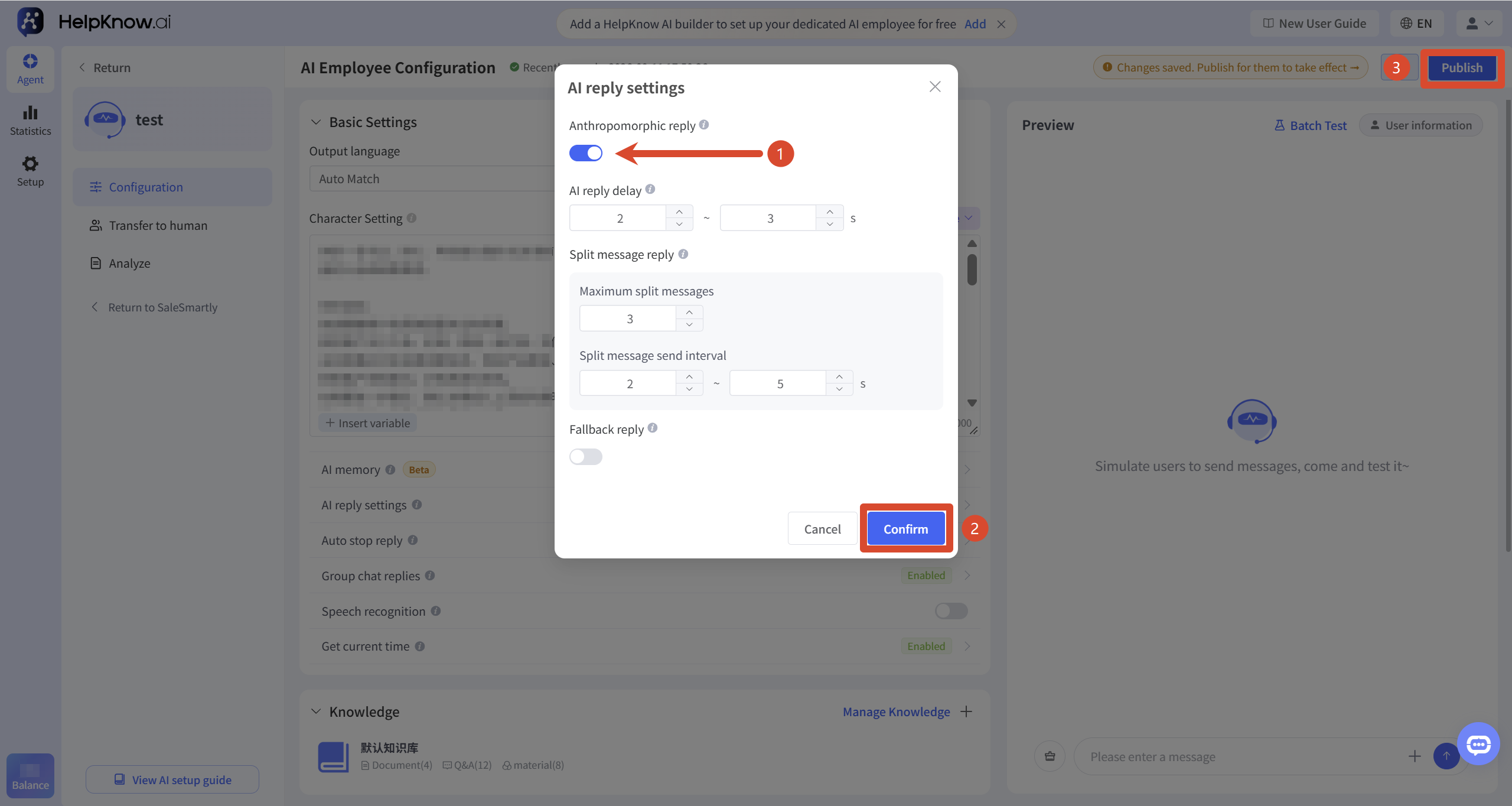
In the "AI Reply Settings" pop-up window, enable "Humanized Reply", then click "OK" and "Publish". The humanized reply settings will only take effect after publishing.
2. Configure anthropomorphic response commands
Enabling only "human-like responses" will make the AI's expression more natural. If you want the AI to better match the brand tone, customer service style, or sales expression, you can add human-like response instructions in the persona settings.
You can configure it from the following directions:
- Role/Identity: This describes the role the AI should assume when responding to the user.
- Tone and style: Indicate whether the AI's expression should be formal, friendly, lively, or professional.
- Output format: Indicate whether the AI should first soothe the user, then provide a solution, and finally guide the user to the next step when responding.
- Example script: Provide several sample responses that you approve of, and let the AI imitate the rhythm of the expression.
- Special scenarios: Explain how to respond when encountering negative reviews, order requests, complaints, after-sales issues, etc.
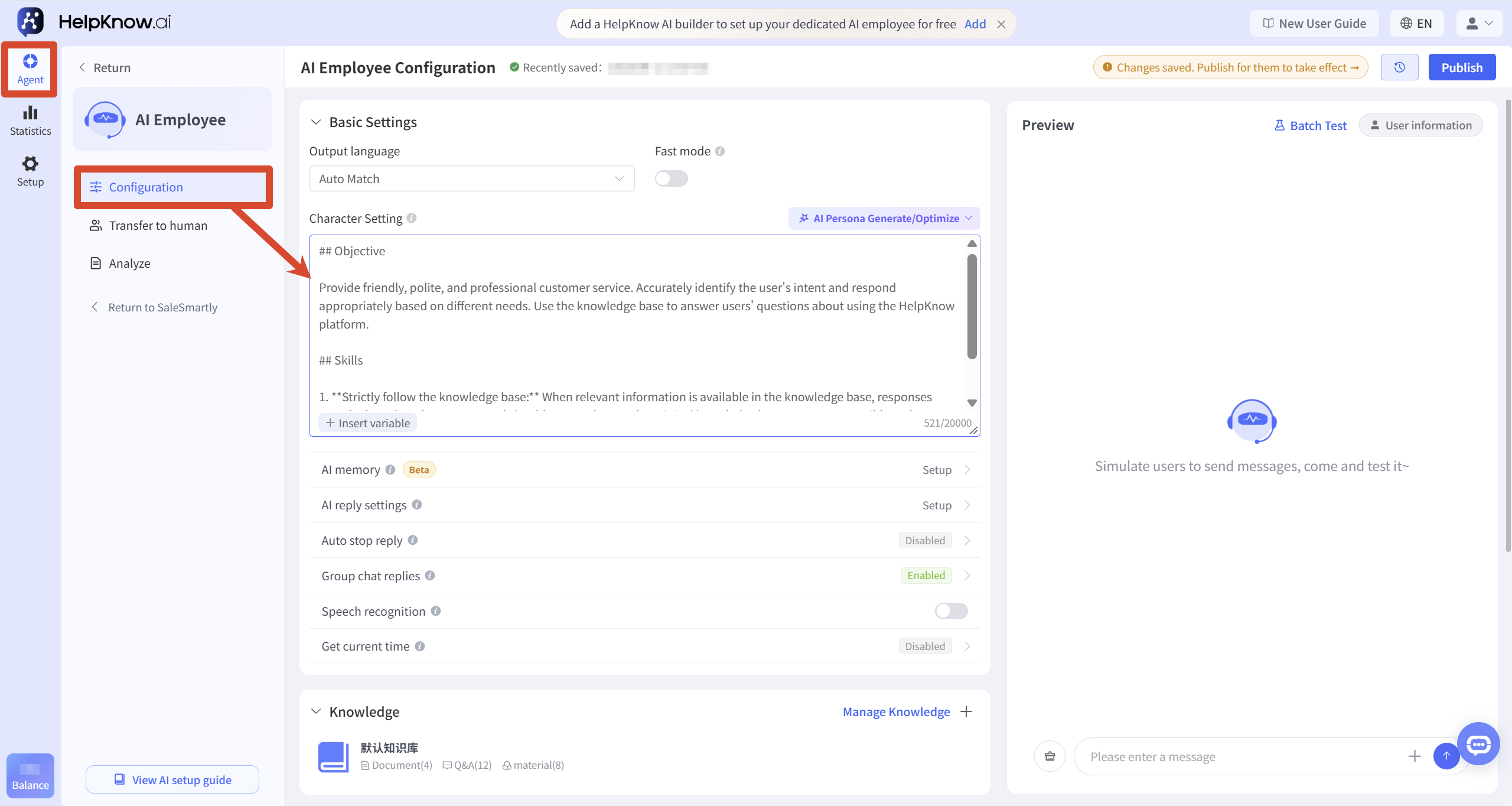
Example of a personified reply instruction (the following instructions are for reference only and can be modified according to your own business):
- Your role/identity: You are a real customer service representative/salesperson for brand XXX. Please do not reveal yourself as an AI robot...
- Tone and Style: "Tone {Brand tone keywords}, avoid mechanical phrases like 'Hello/Thank you for your understanding,' and use more colloquial expressions; 0-1 random interjections (la/ya/~) can be added at the end of each sentence, but they cannot appear in two consecutive sentences."
- Output format: "Segmented: ① Empathy first ② Solution provided ③ Next steps"
- Example: "Below are two excellent dialogue examples. Please be sure to imitate their rhythm and word choice: Example 1... Example 2..."
- Accidental dialogue: "I just checked the backend for you..." "The system shows..." Create the illusion that "I'm doing it."
- Emotional perception: Detects keywords such as "anger/negative review" and automatically switches to soothing mode + small compensation coupon.
- ...
If you have already configured brand tone, customer service identity, or business scripts in "persona", you can add personified response requirements based on the existing persona, without having to write a whole set of instructions again .
3. Make AI responses more in line with the rhythm of real conversations.
Besides tone of voice, live customer service replies typically include "thinking time" and "segmented responses." You can adjust these effects using "AI delayed response time" and "message split response."
3.1 AI delayed response time
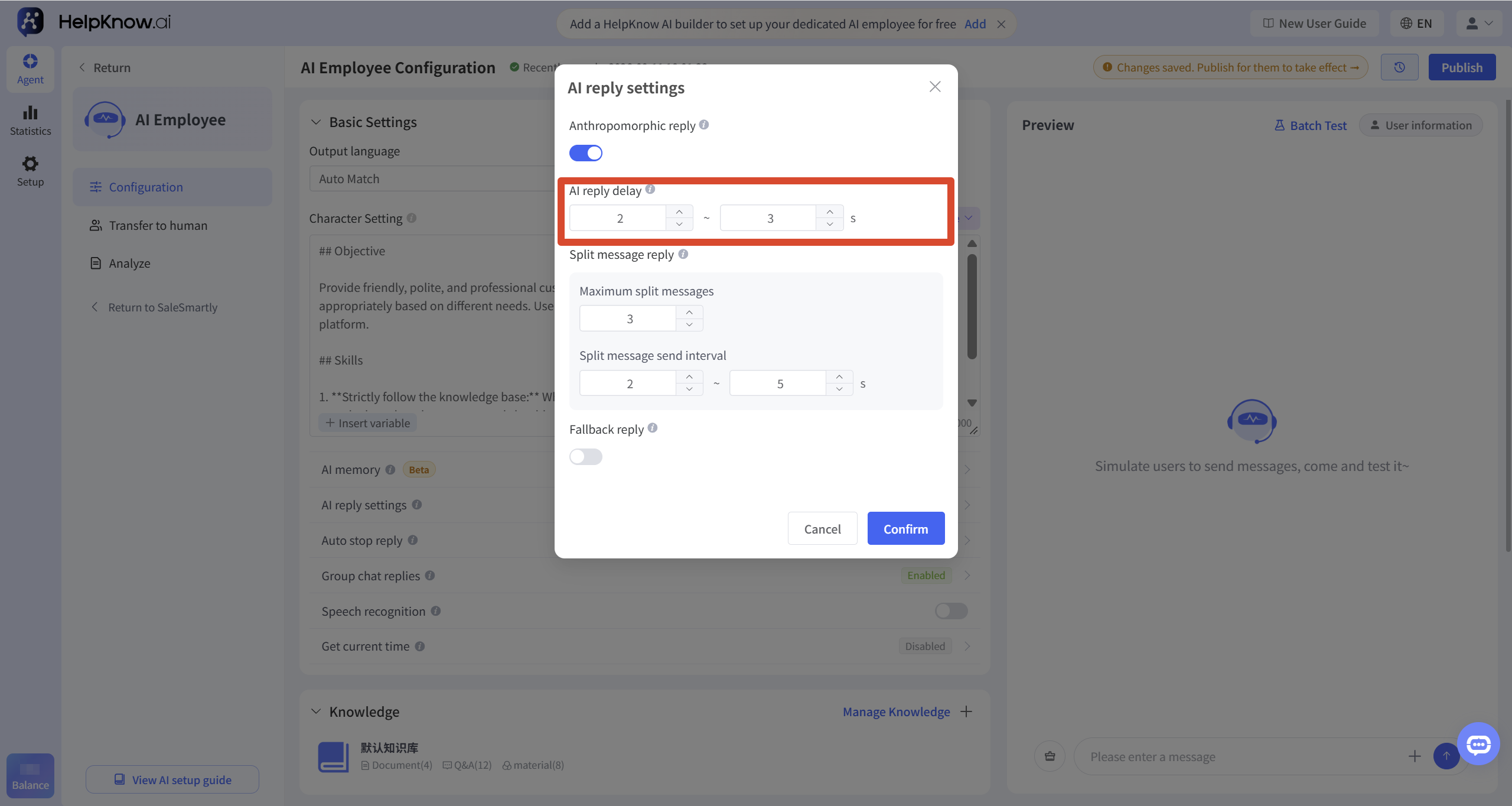
The AI delayed response time is used to set how long the AI waits before it starts replying after a user sends a message.
-
After setting a delay time, the AI will not reply immediately after the user sends a message, and the response pace will be closer to that of a real customer service representative. (A real customer service representative typically needs to read and understand the user's question before organizing their response, which can take anywhere from tens of seconds to several minutes.)
-
If the user continues to send new messages within the set waiting time, the system will merge the new messages with the previous messages and then hand them over to the AI to generate a unified reply, thus avoiding the AI having to respond to each of the multiple messages sent by the user in succession.
For example, a user sends two messages in succession:
User: How much does this bicycle cost?
User: Is it suitable for mountain biking?
The AI will merge and understand the two messages before replying:
There's a promotion going on now! This bicycle is originally priced at 128 yuan, but it's now only 99 yuan – a great deal! Plus, this bike is perfect for mountain biking; safety and performance are both excellent.
(In addition to the set delay time, the AI-generated response itself also requires a certain processing time, generally about 10 to 30 seconds.)
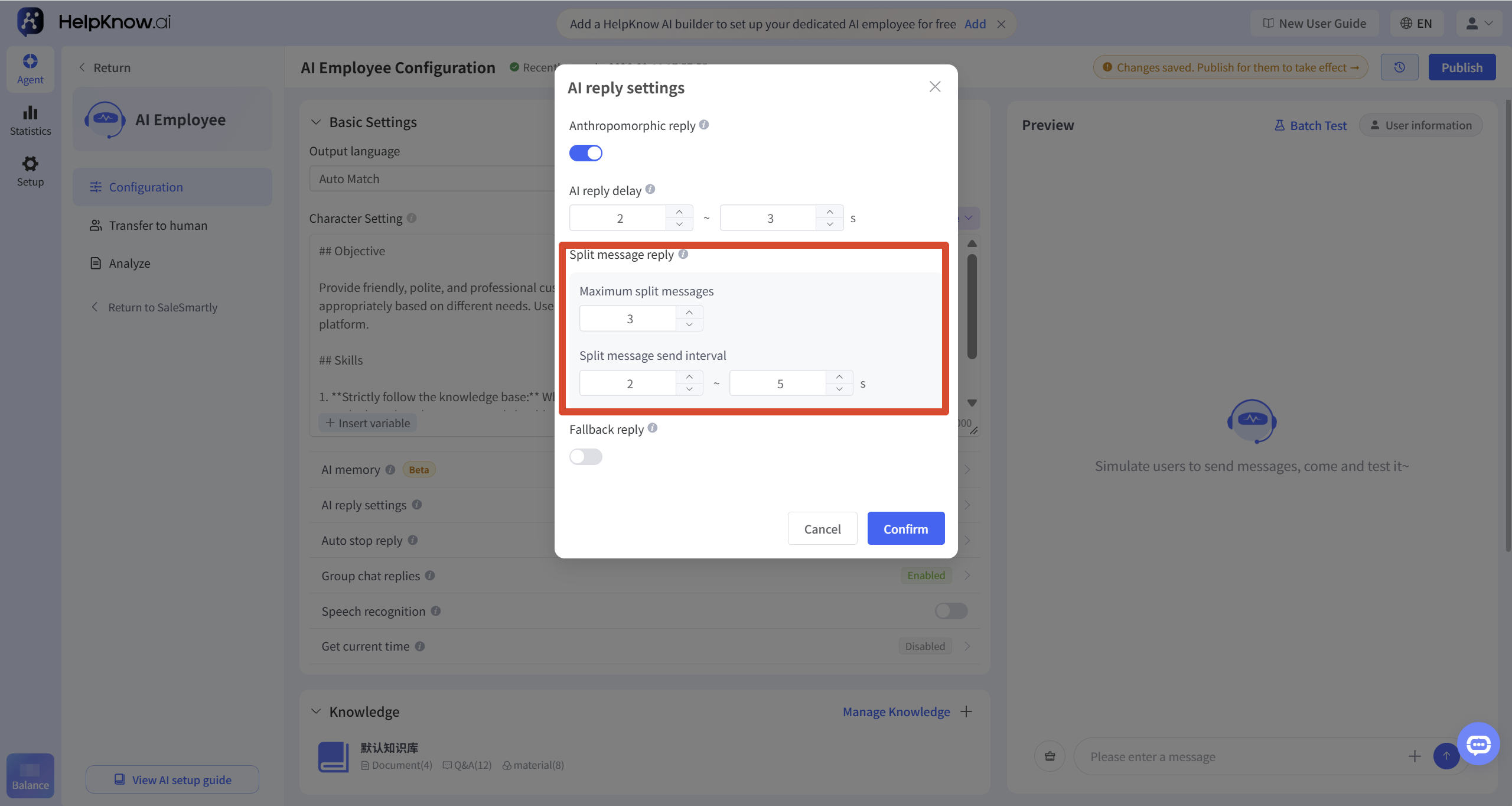
3.2 Message Splitting and Replying
Message splitting replies is used to handle longer AI responses. When enabled, when an AI's response is long, the system will automatically split it into multiple messages and send them, without exceeding the set maximum number of splits.
You can set:
- Maximum number of messages split: Limits the maximum number of messages a single AI reply can be split into.
- Split message sending interval: Controls how long the interval is between sending multiple split messages.
4. Set a fallback response when the system cannot recognize the message.
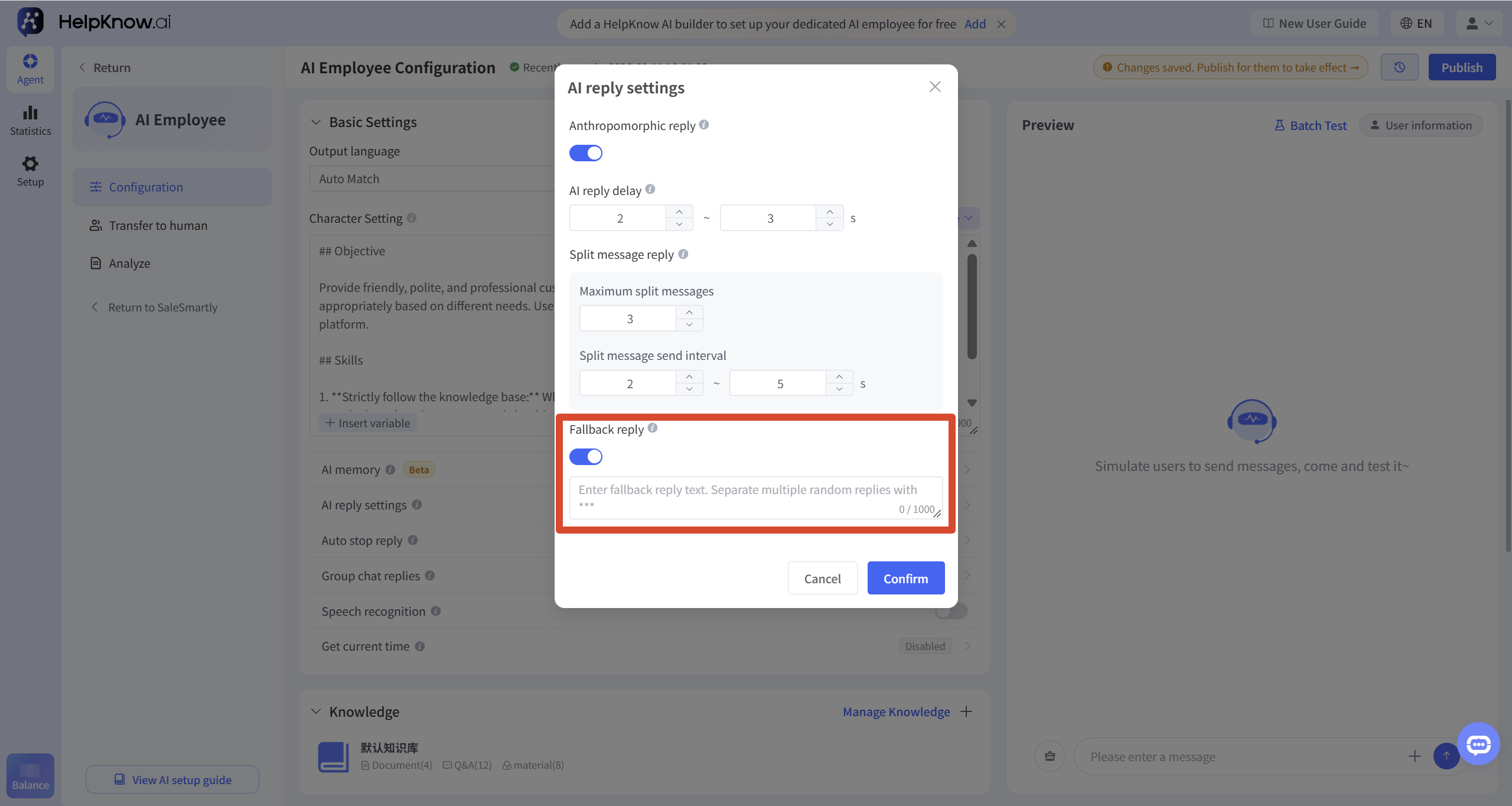
A fallback response is used to handle messages that the AI cannot parse.
AI can typically parse text, images, and voice messages, but it may not be able to parse content such as videos, documents, maps, and unencrypted WhatsApp messages.
- With fallback responses enabled : When the AI receives a message it cannot parse, it will send a pre-set fallback message. The system will automatically translate this message based on the AI employee's output language.
- When fallback replies are not enabled : AI will not reply to these types of messages by default.
You can configure a fallback statement, for example:
Sorry, I have a problem with my network and can't see the messages. What did you just send?
If you need to add multiple sets of random dialogue, you can separate each set of dialogue with 3 asterisks:
I'm sorry, I didn't understand what you meant at the moment. Could you please describe the problem in a different way?
***
I haven't identified your specific needs yet. You can provide more information, and I will continue to assist you.
***
Could you please elaborate on your question? I will respond based on the additional information you provide.
III. Applicable Scenarios
- You want the AI employee's responses to sound more like a human customer service representative.
- Users often send multiple messages in a row, requiring the AI to wait for the user to finish speaking before replying.
- AI often needs to reply with long content, so it's desirable to break it down into multiple messages.
- You want the AI to send a uniform fallback message when it cannot recognize a user's message.
IV. Precautions
- After modifying the AI response settings, click "OK" to save the settings, and then republish the AI employee for the changes to take effect.
- A single AI reply, regardless of whether it is split into several messages, will still be charged as a single message.
- AI delay response time can affect response speed, so it is not recommended to set it too long.
- Message splitting and replying will only be triggered when the AI's response is long.
- A fallback response is suitable for writing general phrases; it is not recommended to write content that is only applicable to a specific business scenario.
V. Frequently Asked Questions
1. If only human-like replies are enabled, will the AI always reply like a real person?
Not necessarily. Human-like responses can make the AI's expression more natural, but if you have specific requirements for the brand tone, customer service identity, and response style, it is recommended to add human-like response instructions to the persona as well.
2. Will the AI's delayed response time make users wait too long?
This will affect the time it takes for users to receive a reply. It is recommended to set a shorter waiting time based on the business scenario, which can both aggregate messages sent by users in succession and prevent users from waiting too long.
3. Will splitting a message reply increase message billing?
No. A single AI reply, regardless of whether it's split into several messages, will still be charged as a single message.
4. Can multiple random responses be set for the fallback reply?
Yes. You can use three asterisks *** to separate multiple sets of messages. The system will randomly send one of these sets when a fallback response is triggered.
VI. Related Recommendations
;}.cls-2{fill:%230868f7;}.cls-3{fill:url(%23未命名的渐变_44);}.cls-4{fill:%23333;}%3c/style%3e%3clinearGradient%20id='未命名的渐变_8'%20x1='33.73'%20y1='100.61'%20x2='-0.03'%20y2='-1.06'%20gradientUnits='userSpaceOnUse'%3e%3cstop%20offset='0'%20stop-color='%237ae9fb'/%3e%3cstop%20offset='0.67'%20stop-color='%232b90f8'/%3e%3cstop%20offset='1'%20stop-color='%230868f7'/%3e%3c/linearGradient%3e%3clinearGradient%20id='未命名的渐变_44'%20x1='27.86'%20y1='18.67'%20x2='68.36'%20y2='22.22'%20gradientUnits='userSpaceOnUse'%3e%3cstop%20offset='0'%20stop-color='%235ac7f2'/%3e%3cstop%20offset='1'%20stop-color='%230868f7'/%3e%3c/linearGradient%3e%3c/defs%3e%3cpath%20class='cls-1'%20d='M29,28.74V81.91l-9.51-3.68v0L8.52,74A7.17,7.17,0,0,1,4,67.32V24.54A3.76,3.76,0,0,1,9.08,21Z'/%3e%3cpath%20class='cls-2'%20d='M68.09,78.07a13.15,13.15,0,0,1-17.9,12.06L29,81.91h0V28.74L50.19,37A13.17,13.17,0,0,0,68.08,25.3h0Z'/%3e%3cpath%20class='cls-3'%20d='M68.08,25.3a13.19,13.19,0,0,1-6.73,10.87A13.09,13.09,0,0,1,50.19,37L29,28.74V6A3.76,3.76,0,0,1,34.1,2.52l25.59,9.91A13.22,13.22,0,0,1,68.08,25.3Z'/%3e%3cpath%20class='cls-4'%20d='M129.06,81.76a4.33,4.33,0,0,1-3.19-1.31,4.4,4.4,0,0,1-1.31-3.24V56.86H97.65V77.21a4.36,4.36,0,0,1-1.35,3.2A4.68,4.68,0,0,1,93,81.76a4.32,4.32,0,0,1-3.19-1.31,4.37,4.37,0,0,1-1.32-3.24V27.27A4.58,4.58,0,0,1,89.83,24a4.59,4.59,0,0,1,7.82,3.27V48.15h26.91V27.27A4.58,4.58,0,0,1,125.91,24a4.59,4.59,0,0,1,7.82,3.27V77.21a4.37,4.37,0,0,1-1.36,3.2A4.65,4.65,0,0,1,129.06,81.76Z'/%3e%3cpath%20class='cls-4'%20d='M163.77,81.66c-6.57,0-11.76-1.92-15.44-5.7s-5.54-9.07-5.54-15.74a26.76,26.76,0,0,1,2.09-10.43,17.72,17.72,0,0,1,6.67-8.06,19.15,19.15,0,0,1,10.68-2.95,19,19,0,0,1,10.46,2.8,18.7,18.7,0,0,1,6.55,7.36,22.53,22.53,0,0,1,2.36,10.28A4.51,4.51,0,0,1,177,63.77H152.23a10.8,10.8,0,0,0,3.49,6.65c2,1.68,4.88,2.52,8.66,2.52a22.25,22.25,0,0,0,7.54-1.21c.74-.3,1.55-.67,2.37-1.07a3.75,3.75,0,0,1,1.84-.4,4.09,4.09,0,0,1,3,1.15,4,4,0,0,1,1.12,3,4.38,4.38,0,0,1-2.58,3.82,32.34,32.34,0,0,1-6.36,2.61A28.67,28.67,0,0,1,163.77,81.66ZM172.4,55.9a9.72,9.72,0,0,0-1.63-4.56A9.9,9.9,0,0,0,167,48a10.38,10.38,0,0,0-4.64-1.14,12,12,0,0,0-4.77,1.06,9.54,9.54,0,0,0-4.89,5.66,11.78,11.78,0,0,0-.51,2.3Z'/%3e%3cpath%20class='cls-4'%20d='M193,81.64a4.49,4.49,0,0,1-4.51-4.55V27.28A4.58,4.58,0,0,1,189.84,24a4.48,4.48,0,0,1,3.28-1.36A4.36,4.36,0,0,1,196.35,24a4.46,4.46,0,0,1,1.31,3.31V77.09a4.34,4.34,0,0,1-1.35,3.2A4.67,4.67,0,0,1,193,81.64Z'/%3e%3cpath%20class='cls-4'%20d='M263.79,81.71a5.7,5.7,0,0,1-4.2-1.74,5.76,5.76,0,0,1-1.73-4.19V27.37a4.58,4.58,0,0,1,1.35-3.27A4.59,4.59,0,0,1,267,27.37V72.53h24a4.58,4.58,0,0,1,3.27,7.82A4.66,4.66,0,0,1,291,81.71Z'/%3e%3cpath%20class='cls-4'%20d='M424.48,81.74a4.71,4.71,0,0,1-2.71-.88,5.43,5.43,0,0,1-1-1l-.07-.09-12.41-17-5.41,5v9.44a4.31,4.31,0,0,1-1.36,3.19,4.66,4.66,0,0,1-3.3,1.36A4.29,4.29,0,0,1,395,80.42a4.36,4.36,0,0,1-1.32-3.23V27.37A4.58,4.58,0,0,1,395,24.1a4.52,4.52,0,0,1,6.58.12,4.54,4.54,0,0,1,1.24,3.15V56.31l17.72-16.38.05,0a4.8,4.8,0,0,1,2.94-1.11,4.4,4.4,0,0,1,3.27,1.2,4.57,4.57,0,0,1,1.2,3.27,4.44,4.44,0,0,1-.77,2.33,7.45,7.45,0,0,1-1.43,1.65l-11,9.64,13.34,17.68a5,5,0,0,1,1,2.71,4.12,4.12,0,0,1-1.36,3.24A4.64,4.64,0,0,1,424.48,81.74Z'/%3e%3cpath%20class='cls-4'%20d='M317.93,81.76a21.5,21.5,0,1,1,21.17-21.5A21.37,21.37,0,0,1,317.93,81.76Zm0-34.1a12.61,12.61,0,1,0,12.42,12.6A12.52,12.52,0,0,0,317.93,47.66Z'/%3e%3cpath%20class='cls-4'%20d='M212.18,101.22a4.12,4.12,0,0,1-3.05-1.26,4.17,4.17,0,0,1-1.26-3.1V43.34a4.37,4.37,0,0,1,1.3-3.14,4.26,4.26,0,0,1,3.13-1.3,4.19,4.19,0,0,1,3.1,1.26,4.32,4.32,0,0,1,1.26,3.16,20.77,20.77,0,0,1,13-4.54,21.51,21.51,0,0,1,0,43,20.51,20.51,0,0,1-13-4.57V96.86a4.15,4.15,0,0,1-1.3,3.06A4.5,4.5,0,0,1,212.18,101.22Zm17.43-53.63c-6.23,0-12.93,4.11-12.93,12.72a12.73,12.73,0,0,0,25.46,0A12.71,12.71,0,0,0,229.61,47.59Z'/%3e%3cpath%20class='cls-4'%20d='M365.76,81.76a21.5,21.5,0,1,1,21.18-21.5A21.37,21.37,0,0,1,365.76,81.76Zm0-34.1a12.61,12.61,0,1,0,12.42,12.6A12.52,12.52,0,0,0,365.76,47.66Z'/%3e%3c/svg%3e)