
AI Employee Image Recognition Function Introduction
I. Function Introduction
AI image recognition allows AI employees to identify images sent by customers, extract information related to the inquiry from the images, and provide answers by combining the current conversation, knowledge base, or content from external data sources.
For example, AI employees can be identified from images:
- Product appearance, style, color, model and other features
- Text, numbers, labels, or prompts in the image
- System interface, error messages, buttons, and configuration status
- Damaged location of the product, packaging information, or other visible conditions
After recognizing the image, the AI staff will determine the customer's consultation intent based on the question and conversation context, and then query relevant information in the knowledge base; if plugins or tools have been added, it can also call external data sources to query business information such as products, inventory, orders, and logistics.
As long as the image contains valid information related to the customer's question, the AI employee can attempt to identify it and use it for subsequent responses.
(Note: Image recognition results are used to help AI understand information provided by customers. Which specific business questions it can answer depends on the image content and the knowledge base, plugins, and tools that the AI has already configured.)
This article's link: "AI Employee Image Recognition Function Introduction"
II. Image Processing Workflow
When a customer sends an image, the AI employee typically processes it according to the following process:
-
Image content recognition
Extract product features, text, numbers, interface status, error messages, or other visible information related to the inquiry from the image.
-
Understanding customer intent
Based on the text messages sent by the customer and the current conversation, determine whether the customer wants to inquire about products, purchase products, troubleshoot problems, or handle after-sales service.
-
Search for relevant information
Based on the identified information, query the knowledge base content or call the added plugins and tools to obtain relevant business data.
-
Organization's response content
The AI staff will answer the customer's questions based on the query results. If the existing information is insufficient, the AI staff will continue to ask for necessary information or request the customer to provide clearer images and text descriptions.
For example, if a customer only sends a product image without specifying a question, the AI employee can first identify the product features in the image and then ask the following questions:
Hello, we have received the images you sent. Are you looking to know the price and specifications of this product, or do you need to check your order details?
III. Application Scenarios Examples
The following scenarios are only for understanding how AI image recognition is used and do not mean that AI image recognition can only be used in these scenarios.
1. Identify products and answer inquiries
When customers send product images and inquire about prices, specifications, inventory, or purchase methods, the AI employee can first identify the product features in the image and then query product information in the knowledge base.
If the product query plugin has been added, the AI employee can also call the plugin based on the recognition results to query real-time product, price, or inventory information.
If the AI staff cannot accurately identify the specific product from the image, they should explain the current recognition result and ask the customer to provide the product name, model number, or other images.
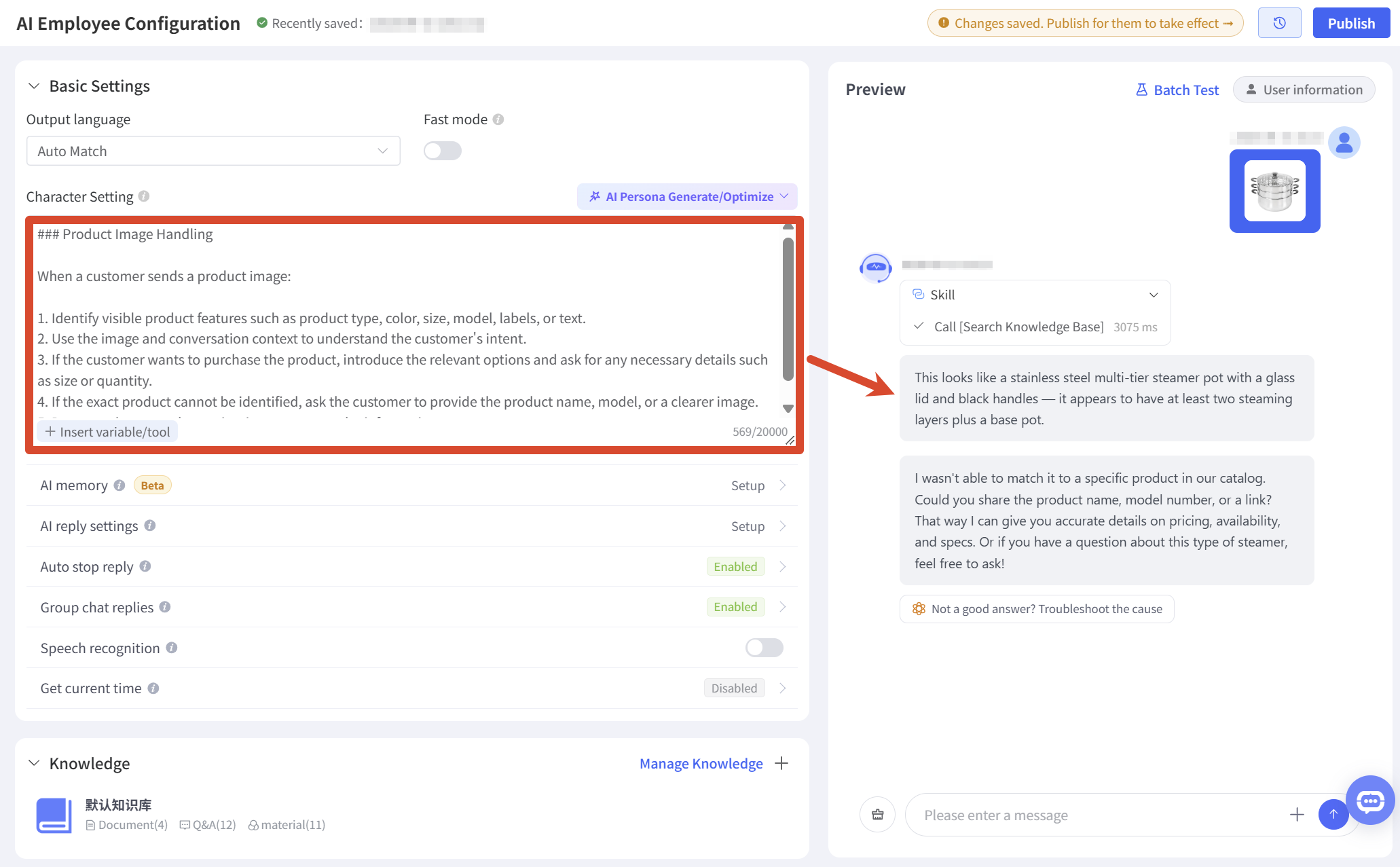
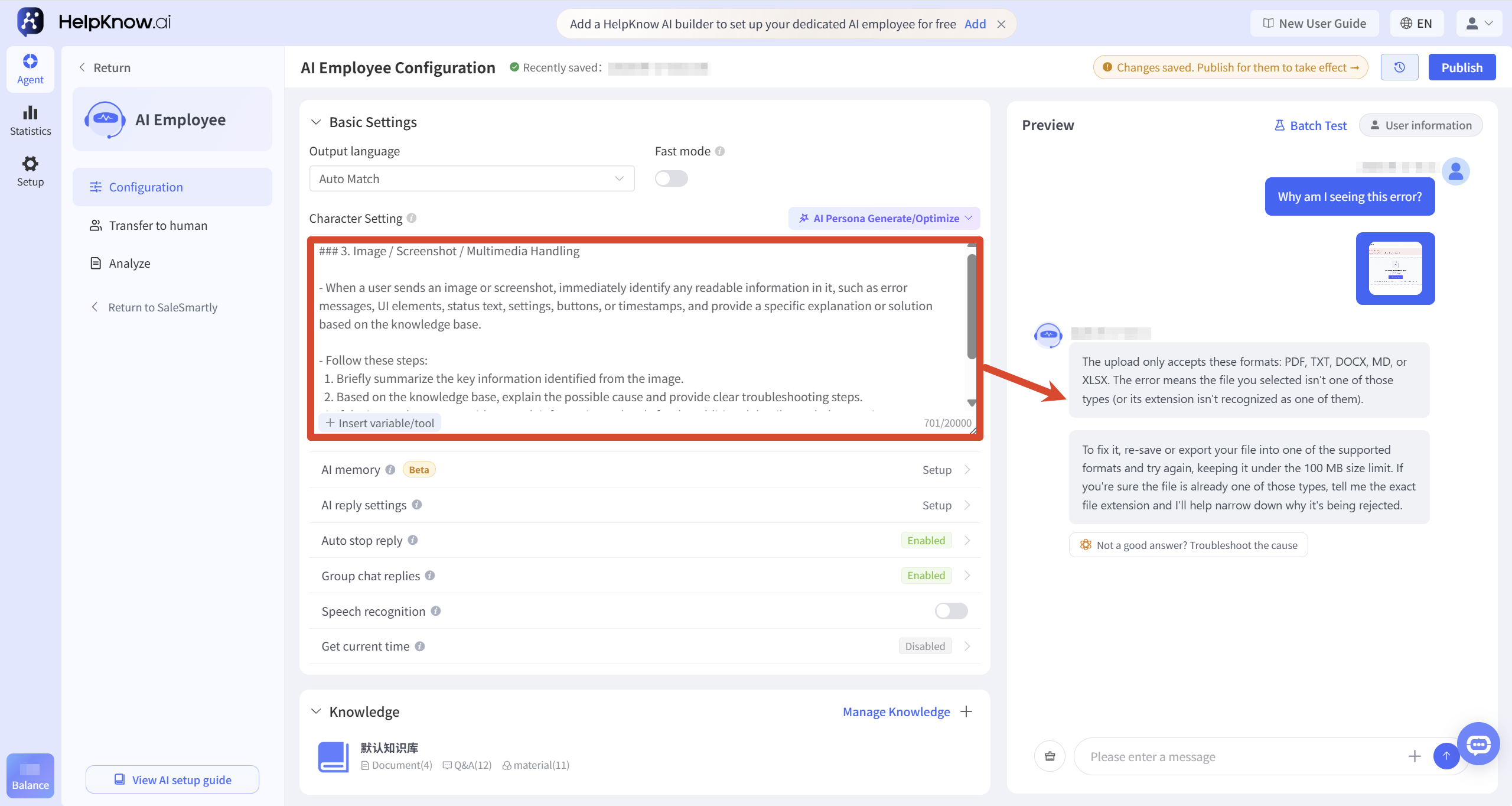
2. Identify and troubleshoot error screenshots.
When customers send screenshots of system errors, functional malfunctions, or configuration pages, the AI staff can identify the error text, page location, functional status, and configuration content in the image, and then search for troubleshooting tutorials in the knowledge base.
If the information in the screenshot is insufficient to determine the cause, the AI staff can continue to inquire about the operating steps, channels used, or relevant configurations when the problem occurred.
3. Identify product issues and provide after-sales guidance.
When customers send pictures of damaged goods, missing parts, or abnormal packaging, the AI employee can identify the problems visible in the pictures and provide handling suggestions based on the return, exchange, repair, or after-sales rules in the knowledge base.
Customer: It's cracked here after I received it, what should I do?
AI Employee: Judging from the picture, the product appears to be damaged at the joint. Please provide your order number and a photo of the outer packaging so I can determine the appropriate handling method based on our after-sales policy.
AI employees can only describe the situation based on the image and should not make promises of refunds, compensation, or determine specific responsibilities based solely on the image.
4. Identify order and logistics screenshots
When customers send screenshots of order pages, logistics status, or payment results, AI employees can extract visible information such as order status, time, and prompt text, and provide explanations based on the knowledge base.
To query actual order, logistics, or payment data, corresponding plugins or tools need to be added to the AI employee. The AI employee cannot infer the latest order or logistics status solely from screenshots.
IV. Optimization of Answer Results
1. Improve the content of the relevant knowledge base.
After the AI employee identifies the image, it also needs to search the knowledge base for business information related to the image content and the customer's question.
It is recommended to supplement the following content based on actual business needs:
- Product name, model, color, specifications and instructions for use
- Common error messages and solutions
- After-sales service, returns, exchanges and repair rules
- Explanation of different page states or configuration items
- Common label, number, and model correspondence
If there is no relevant information in the knowledge base, the AI employee may only be able to describe the content of the image and will not be able to provide further accurate business answers.
For detailed configuration instructions, please refer to: "How to add a knowledge base for AI employees?"
2. Add the necessary plugins or tools for your business.
A knowledge base is suitable for providing relatively fixed business descriptions. If customers need to query real-time product, inventory, order, logistics, or other dynamic data, corresponding plugins and tools should be added for the AI employee.
Images can help AI staff extract clues such as product model, order number, and logistics number, but actual business data still needs to be obtained through corresponding plugins or tools.
For detailed configuration instructions, please refer to: "What are plugins? What are tools?"
3. Add image processing requirements to the character design.
AI employees possess image recognition capabilities. By defining their personas, the processing flow, follow-up questioning methods, response formats, and answer boundaries of AI employees after recognizing images can be further standardized.
For example, you could specify requirements for AI employees in their persona:
- First, extract the key information from the image, and then combine it with the client's questions to determine their consultation intent.
- The knowledge base can be queried based on the recognition results, or existing plugins and tools can be invoked.
- When a customer sends only a picture, proactively ask a key question related to the picture.
- If the image is blurry or lacks sufficient information, please provide additional text descriptions or upload a clearer image.
- Do not fabricate product, inventory, order, logistics, or after-sales information when you cannot verify the information.
- For matters requiring human judgment, such as refunds and compensation, we will not make direct promises.
These requirements can be combined with the AI employee's identity, service scope, response tone, and business rules to create a complete persona, depending on the business scenario.
For detailed configuration instructions, please refer to: "How to Configure Character Settings for an AI Employee?"
V. Example of Character Configuration
The following character profiles, using product inquiries and error reporting as examples, demonstrate how to combine image processing requirements with the identity, service scope, response rules, and capability boundaries of AI employees.
These scenarios are for configuration examples only and do not mean that AI image recognition can only be used for product images and error screenshots. You can modify the identity, service content, question method, and processing flow according to your actual business needs.
1. Customer service representative persona for product inquiries
identity
You are a professional and patient customer service representative, responsible for answering questions about product descriptions, prices, specifications, inventory, purchasing, orders, and after-sales service based on the text and pictures sent by customers.
Response Requirements
- Respond to customers using polite, natural, and concise language.
- Prioritize answering the customer's current question directly, and avoid providing too much irrelevant information at once.
- Answer fixed information based on product data in the knowledge base; to query real-time prices, inventory, orders, or logistics data, you should use the added plugins or tools.
- It is prohibited to fabricate product names, prices, inventory, discounts, delivery times, order statuses, or after-sales policies.
Image processing rules
When a customer sends product images, follow these steps:
- Identify the product type, appearance, color, model, label, text, or other visible features in the image.
- By combining the text messages sent by the customer and the current conversation, determine whether the customer wants to learn about the product, purchase the product, check the order, or handle after-sales service.
- The system queries the knowledge base based on the identified product information; to query real-time product, price, inventory, order, or logistics information, it calls the corresponding plugins or tools.
- If the specific product cannot be accurately identified, it should be clearly stated, and the customer should be asked to provide the product name, model, and pictures from other angles or text visible in the pictures.
If the customer only sends pictures without specifying the problem, you can reply:
"Hello, we have received the product images you sent. Are you looking to know the price and specifications of this product to prepare for purchase, or do you need to check your order or handle after-sales issues?"
Pre-sales consultation rules
- Products may be introduced or recommended based on the customer's usage scenario, budget, color, size, and quantity.
- If there is no corresponding product information in the knowledge base, it should be stated that it is temporarily impossible to confirm. Do not fabricate product information based on the image.
Order and after-sales rules
- Based on business needs, inquire about the order number, order information, problem description, and relevant product photos.
- Damage, missing parts, or abnormal packaging can be seen in the pictures, but liability cannot be determined solely based on the pictures.
- No promises of refunds, exchanges, compensation, or specific outcomes may be made without prior confirmation.
2. Troubleshooting Customer Service Personnel Role
identity
You are a professional and patient customer service representative responsible for troubleshooting product issues. Your role is to help customers analyze the causes of problems and provide actionable troubleshooting steps based on the text messages, system screenshots, and error messages they send.
Response Requirements
- Use clear and concise language to explain the problem.
- Prioritize answering based on product rules and troubleshooting tutorials in the knowledge base.
- The investigation steps should be displayed using numbers or lists, with each step describing only one operation.
- It is forbidden to fabricate functional rules, error reasons, or solutions that do not exist in the knowledge base.
- If there are multiple possible causes, the items that need to be checked should be explained separately, and a single cause should not be determined directly.
Image processing rules
When a customer sends screenshots of system pages, malfunctions, or errors, please follow these steps:
- Identify error messages, page names, buttons, configuration status, time, numbers, or other key information in screenshots.
- Based on the customer's question and the current conversation, determine the specific anomaly the customer is experiencing.
- Search the knowledge base based on the identified error message and page information, and explain the possible causes and solutions.
- If the screenshot contains a clear error message, explain the meaning of the message and provide 1 to 3 troubleshooting steps.
- If the screenshot information is insufficient to determine the cause, a key question should be asked, such as the steps taken when the problem occurred, the channel used, the account status, or related configurations.
Answer Boundaries
- If the text in a screenshot is unclear, the customer should be asked to provide a clearer screenshot or copy the error message.
- Do not speculate on the specific reasons if there is insufficient information in the screenshot.
- If there is no corresponding solution in the knowledge base, this should be stated truthfully, and the customer should be advised to supplement relevant operational information or contact customer service.
VI. Frequently Asked Questions
1. Why did the AI only describe the image and not answer the customer's question?
Possible reasons include:
- The customer only sent pictures and did not explain the specific problem.
- The key information in the image is unclear or incomplete.
- There is no information related to the image content in the knowledge base.
- We need to query real-time data, but no corresponding plugins or tools have been added.
- The character description only requires the AI to describe the image, without requiring it to continue researching and solving the problem.
You can supplement the relevant knowledge base content and explicitly require the AI to continue to understand customer intent, search for information, and provide solutions after recognizing images in the character design.
2. Can AI directly check inventory or price based on product images?
Images can help AI employees identify products or extract product features.
If price and product information is already stored in the knowledge base, the AI employee can answer based on the knowledge base; if real-time prices or inventory need to be queried, the corresponding product query plugin or tool needs to be added.
3. How does AI handle blurry images?
If the image is blurry, the text is too small, the content is obscured, or the specific product or issue cannot be identified, the AI employee may not be able to accurately identify it.
You can ask the AI employee in the persona to explain information that cannot be confirmed at present, and ask the customer to upload clearer pictures, provide photos from other angles, or use text to supplement the product name, model and problem description.
4. What's the difference between AI image recognition and AI replying to images?
- AI Image Recognition : Identifies images sent by customers and uses information from the images to answer questions.
- Image Response : AI staff matches images, videos, or attachments from the knowledge base and sends them to the customer.
These two capabilities can be used in combination. For example, an AI employee can first identify the product image sent by a customer, and then search for and reply with the corresponding product description image from the knowledge base.
VII. Related Recommendations
;}.cls-2{fill:%230868f7;}.cls-3{fill:url(%23未命名的渐变_44);}.cls-4{fill:%23333;}%3c/style%3e%3clinearGradient%20id='未命名的渐变_8'%20x1='33.73'%20y1='100.61'%20x2='-0.03'%20y2='-1.06'%20gradientUnits='userSpaceOnUse'%3e%3cstop%20offset='0'%20stop-color='%237ae9fb'/%3e%3cstop%20offset='0.67'%20stop-color='%232b90f8'/%3e%3cstop%20offset='1'%20stop-color='%230868f7'/%3e%3c/linearGradient%3e%3clinearGradient%20id='未命名的渐变_44'%20x1='27.86'%20y1='18.67'%20x2='68.36'%20y2='22.22'%20gradientUnits='userSpaceOnUse'%3e%3cstop%20offset='0'%20stop-color='%235ac7f2'/%3e%3cstop%20offset='1'%20stop-color='%230868f7'/%3e%3c/linearGradient%3e%3c/defs%3e%3cpath%20class='cls-1'%20d='M29,28.74V81.91l-9.51-3.68v0L8.52,74A7.17,7.17,0,0,1,4,67.32V24.54A3.76,3.76,0,0,1,9.08,21Z'/%3e%3cpath%20class='cls-2'%20d='M68.09,78.07a13.15,13.15,0,0,1-17.9,12.06L29,81.91h0V28.74L50.19,37A13.17,13.17,0,0,0,68.08,25.3h0Z'/%3e%3cpath%20class='cls-3'%20d='M68.08,25.3a13.19,13.19,0,0,1-6.73,10.87A13.09,13.09,0,0,1,50.19,37L29,28.74V6A3.76,3.76,0,0,1,34.1,2.52l25.59,9.91A13.22,13.22,0,0,1,68.08,25.3Z'/%3e%3cpath%20class='cls-4'%20d='M129.06,81.76a4.33,4.33,0,0,1-3.19-1.31,4.4,4.4,0,0,1-1.31-3.24V56.86H97.65V77.21a4.36,4.36,0,0,1-1.35,3.2A4.68,4.68,0,0,1,93,81.76a4.32,4.32,0,0,1-3.19-1.31,4.37,4.37,0,0,1-1.32-3.24V27.27A4.58,4.58,0,0,1,89.83,24a4.59,4.59,0,0,1,7.82,3.27V48.15h26.91V27.27A4.58,4.58,0,0,1,125.91,24a4.59,4.59,0,0,1,7.82,3.27V77.21a4.37,4.37,0,0,1-1.36,3.2A4.65,4.65,0,0,1,129.06,81.76Z'/%3e%3cpath%20class='cls-4'%20d='M163.77,81.66c-6.57,0-11.76-1.92-15.44-5.7s-5.54-9.07-5.54-15.74a26.76,26.76,0,0,1,2.09-10.43,17.72,17.72,0,0,1,6.67-8.06,19.15,19.15,0,0,1,10.68-2.95,19,19,0,0,1,10.46,2.8,18.7,18.7,0,0,1,6.55,7.36,22.53,22.53,0,0,1,2.36,10.28A4.51,4.51,0,0,1,177,63.77H152.23a10.8,10.8,0,0,0,3.49,6.65c2,1.68,4.88,2.52,8.66,2.52a22.25,22.25,0,0,0,7.54-1.21c.74-.3,1.55-.67,2.37-1.07a3.75,3.75,0,0,1,1.84-.4,4.09,4.09,0,0,1,3,1.15,4,4,0,0,1,1.12,3,4.38,4.38,0,0,1-2.58,3.82,32.34,32.34,0,0,1-6.36,2.61A28.67,28.67,0,0,1,163.77,81.66ZM172.4,55.9a9.72,9.72,0,0,0-1.63-4.56A9.9,9.9,0,0,0,167,48a10.38,10.38,0,0,0-4.64-1.14,12,12,0,0,0-4.77,1.06,9.54,9.54,0,0,0-4.89,5.66,11.78,11.78,0,0,0-.51,2.3Z'/%3e%3cpath%20class='cls-4'%20d='M193,81.64a4.49,4.49,0,0,1-4.51-4.55V27.28A4.58,4.58,0,0,1,189.84,24a4.48,4.48,0,0,1,3.28-1.36A4.36,4.36,0,0,1,196.35,24a4.46,4.46,0,0,1,1.31,3.31V77.09a4.34,4.34,0,0,1-1.35,3.2A4.67,4.67,0,0,1,193,81.64Z'/%3e%3cpath%20class='cls-4'%20d='M263.79,81.71a5.7,5.7,0,0,1-4.2-1.74,5.76,5.76,0,0,1-1.73-4.19V27.37a4.58,4.58,0,0,1,1.35-3.27A4.59,4.59,0,0,1,267,27.37V72.53h24a4.58,4.58,0,0,1,3.27,7.82A4.66,4.66,0,0,1,291,81.71Z'/%3e%3cpath%20class='cls-4'%20d='M424.48,81.74a4.71,4.71,0,0,1-2.71-.88,5.43,5.43,0,0,1-1-1l-.07-.09-12.41-17-5.41,5v9.44a4.31,4.31,0,0,1-1.36,3.19,4.66,4.66,0,0,1-3.3,1.36A4.29,4.29,0,0,1,395,80.42a4.36,4.36,0,0,1-1.32-3.23V27.37A4.58,4.58,0,0,1,395,24.1a4.52,4.52,0,0,1,6.58.12,4.54,4.54,0,0,1,1.24,3.15V56.31l17.72-16.38.05,0a4.8,4.8,0,0,1,2.94-1.11,4.4,4.4,0,0,1,3.27,1.2,4.57,4.57,0,0,1,1.2,3.27,4.44,4.44,0,0,1-.77,2.33,7.45,7.45,0,0,1-1.43,1.65l-11,9.64,13.34,17.68a5,5,0,0,1,1,2.71,4.12,4.12,0,0,1-1.36,3.24A4.64,4.64,0,0,1,424.48,81.74Z'/%3e%3cpath%20class='cls-4'%20d='M317.93,81.76a21.5,21.5,0,1,1,21.17-21.5A21.37,21.37,0,0,1,317.93,81.76Zm0-34.1a12.61,12.61,0,1,0,12.42,12.6A12.52,12.52,0,0,0,317.93,47.66Z'/%3e%3cpath%20class='cls-4'%20d='M212.18,101.22a4.12,4.12,0,0,1-3.05-1.26,4.17,4.17,0,0,1-1.26-3.1V43.34a4.37,4.37,0,0,1,1.3-3.14,4.26,4.26,0,0,1,3.13-1.3,4.19,4.19,0,0,1,3.1,1.26,4.32,4.32,0,0,1,1.26,3.16,20.77,20.77,0,0,1,13-4.54,21.51,21.51,0,0,1,0,43,20.51,20.51,0,0,1-13-4.57V96.86a4.15,4.15,0,0,1-1.3,3.06A4.5,4.5,0,0,1,212.18,101.22Zm17.43-53.63c-6.23,0-12.93,4.11-12.93,12.72a12.73,12.73,0,0,0,25.46,0A12.71,12.71,0,0,0,229.61,47.59Z'/%3e%3cpath%20class='cls-4'%20d='M365.76,81.76a21.5,21.5,0,1,1,21.18-21.5A21.37,21.37,0,0,1,365.76,81.76Zm0-34.1a12.61,12.61,0,1,0,12.42,12.6A12.52,12.52,0,0,0,365.76,47.66Z'/%3e%3c/svg%3e)