
What are plugins? What are tools?
I. Function Introduction
Plugins and tools are used to extend the capabilities of external systems for AI employees.
By default, AI employees primarily respond based on pre-configured personas and knowledge bases, and execute enabled skills. With added plugins and tools, AI employees can also invoke external system capabilities in appropriate dialogue scenarios, such as:
- Query customer order information
- Search for products, inventory, or prices.
- Check logistics status
- Call the API in your own system to retrieve business data
In short, plugins and tools can transform AI employees from "only answering based on existing content" to "being able to call upon external capabilities on demand during conversations".
This article's link: "What are plugins? What are tools?"
II. The Relationship Between Plugins and Tools
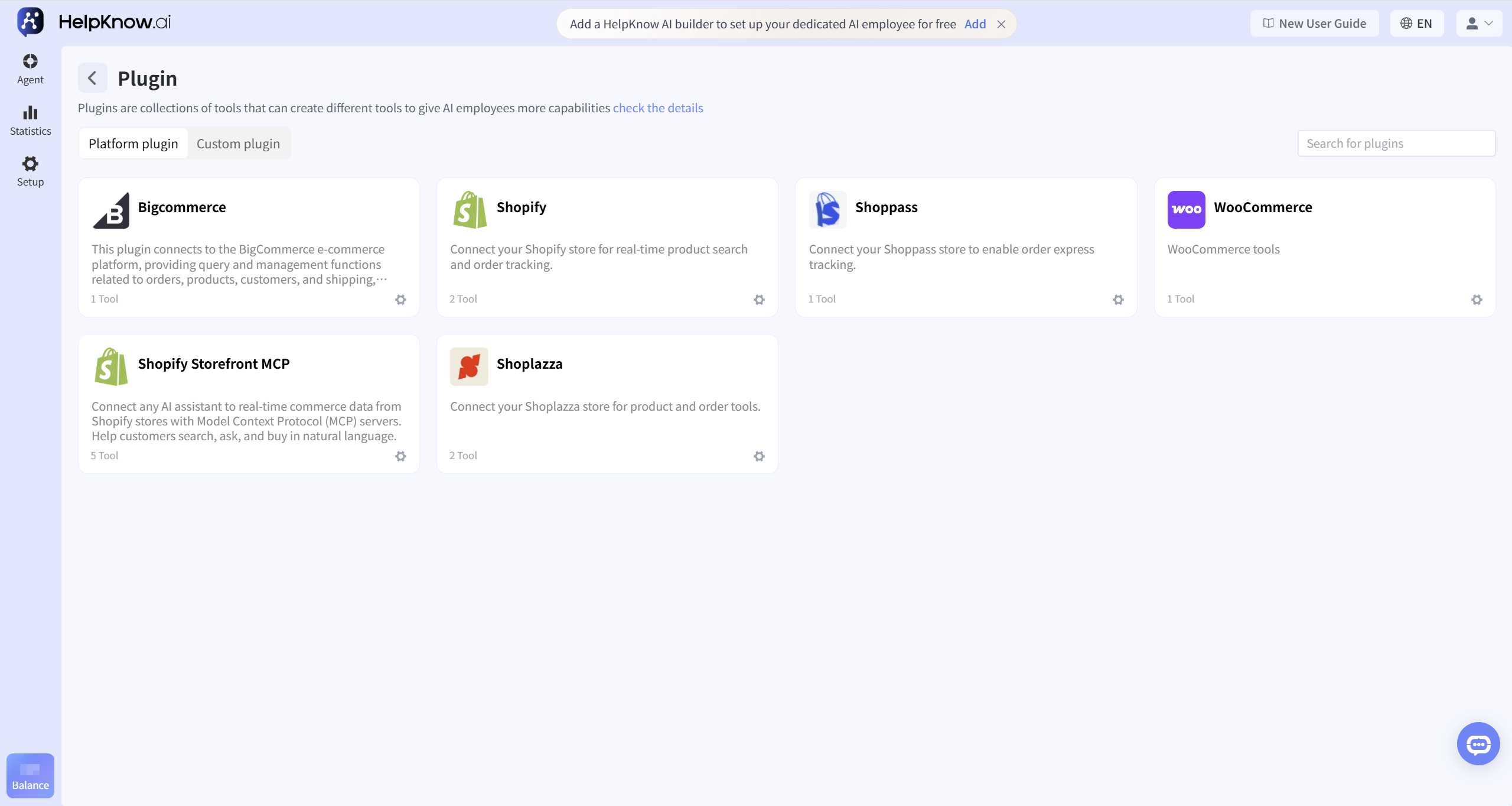
Plugins are collections of tools , and tools are specific capabilities that AI employees can utilize.
This can be understood as follows:
- Plugins: Used to manage a set of related capabilities, such as Shopify plugins, WooCommerce plugins, and custom plugins.
- Tools: Specific capabilities within the plugin, such as order inquiry, product search, and logistics tracking.
A plugin can contain one or more tools. The AI employee actually uses the tools, and the plugin is responsible for categorizing and managing these tools, as well as carrying out the relevant authorizations or configurations.
Once you add one of these tools to the AI employee, the AI employee will have the opportunity to use that specific capability in a conversation.
III. Plugin Type Description
1. Platform Plugins
The platform plugin is a built-in plugin of HelpKnow, suitable for integrating with common platforms.
For example, platform plugins may include Shopify, BigCommerce, Shoppass, WooCommerce, etc. (the specific supported platforms are subject to the information displayed on the plugin page).
Platform plugins are typically suitable for the following situations:
- The platform you are using has already appeared in the plugin list.
- You want your AI employees to quickly query platform data such as orders, products, and logistics.
- You do not want to configure API requests, input parameters, and output parameters from scratch.
Platform plugins generally require completing the corresponding platform authorization configuration first, and then adding the necessary tools to the AI employee.
2. Custom Plugins
Custom plugins are suitable for integration with your own system or API.
If HelpKnow does not currently have the platform plugins you need built-in, or if you want the AI employee to call interfaces of your company's internal systems, CRM, ERP, work order systems, etc., you can use custom plugins.
Custom plugins typically require configuration:
- Plugin Name and Description
- Authorization method
- Tool Name and Description
- Request URL and Request Method
- Input parameters
- Output parameters
- Debugging and saving
This part of the configuration is relatively technical, and it is recommended that it be completed by a member who is familiar with the interface information.
IV. How to add tools to AI employees
The tool will only affect the AI employee's responsiveness after it has been added to that specific AI employee.
The operation entry point is:
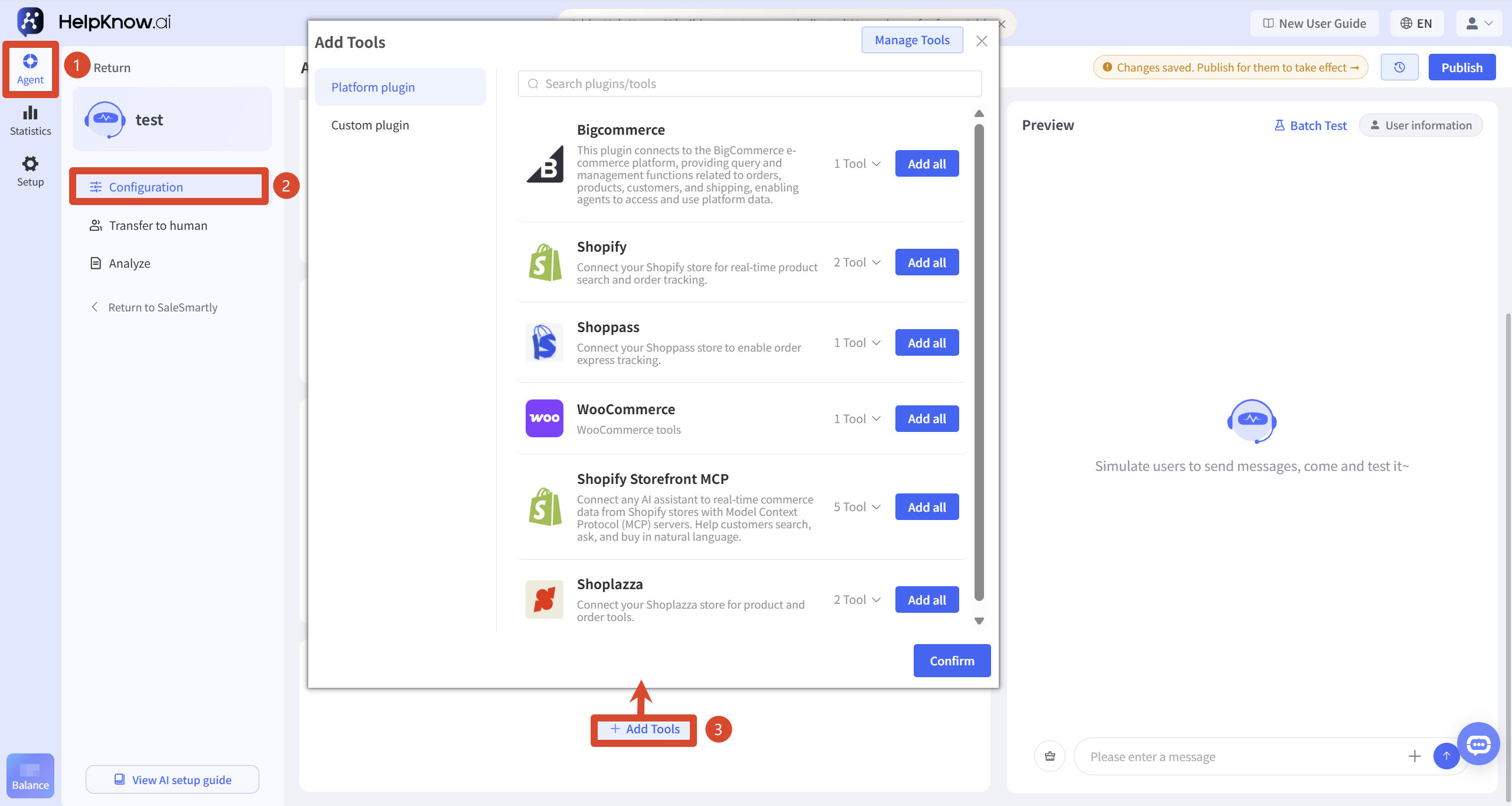
- Enter the AI employee that needs to be configured.
- Open the AI employee configuration page.
- Locate the "Tools" module and click "Add Tool".
- Choose the platform plugin tool or custom plugin tool you want to add.
- After adding, click "Publish" to make the tool configuration officially effective.
After adding a tool, it's recommended to explain the conditions for its use in the AI employee's persona. This will help the AI employee determine when to invoke the tool.
For example:
When customers inquire about order status, logistics progress, or delivery time, the order query tool is used to obtain the latest information, and then the customer is replied to based on the query results.
(The specific wording can be adjusted according to your business scenario.)
Precautions
- After completing plugin authorization or configuration, you also need to add the specific tool to the corresponding AI employee. Adding the tool does not guarantee that the AI employee will use it every time; whether it is used will be affected by factors such as user questions, tool descriptions, user personas, and usage conditions.
- Platform plugins typically require prior authorization configuration; otherwise, the tool may be unable to properly acquire platform data.
- Custom plugins require that the API address, authentication method, input parameters, and output parameters be configured correctly; otherwise, tool calls may fail.
- It is recommended that each tool correspond to only one specific capability, such as order inquiry, product search, or logistics tracking, to avoid a single tool undertaking too many tasks.
- The number of platforms, tools, and licensing requirements displayed on the plugin page may be adjusted. Please refer to the actual page for the most accurate information.
Frequently Asked Questions
1. What is the difference between plugins and tools?
Plugins are collections of tools, and tools are specific capabilities that AI employees can utilize.
For example, a Shopify plugin can be understood as a collection of Shopify-related capabilities, which may include order tracking tools, product search tools, and so on.
2. Can adding only the plugin allow the AI employee to access capabilities?
Typically, the specific tool needs to be added to the AI employee before the AI employee can use it.
The plugin is used for management tools; the AI employee is actually using the tools.
3. How should I choose between platform plugins and custom plugins?
If HelpKnow already provides a corresponding platform plugin, it is recommended to use the platform plugin first.
If you want to integrate your own system, or if there is no corresponding platform plugin currently available, you can use a custom plugin.
4. Why didn't the AI employee use the tool after it was added?
Possible reasons include:
- The user's question did not trigger a scenario for using the tool.
- The tool has not been added to the current AI employee.
- The tool name or description is not clear enough.
- The AI employee's persona does not specify the necessary conditions for its use.
- The plugin authorization, interface parameters, or output parameters are not configured correctly.
First, confirm whether the tool has been added to the corresponding AI employee and check the plugin authorization and parameter configuration; if the tool still does not call as expected, supplement the tool description or explain the calling conditions in the persona.
Related tutorials
If you wish to complete the specific configuration, you can select the corresponding tutorial based on your goals:
- If you want to integrate your Shopify store, please see: Tutorial | Connect your Shopify Store to HelpKnow to Enable Order Query + Product Recommendation
- If you want to integrate your Shoppass store, please see: Tutorial | Connect your Shoppass store to HelpKnow to provide your customers with self-service order logistics query service
- If you want to integrate WooCommerce, please see: Tutorial | Integrating WooCommerce to Implement Product Search and Recommendation
- If you want to create your own plugins and tools, please see: Custom Plugins and Tools
- If the AI employee does not use the tools as expected, please see: "Why didn't the AI employee use the tools as expected?"
;}.cls-2{fill:%230868f7;}.cls-3{fill:url(%23未命名的渐变_44);}.cls-4{fill:%23333;}%3c/style%3e%3clinearGradient%20id='未命名的渐变_8'%20x1='33.73'%20y1='100.61'%20x2='-0.03'%20y2='-1.06'%20gradientUnits='userSpaceOnUse'%3e%3cstop%20offset='0'%20stop-color='%237ae9fb'/%3e%3cstop%20offset='0.67'%20stop-color='%232b90f8'/%3e%3cstop%20offset='1'%20stop-color='%230868f7'/%3e%3c/linearGradient%3e%3clinearGradient%20id='未命名的渐变_44'%20x1='27.86'%20y1='18.67'%20x2='68.36'%20y2='22.22'%20gradientUnits='userSpaceOnUse'%3e%3cstop%20offset='0'%20stop-color='%235ac7f2'/%3e%3cstop%20offset='1'%20stop-color='%230868f7'/%3e%3c/linearGradient%3e%3c/defs%3e%3cpath%20class='cls-1'%20d='M29,28.74V81.91l-9.51-3.68v0L8.52,74A7.17,7.17,0,0,1,4,67.32V24.54A3.76,3.76,0,0,1,9.08,21Z'/%3e%3cpath%20class='cls-2'%20d='M68.09,78.07a13.15,13.15,0,0,1-17.9,12.06L29,81.91h0V28.74L50.19,37A13.17,13.17,0,0,0,68.08,25.3h0Z'/%3e%3cpath%20class='cls-3'%20d='M68.08,25.3a13.19,13.19,0,0,1-6.73,10.87A13.09,13.09,0,0,1,50.19,37L29,28.74V6A3.76,3.76,0,0,1,34.1,2.52l25.59,9.91A13.22,13.22,0,0,1,68.08,25.3Z'/%3e%3cpath%20class='cls-4'%20d='M129.06,81.76a4.33,4.33,0,0,1-3.19-1.31,4.4,4.4,0,0,1-1.31-3.24V56.86H97.65V77.21a4.36,4.36,0,0,1-1.35,3.2A4.68,4.68,0,0,1,93,81.76a4.32,4.32,0,0,1-3.19-1.31,4.37,4.37,0,0,1-1.32-3.24V27.27A4.58,4.58,0,0,1,89.83,24a4.59,4.59,0,0,1,7.82,3.27V48.15h26.91V27.27A4.58,4.58,0,0,1,125.91,24a4.59,4.59,0,0,1,7.82,3.27V77.21a4.37,4.37,0,0,1-1.36,3.2A4.65,4.65,0,0,1,129.06,81.76Z'/%3e%3cpath%20class='cls-4'%20d='M163.77,81.66c-6.57,0-11.76-1.92-15.44-5.7s-5.54-9.07-5.54-15.74a26.76,26.76,0,0,1,2.09-10.43,17.72,17.72,0,0,1,6.67-8.06,19.15,19.15,0,0,1,10.68-2.95,19,19,0,0,1,10.46,2.8,18.7,18.7,0,0,1,6.55,7.36,22.53,22.53,0,0,1,2.36,10.28A4.51,4.51,0,0,1,177,63.77H152.23a10.8,10.8,0,0,0,3.49,6.65c2,1.68,4.88,2.52,8.66,2.52a22.25,22.25,0,0,0,7.54-1.21c.74-.3,1.55-.67,2.37-1.07a3.75,3.75,0,0,1,1.84-.4,4.09,4.09,0,0,1,3,1.15,4,4,0,0,1,1.12,3,4.38,4.38,0,0,1-2.58,3.82,32.34,32.34,0,0,1-6.36,2.61A28.67,28.67,0,0,1,163.77,81.66ZM172.4,55.9a9.72,9.72,0,0,0-1.63-4.56A9.9,9.9,0,0,0,167,48a10.38,10.38,0,0,0-4.64-1.14,12,12,0,0,0-4.77,1.06,9.54,9.54,0,0,0-4.89,5.66,11.78,11.78,0,0,0-.51,2.3Z'/%3e%3cpath%20class='cls-4'%20d='M193,81.64a4.49,4.49,0,0,1-4.51-4.55V27.28A4.58,4.58,0,0,1,189.84,24a4.48,4.48,0,0,1,3.28-1.36A4.36,4.36,0,0,1,196.35,24a4.46,4.46,0,0,1,1.31,3.31V77.09a4.34,4.34,0,0,1-1.35,3.2A4.67,4.67,0,0,1,193,81.64Z'/%3e%3cpath%20class='cls-4'%20d='M263.79,81.71a5.7,5.7,0,0,1-4.2-1.74,5.76,5.76,0,0,1-1.73-4.19V27.37a4.58,4.58,0,0,1,1.35-3.27A4.59,4.59,0,0,1,267,27.37V72.53h24a4.58,4.58,0,0,1,3.27,7.82A4.66,4.66,0,0,1,291,81.71Z'/%3e%3cpath%20class='cls-4'%20d='M424.48,81.74a4.71,4.71,0,0,1-2.71-.88,5.43,5.43,0,0,1-1-1l-.07-.09-12.41-17-5.41,5v9.44a4.31,4.31,0,0,1-1.36,3.19,4.66,4.66,0,0,1-3.3,1.36A4.29,4.29,0,0,1,395,80.42a4.36,4.36,0,0,1-1.32-3.23V27.37A4.58,4.58,0,0,1,395,24.1a4.52,4.52,0,0,1,6.58.12,4.54,4.54,0,0,1,1.24,3.15V56.31l17.72-16.38.05,0a4.8,4.8,0,0,1,2.94-1.11,4.4,4.4,0,0,1,3.27,1.2,4.57,4.57,0,0,1,1.2,3.27,4.44,4.44,0,0,1-.77,2.33,7.45,7.45,0,0,1-1.43,1.65l-11,9.64,13.34,17.68a5,5,0,0,1,1,2.71,4.12,4.12,0,0,1-1.36,3.24A4.64,4.64,0,0,1,424.48,81.74Z'/%3e%3cpath%20class='cls-4'%20d='M317.93,81.76a21.5,21.5,0,1,1,21.17-21.5A21.37,21.37,0,0,1,317.93,81.76Zm0-34.1a12.61,12.61,0,1,0,12.42,12.6A12.52,12.52,0,0,0,317.93,47.66Z'/%3e%3cpath%20class='cls-4'%20d='M212.18,101.22a4.12,4.12,0,0,1-3.05-1.26,4.17,4.17,0,0,1-1.26-3.1V43.34a4.37,4.37,0,0,1,1.3-3.14,4.26,4.26,0,0,1,3.13-1.3,4.19,4.19,0,0,1,3.1,1.26,4.32,4.32,0,0,1,1.26,3.16,20.77,20.77,0,0,1,13-4.54,21.51,21.51,0,0,1,0,43,20.51,20.51,0,0,1-13-4.57V96.86a4.15,4.15,0,0,1-1.3,3.06A4.5,4.5,0,0,1,212.18,101.22Zm17.43-53.63c-6.23,0-12.93,4.11-12.93,12.72a12.73,12.73,0,0,0,25.46,0A12.71,12.71,0,0,0,229.61,47.59Z'/%3e%3cpath%20class='cls-4'%20d='M365.76,81.76a21.5,21.5,0,1,1,21.18-21.5A21.37,21.37,0,0,1,365.76,81.76Zm0-34.1a12.61,12.61,0,1,0,12.42,12.6A12.52,12.52,0,0,0,365.76,47.66Z'/%3e%3c/svg%3e)