
Session Resolution Status Explanation
I. Functional Description
The session resolution status is used to assess whether the customer's main issues have been resolved in a session, helping you understand the effectiveness of the AI staff's service.
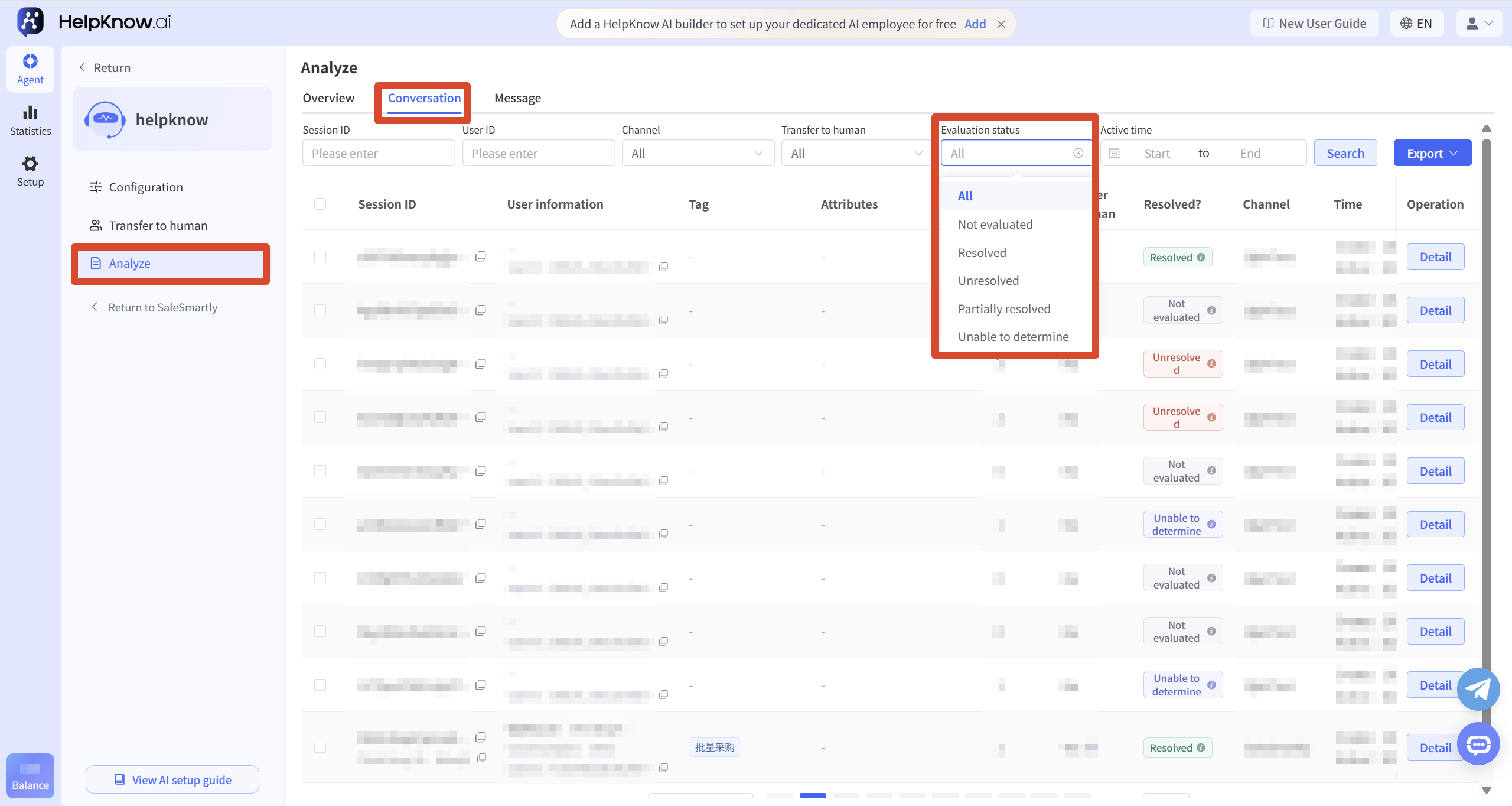
The system will make a comprehensive judgment based on the complete conversation content. The conversation status includes "to be evaluated", "resolved", "unresolved", "partially resolved" and "invalid/cannot be judged".
Link to this article: "Session Resolution Status Explanation"
II. Scope of Application
1. Default applicable scenarios
The default session status assessment criteria are mainly applicable to reception scenarios with the goal of "solving customer problems", such as product consultation, pre-sales and after-sales service, answering usage questions and troubleshooting.
2. Customize evaluation criteria
Different business scenarios may have different criteria for judging the effectiveness of a conversation. If your business goals or evaluation criteria differ from the default standards, the default conversation resolution status may not accurately reflect the actual reception effect.
For customized session evaluation criteria based on actual business scenarios, please contact HelpKnow's dedicated customer service.
III. State Definition
1. To be evaluated
This indicates that the current session has not yet completed the status assessment.
The system conducts a unified session evaluation every day at midnight. For sessions that have not generated new messages for 24 to 48 consecutive hours at the time of evaluation, the system will evaluate them as "resolved", "unresolved", "partially resolved", or "invalid/unable to determine" based on the complete dialogue content.
2. Resolved
This indicates that the main issues raised by the customer in this session have been clearly and completely resolved.
Common situations include:
- The customer clearly expressed satisfaction, understanding, gratitude, or approval, and did not continue to ask follow-up questions on the same core issue.
- We have provided clear, complete, and actionable answers, solutions, or conclusions that directly address the client's main problems.
- From the complete conversation, the customer's core demands have formed a closed loop, and there is no obvious information indicating that the problem is still unresolved.
3. Unresolved
This indicates that the main issues raised by the customer during this session have not been effectively resolved.
Common situations include:
- The customer clearly expressed dissatisfaction, disagreement, or stated that "it's not resolved" or "it still doesn't work."
- The response is irrelevant, off-topic, or fails to address the client's core concerns.
- The lack of key information, steps, or solutions needed to solve the problem prevents it from forming a closed loop.
- The customer repeatedly asked the same core question, but did not receive a valid response until the end of the session.
4. Partial solution
This indicates that the customer's problem has been resolved to some extent, but there are still important issues that have not been fully addressed.
Common situations include:
- Only part of the customer's problem has been resolved; important questions remain unanswered.
- The basic direction of the process has been provided, but the information, steps, or details are not complete.
- The customer raised several related questions, some of which have been resolved, while others remain unresolved.
- The response was helpful to the customer, but judging from the entire conversation, there was still a significant gap between the current situation and a complete solution to the problem.
5. Invalid/Unable to determine
This indicates that the current session lacks sufficient information to reasonably determine whether the customer's problem has been resolved, or that the session itself does not have a clear resolution goal.
Common situations include:
- The conversation content is too short to determine the customer's actual needs and the outcome of the process.
- The conversations mainly consisted of greetings, small talk, and tests, with no specific issues requiring resolution.
- The conversation was interrupted early on, and the customer's questions were not fully expressed.
- The dialogue lacks the crucial information needed to determine whether the problem has been resolved.
- Based on the complete conversation content, there is insufficient evidence to determine whether it is "resolved", "unresolved", or "partially resolved".
IV. Conversation Assessment
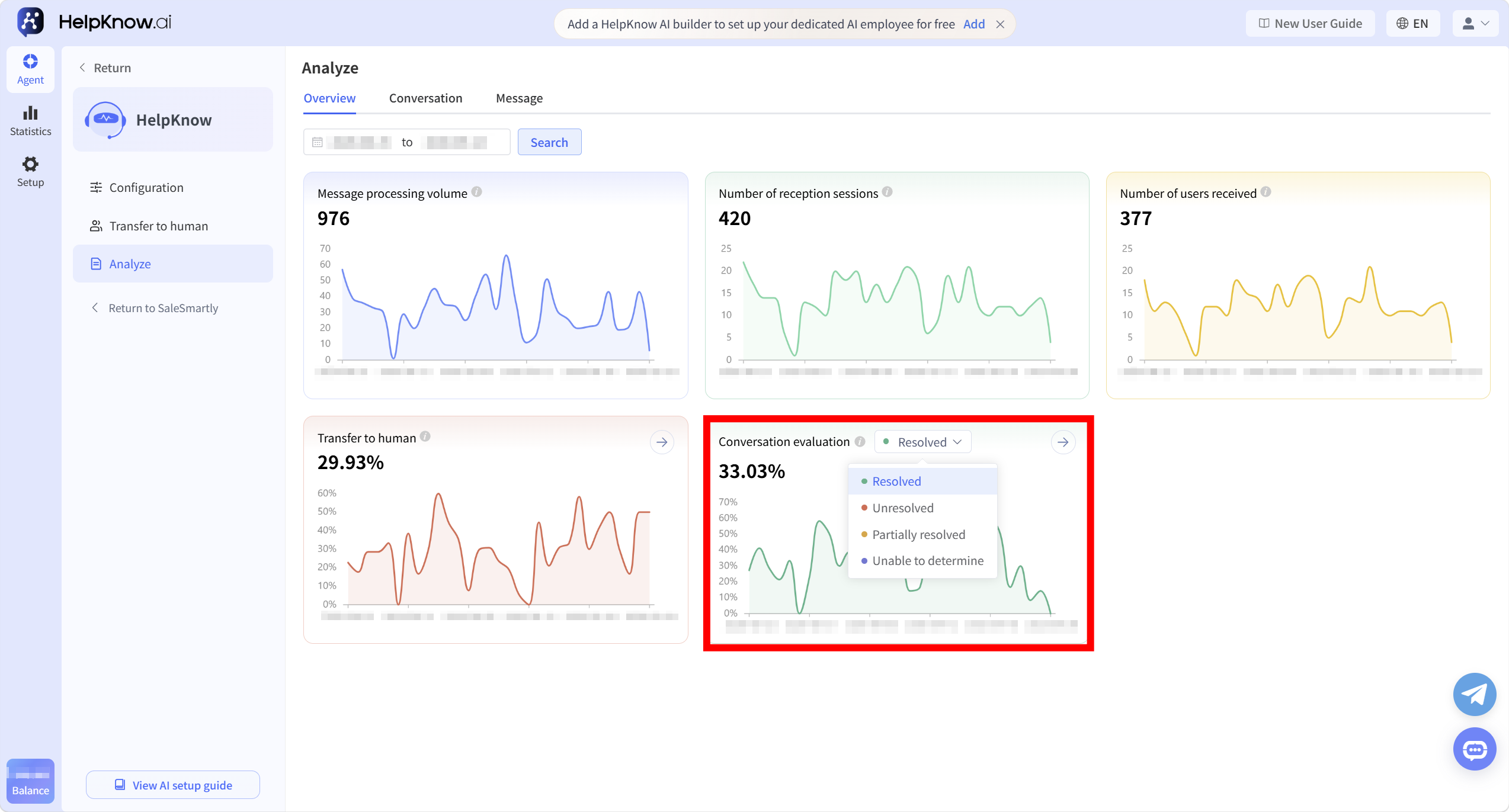
In "Analysis > Overview", you can view the percentage and trend of different session states within the selected time range.
Clicking the status drop-down box in "Session Assessment" allows you to switch between viewing "Resolved", "Unresolved", "Partially Resolved", and "Unable to Determine" session data.
The calculation method for the proportion of each state is as follows:
Percentage of sessions in selected state = Number of sessions in selected state ÷ Number of sessions × 100%
For example, when you select "Resolved", the page displays the percentage of resolved sessions out of all sessions.
;}.cls-2{fill:%230868f7;}.cls-3{fill:url(%23未命名的渐变_44);}.cls-4{fill:%23333;}%3c/style%3e%3clinearGradient%20id='未命名的渐变_8'%20x1='33.73'%20y1='100.61'%20x2='-0.03'%20y2='-1.06'%20gradientUnits='userSpaceOnUse'%3e%3cstop%20offset='0'%20stop-color='%237ae9fb'/%3e%3cstop%20offset='0.67'%20stop-color='%232b90f8'/%3e%3cstop%20offset='1'%20stop-color='%230868f7'/%3e%3c/linearGradient%3e%3clinearGradient%20id='未命名的渐变_44'%20x1='27.86'%20y1='18.67'%20x2='68.36'%20y2='22.22'%20gradientUnits='userSpaceOnUse'%3e%3cstop%20offset='0'%20stop-color='%235ac7f2'/%3e%3cstop%20offset='1'%20stop-color='%230868f7'/%3e%3c/linearGradient%3e%3c/defs%3e%3cpath%20class='cls-1'%20d='M29,28.74V81.91l-9.51-3.68v0L8.52,74A7.17,7.17,0,0,1,4,67.32V24.54A3.76,3.76,0,0,1,9.08,21Z'/%3e%3cpath%20class='cls-2'%20d='M68.09,78.07a13.15,13.15,0,0,1-17.9,12.06L29,81.91h0V28.74L50.19,37A13.17,13.17,0,0,0,68.08,25.3h0Z'/%3e%3cpath%20class='cls-3'%20d='M68.08,25.3a13.19,13.19,0,0,1-6.73,10.87A13.09,13.09,0,0,1,50.19,37L29,28.74V6A3.76,3.76,0,0,1,34.1,2.52l25.59,9.91A13.22,13.22,0,0,1,68.08,25.3Z'/%3e%3cpath%20class='cls-4'%20d='M129.06,81.76a4.33,4.33,0,0,1-3.19-1.31,4.4,4.4,0,0,1-1.31-3.24V56.86H97.65V77.21a4.36,4.36,0,0,1-1.35,3.2A4.68,4.68,0,0,1,93,81.76a4.32,4.32,0,0,1-3.19-1.31,4.37,4.37,0,0,1-1.32-3.24V27.27A4.58,4.58,0,0,1,89.83,24a4.59,4.59,0,0,1,7.82,3.27V48.15h26.91V27.27A4.58,4.58,0,0,1,125.91,24a4.59,4.59,0,0,1,7.82,3.27V77.21a4.37,4.37,0,0,1-1.36,3.2A4.65,4.65,0,0,1,129.06,81.76Z'/%3e%3cpath%20class='cls-4'%20d='M163.77,81.66c-6.57,0-11.76-1.92-15.44-5.7s-5.54-9.07-5.54-15.74a26.76,26.76,0,0,1,2.09-10.43,17.72,17.72,0,0,1,6.67-8.06,19.15,19.15,0,0,1,10.68-2.95,19,19,0,0,1,10.46,2.8,18.7,18.7,0,0,1,6.55,7.36,22.53,22.53,0,0,1,2.36,10.28A4.51,4.51,0,0,1,177,63.77H152.23a10.8,10.8,0,0,0,3.49,6.65c2,1.68,4.88,2.52,8.66,2.52a22.25,22.25,0,0,0,7.54-1.21c.74-.3,1.55-.67,2.37-1.07a3.75,3.75,0,0,1,1.84-.4,4.09,4.09,0,0,1,3,1.15,4,4,0,0,1,1.12,3,4.38,4.38,0,0,1-2.58,3.82,32.34,32.34,0,0,1-6.36,2.61A28.67,28.67,0,0,1,163.77,81.66ZM172.4,55.9a9.72,9.72,0,0,0-1.63-4.56A9.9,9.9,0,0,0,167,48a10.38,10.38,0,0,0-4.64-1.14,12,12,0,0,0-4.77,1.06,9.54,9.54,0,0,0-4.89,5.66,11.78,11.78,0,0,0-.51,2.3Z'/%3e%3cpath%20class='cls-4'%20d='M193,81.64a4.49,4.49,0,0,1-4.51-4.55V27.28A4.58,4.58,0,0,1,189.84,24a4.48,4.48,0,0,1,3.28-1.36A4.36,4.36,0,0,1,196.35,24a4.46,4.46,0,0,1,1.31,3.31V77.09a4.34,4.34,0,0,1-1.35,3.2A4.67,4.67,0,0,1,193,81.64Z'/%3e%3cpath%20class='cls-4'%20d='M263.79,81.71a5.7,5.7,0,0,1-4.2-1.74,5.76,5.76,0,0,1-1.73-4.19V27.37a4.58,4.58,0,0,1,1.35-3.27A4.59,4.59,0,0,1,267,27.37V72.53h24a4.58,4.58,0,0,1,3.27,7.82A4.66,4.66,0,0,1,291,81.71Z'/%3e%3cpath%20class='cls-4'%20d='M424.48,81.74a4.71,4.71,0,0,1-2.71-.88,5.43,5.43,0,0,1-1-1l-.07-.09-12.41-17-5.41,5v9.44a4.31,4.31,0,0,1-1.36,3.19,4.66,4.66,0,0,1-3.3,1.36A4.29,4.29,0,0,1,395,80.42a4.36,4.36,0,0,1-1.32-3.23V27.37A4.58,4.58,0,0,1,395,24.1a4.52,4.52,0,0,1,6.58.12,4.54,4.54,0,0,1,1.24,3.15V56.31l17.72-16.38.05,0a4.8,4.8,0,0,1,2.94-1.11,4.4,4.4,0,0,1,3.27,1.2,4.57,4.57,0,0,1,1.2,3.27,4.44,4.44,0,0,1-.77,2.33,7.45,7.45,0,0,1-1.43,1.65l-11,9.64,13.34,17.68a5,5,0,0,1,1,2.71,4.12,4.12,0,0,1-1.36,3.24A4.64,4.64,0,0,1,424.48,81.74Z'/%3e%3cpath%20class='cls-4'%20d='M317.93,81.76a21.5,21.5,0,1,1,21.17-21.5A21.37,21.37,0,0,1,317.93,81.76Zm0-34.1a12.61,12.61,0,1,0,12.42,12.6A12.52,12.52,0,0,0,317.93,47.66Z'/%3e%3cpath%20class='cls-4'%20d='M212.18,101.22a4.12,4.12,0,0,1-3.05-1.26,4.17,4.17,0,0,1-1.26-3.1V43.34a4.37,4.37,0,0,1,1.3-3.14,4.26,4.26,0,0,1,3.13-1.3,4.19,4.19,0,0,1,3.1,1.26,4.32,4.32,0,0,1,1.26,3.16,20.77,20.77,0,0,1,13-4.54,21.51,21.51,0,0,1,0,43,20.51,20.51,0,0,1-13-4.57V96.86a4.15,4.15,0,0,1-1.3,3.06A4.5,4.5,0,0,1,212.18,101.22Zm17.43-53.63c-6.23,0-12.93,4.11-12.93,12.72a12.73,12.73,0,0,0,25.46,0A12.71,12.71,0,0,0,229.61,47.59Z'/%3e%3cpath%20class='cls-4'%20d='M365.76,81.76a21.5,21.5,0,1,1,21.18-21.5A21.37,21.37,0,0,1,365.76,81.76Zm0-34.1a12.61,12.61,0,1,0,12.42,12.6A12.52,12.52,0,0,0,365.76,47.66Z'/%3e%3c/svg%3e)