
How to add a knowledge base for AI employees?
I. Function Introduction
The knowledge base is used to provide AI employees with product information, service policies, frequently asked questions, as well as business content such as images, audio and video files, and attachments.
When a user asks a question, the AI staff will retrieve relevant content from the existing knowledge base and respond by combining documents, Q&A, and materials from the knowledge base.
The knowledge base supports the following three content types:
- Documentation: Suitable for maintaining systematic content such as product introductions, operating instructions, and service policies.
- Q&A: Suitable for maintaining frequently asked questions, standard replies, and fixed business statements.
- Materials: Images, videos, audio, and attachments cited by employees in their replies, suitable for management needs that require AI.
This article primarily introduces how to add or create knowledge bases for AI employees, maintain knowledge base content, and publish configurations to make them effective. For detailed usage methods of different content types, please refer to the corresponding tutorials.
This article's link: "How to Add a Knowledge Base for AI Employees?"
II. Content Types
The knowledge base supports supplementing the knowledge of AI employees through three types of content: "documents, Q&A, and materials".
document
This document is suitable for storing systematic information such as product descriptions, operation manuals, and service policies.
You can upload local documents, add content online, or sync document content from HelpLook.
If the company's documents contain images, the knowledge base can also recognize the information within them, helping the AI employee understand the content.
Q&A
The Q&A section is suitable for including frequently asked questions, standard answers, and fixed business statements.
You can upload an Excel file, or you can fill out the questions and answers online.
material
The materials are suitable for including images, videos, audio, or attachments. When the AI employee answers user questions, it can reference content from the materials, such as attaching relevant images, videos, audio, or attachments in its reply.
III. Usage Method
1. Access the knowledge base configuration entry.
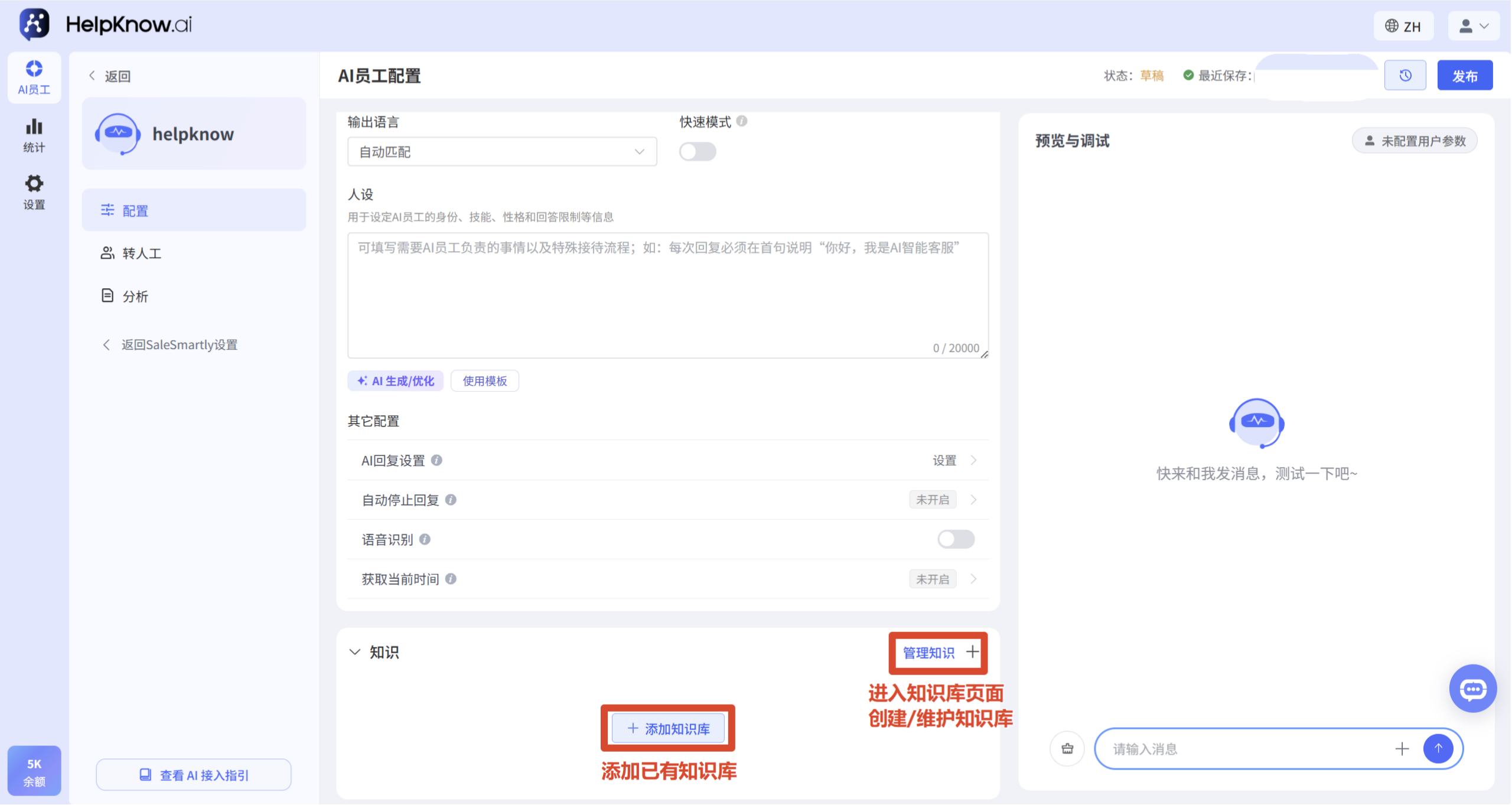
Click "AI Employee" in the left navigation bar, then click the AI employee you want to configure to enter the configuration page. In the "Knowledge" area, you can view or add knowledge bases.
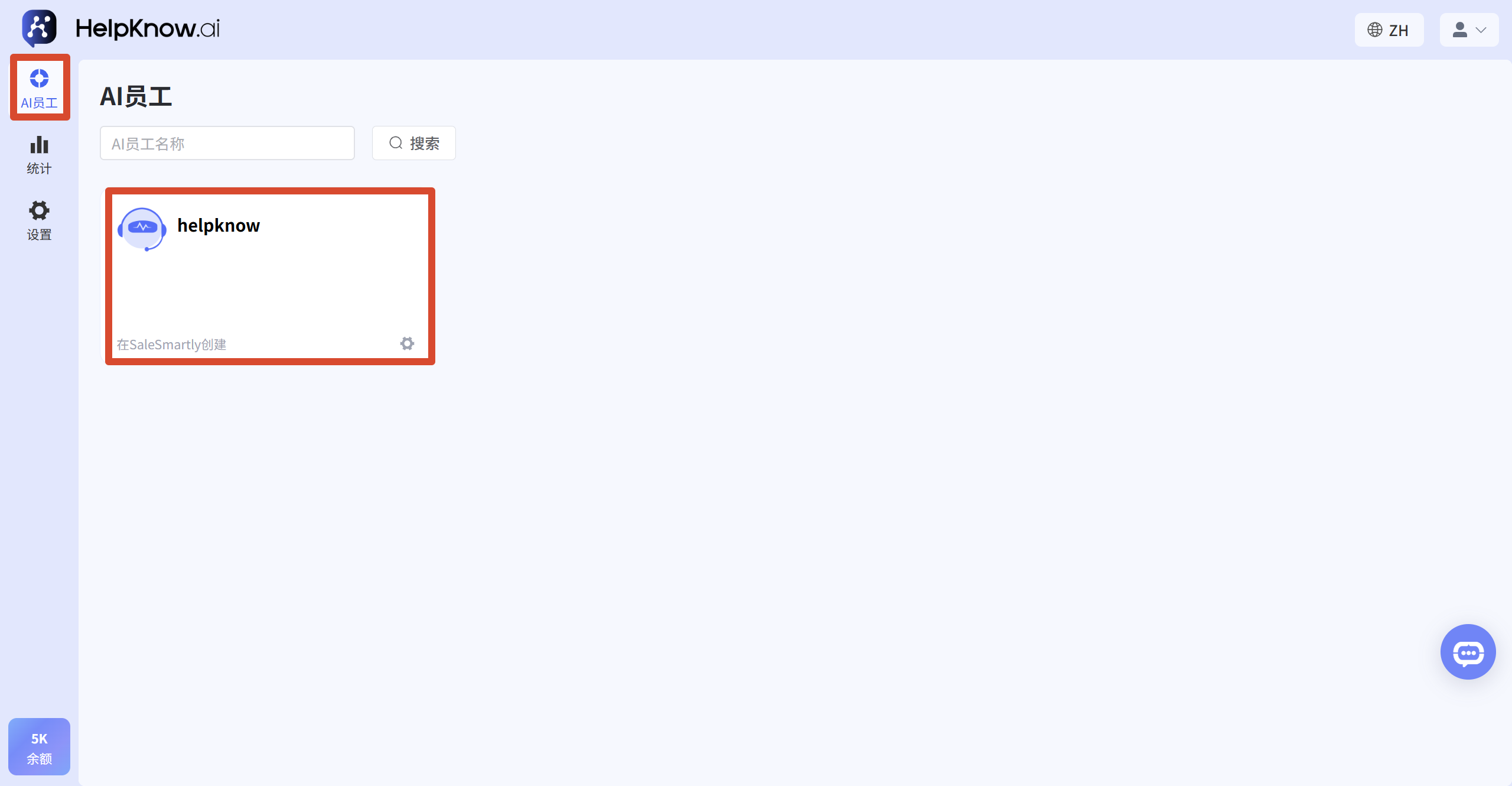
2. Add or create a knowledge base
You can configure the knowledge base in the following ways:
- Add an existing knowledge base: Click "Add Knowledge Base", select an existing knowledge base in the pop-up window and add it.
- To create a new knowledge base: Click "Manage Knowledge", then click "Create Knowledge Base" on the knowledge base page.
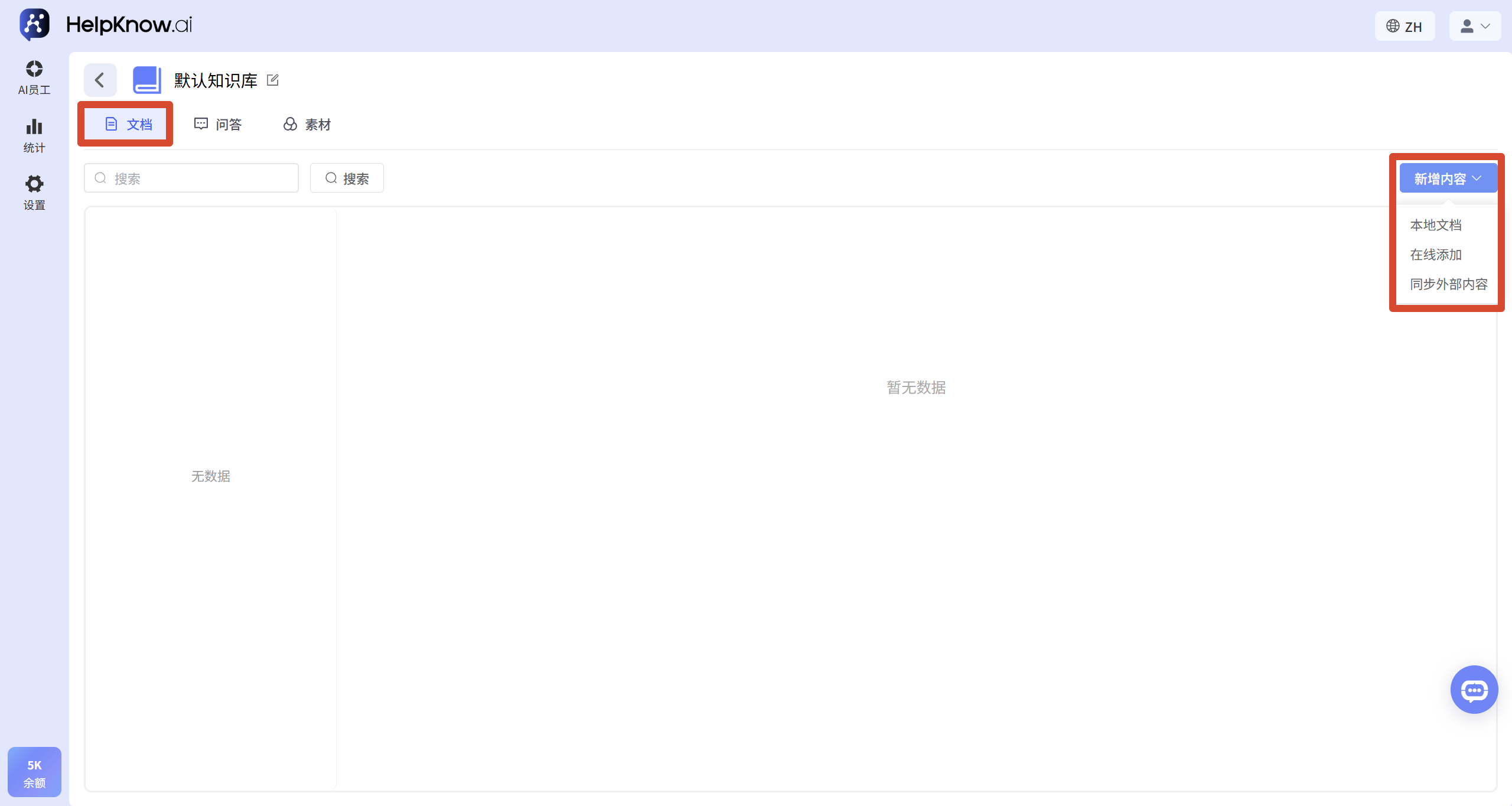
3. Maintain the knowledge base content
Once in the knowledge base, knowledge can be maintained by content type:
- Documents: Upload local documents, add content online, or sync HelpLook documents.
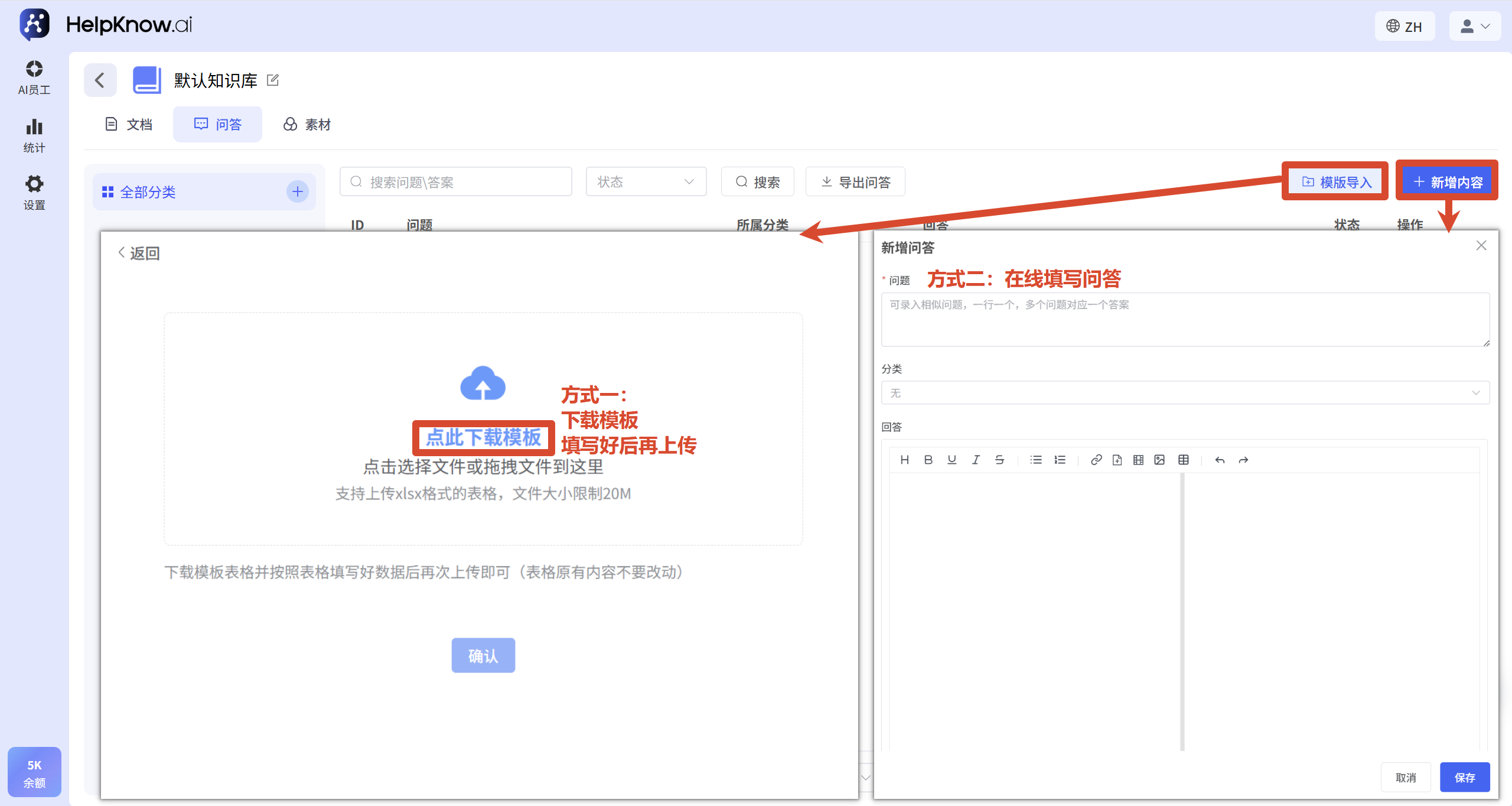
- Q&A: Click "Add Content" to fill in the questions and answers one by one; if you need to import in batches, click "Import Template", download the template first after entering the import page, fill in the template according to the template and then upload the Excel.
- Materials: Upload images, videos, audio files, or attachments, and manage them through the materials group.
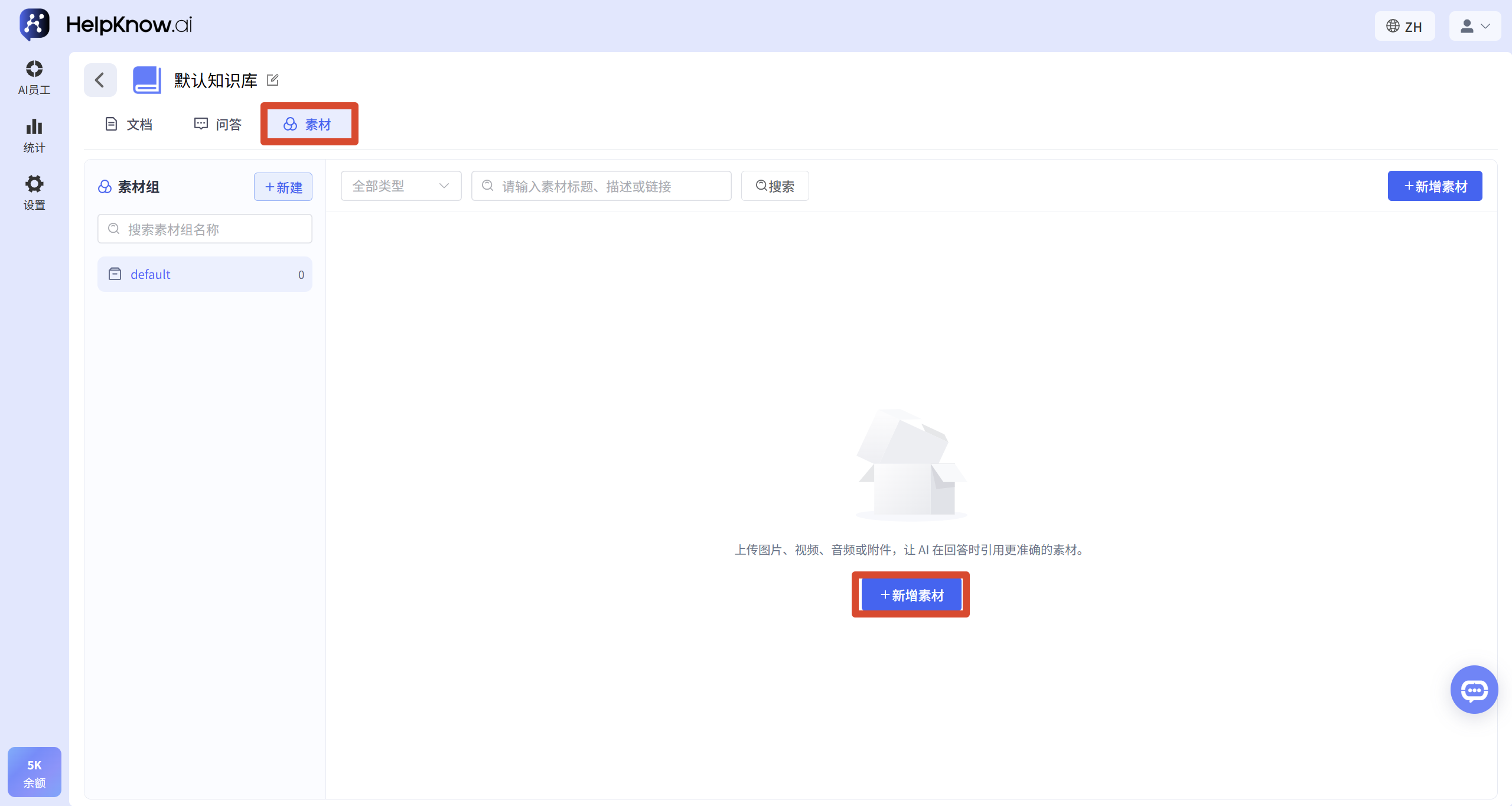
4. Release AI employee configuration
After adding or updating the knowledge base, return to the AI employee configuration page and click "Publish" in the upper right corner to make the configuration take effect.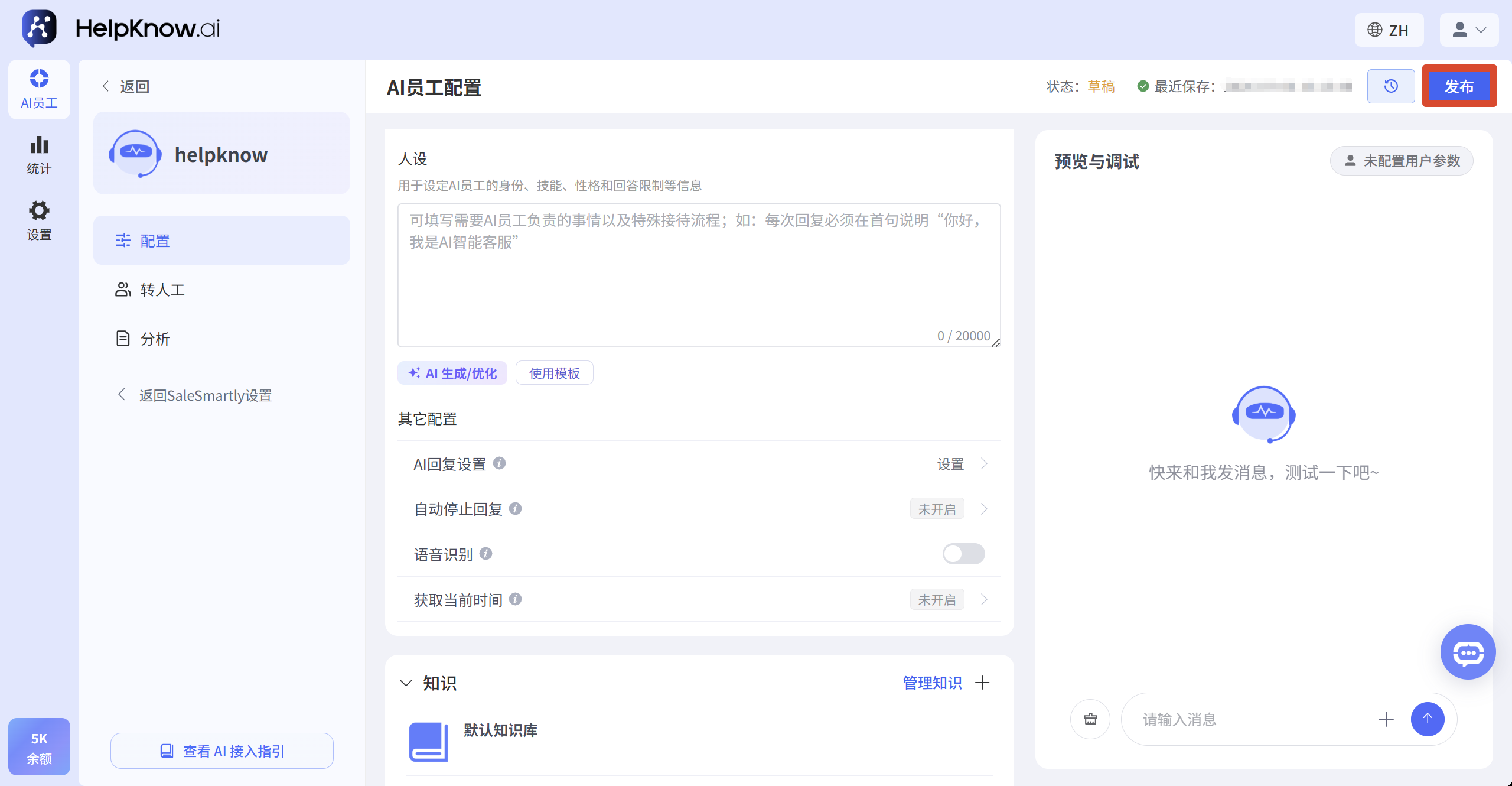
IV. Applicable Scenarios
- We have existing product information, help documents, or frequently asked questions. We hope that AI staff will answer these questions based on the provided information.
- Different AI employees are responsible for different business areas and need to be configured with different knowledge sources.
- AI employees are required to include images, videos, audio, or attachments in their replies.
V. Precautions
- An AI employee can add multiple knowledge bases.
- When the knowledge base is empty, AI employees may not be able to cite relevant content to answer users.
- When uploading documents, Q&A, or materials, please refer to the format, size, and quantity limits indicated on the page.
- Each media group supports a maximum of 100 media. If you need more, please create a new media group.
- You can upload materials in only one language, and the AI will automatically translate them into the corresponding language based on the questioner's language. It's recommended to test the response in different languages first to ensure the answer meets your expectations.
VI. Frequently Asked Questions
1. Can an AI employee add multiple knowledge bases?
Yes. You can add multiple knowledge bases for the same AI employee, allowing the AI employee to reference knowledge content from different sources.
2. Why didn't the added knowledge base take effect?
After adding or updating the knowledge base, you need to click "Publish" in the upper right corner of the AI Employee Configuration page. The new configuration will only take effect after publishing.
3. What are the differences between documents, Q&A, and resources?
Documentation is suitable for maintaining systematic explanatory content, such as product documentation, service policies, and operating instructions.
Q&A is suitable for maintaining standard questions and fixed answers, such as common questions, business statements, and customer service responses.
The materials can be uploaded as images, videos, audio, or attachments, allowing the AI employee to cite more specific information when answering questions.
;}.cls-2{fill:%230868f7;}.cls-3{fill:url(%23未命名的渐变_44);}.cls-4{fill:%23333;}%3c/style%3e%3clinearGradient%20id='未命名的渐变_8'%20x1='33.73'%20y1='100.61'%20x2='-0.03'%20y2='-1.06'%20gradientUnits='userSpaceOnUse'%3e%3cstop%20offset='0'%20stop-color='%237ae9fb'/%3e%3cstop%20offset='0.67'%20stop-color='%232b90f8'/%3e%3cstop%20offset='1'%20stop-color='%230868f7'/%3e%3c/linearGradient%3e%3clinearGradient%20id='未命名的渐变_44'%20x1='27.86'%20y1='18.67'%20x2='68.36'%20y2='22.22'%20gradientUnits='userSpaceOnUse'%3e%3cstop%20offset='0'%20stop-color='%235ac7f2'/%3e%3cstop%20offset='1'%20stop-color='%230868f7'/%3e%3c/linearGradient%3e%3c/defs%3e%3cpath%20class='cls-1'%20d='M29,28.74V81.91l-9.51-3.68v0L8.52,74A7.17,7.17,0,0,1,4,67.32V24.54A3.76,3.76,0,0,1,9.08,21Z'/%3e%3cpath%20class='cls-2'%20d='M68.09,78.07a13.15,13.15,0,0,1-17.9,12.06L29,81.91h0V28.74L50.19,37A13.17,13.17,0,0,0,68.08,25.3h0Z'/%3e%3cpath%20class='cls-3'%20d='M68.08,25.3a13.19,13.19,0,0,1-6.73,10.87A13.09,13.09,0,0,1,50.19,37L29,28.74V6A3.76,3.76,0,0,1,34.1,2.52l25.59,9.91A13.22,13.22,0,0,1,68.08,25.3Z'/%3e%3cpath%20class='cls-4'%20d='M129.06,81.76a4.33,4.33,0,0,1-3.19-1.31,4.4,4.4,0,0,1-1.31-3.24V56.86H97.65V77.21a4.36,4.36,0,0,1-1.35,3.2A4.68,4.68,0,0,1,93,81.76a4.32,4.32,0,0,1-3.19-1.31,4.37,4.37,0,0,1-1.32-3.24V27.27A4.58,4.58,0,0,1,89.83,24a4.59,4.59,0,0,1,7.82,3.27V48.15h26.91V27.27A4.58,4.58,0,0,1,125.91,24a4.59,4.59,0,0,1,7.82,3.27V77.21a4.37,4.37,0,0,1-1.36,3.2A4.65,4.65,0,0,1,129.06,81.76Z'/%3e%3cpath%20class='cls-4'%20d='M163.77,81.66c-6.57,0-11.76-1.92-15.44-5.7s-5.54-9.07-5.54-15.74a26.76,26.76,0,0,1,2.09-10.43,17.72,17.72,0,0,1,6.67-8.06,19.15,19.15,0,0,1,10.68-2.95,19,19,0,0,1,10.46,2.8,18.7,18.7,0,0,1,6.55,7.36,22.53,22.53,0,0,1,2.36,10.28A4.51,4.51,0,0,1,177,63.77H152.23a10.8,10.8,0,0,0,3.49,6.65c2,1.68,4.88,2.52,8.66,2.52a22.25,22.25,0,0,0,7.54-1.21c.74-.3,1.55-.67,2.37-1.07a3.75,3.75,0,0,1,1.84-.4,4.09,4.09,0,0,1,3,1.15,4,4,0,0,1,1.12,3,4.38,4.38,0,0,1-2.58,3.82,32.34,32.34,0,0,1-6.36,2.61A28.67,28.67,0,0,1,163.77,81.66ZM172.4,55.9a9.72,9.72,0,0,0-1.63-4.56A9.9,9.9,0,0,0,167,48a10.38,10.38,0,0,0-4.64-1.14,12,12,0,0,0-4.77,1.06,9.54,9.54,0,0,0-4.89,5.66,11.78,11.78,0,0,0-.51,2.3Z'/%3e%3cpath%20class='cls-4'%20d='M193,81.64a4.49,4.49,0,0,1-4.51-4.55V27.28A4.58,4.58,0,0,1,189.84,24a4.48,4.48,0,0,1,3.28-1.36A4.36,4.36,0,0,1,196.35,24a4.46,4.46,0,0,1,1.31,3.31V77.09a4.34,4.34,0,0,1-1.35,3.2A4.67,4.67,0,0,1,193,81.64Z'/%3e%3cpath%20class='cls-4'%20d='M263.79,81.71a5.7,5.7,0,0,1-4.2-1.74,5.76,5.76,0,0,1-1.73-4.19V27.37a4.58,4.58,0,0,1,1.35-3.27A4.59,4.59,0,0,1,267,27.37V72.53h24a4.58,4.58,0,0,1,3.27,7.82A4.66,4.66,0,0,1,291,81.71Z'/%3e%3cpath%20class='cls-4'%20d='M424.48,81.74a4.71,4.71,0,0,1-2.71-.88,5.43,5.43,0,0,1-1-1l-.07-.09-12.41-17-5.41,5v9.44a4.31,4.31,0,0,1-1.36,3.19,4.66,4.66,0,0,1-3.3,1.36A4.29,4.29,0,0,1,395,80.42a4.36,4.36,0,0,1-1.32-3.23V27.37A4.58,4.58,0,0,1,395,24.1a4.52,4.52,0,0,1,6.58.12,4.54,4.54,0,0,1,1.24,3.15V56.31l17.72-16.38.05,0a4.8,4.8,0,0,1,2.94-1.11,4.4,4.4,0,0,1,3.27,1.2,4.57,4.57,0,0,1,1.2,3.27,4.44,4.44,0,0,1-.77,2.33,7.45,7.45,0,0,1-1.43,1.65l-11,9.64,13.34,17.68a5,5,0,0,1,1,2.71,4.12,4.12,0,0,1-1.36,3.24A4.64,4.64,0,0,1,424.48,81.74Z'/%3e%3cpath%20class='cls-4'%20d='M317.93,81.76a21.5,21.5,0,1,1,21.17-21.5A21.37,21.37,0,0,1,317.93,81.76Zm0-34.1a12.61,12.61,0,1,0,12.42,12.6A12.52,12.52,0,0,0,317.93,47.66Z'/%3e%3cpath%20class='cls-4'%20d='M212.18,101.22a4.12,4.12,0,0,1-3.05-1.26,4.17,4.17,0,0,1-1.26-3.1V43.34a4.37,4.37,0,0,1,1.3-3.14,4.26,4.26,0,0,1,3.13-1.3,4.19,4.19,0,0,1,3.1,1.26,4.32,4.32,0,0,1,1.26,3.16,20.77,20.77,0,0,1,13-4.54,21.51,21.51,0,0,1,0,43,20.51,20.51,0,0,1-13-4.57V96.86a4.15,4.15,0,0,1-1.3,3.06A4.5,4.5,0,0,1,212.18,101.22Zm17.43-53.63c-6.23,0-12.93,4.11-12.93,12.72a12.73,12.73,0,0,0,25.46,0A12.71,12.71,0,0,0,229.61,47.59Z'/%3e%3cpath%20class='cls-4'%20d='M365.76,81.76a21.5,21.5,0,1,1,21.18-21.5A21.37,21.37,0,0,1,365.76,81.76Zm0-34.1a12.61,12.61,0,1,0,12.42,12.6A12.52,12.52,0,0,0,365.76,47.66Z'/%3e%3c/svg%3e)