
Why didn't the AI employee use the tools as expected?
When users inquire about information such as orders, products, inventory, or logistics, AI employees can use the added tools to query relevant data.
If the tool has been added, but the AI employee has not called the tool, called the wrong tool, or has not used the data returned by the tool correctly, you can check the tool configuration, persona rules, and actual usage by following the methods in this article.
This article's link: "Why didn't the AI employee use the tools as expected?"
I. Confirm that the tool is working properly.
First, check if the tool itself is configured correctly:
- Has the tool been added to the current AI employee?
- Has the plugin been authenticated?
- Can the custom tool be successfully debugged and return the expected data?
- After modifying the AI employee configuration, have you clicked "Publish"?
Successful tool debugging only indicates that the interface and parameters can function normally. Whether the AI employee will call the tool in a conversation also depends on whether the added tool is suitable for the current use case, the tool's name and description, and the calling rules in the user persona.
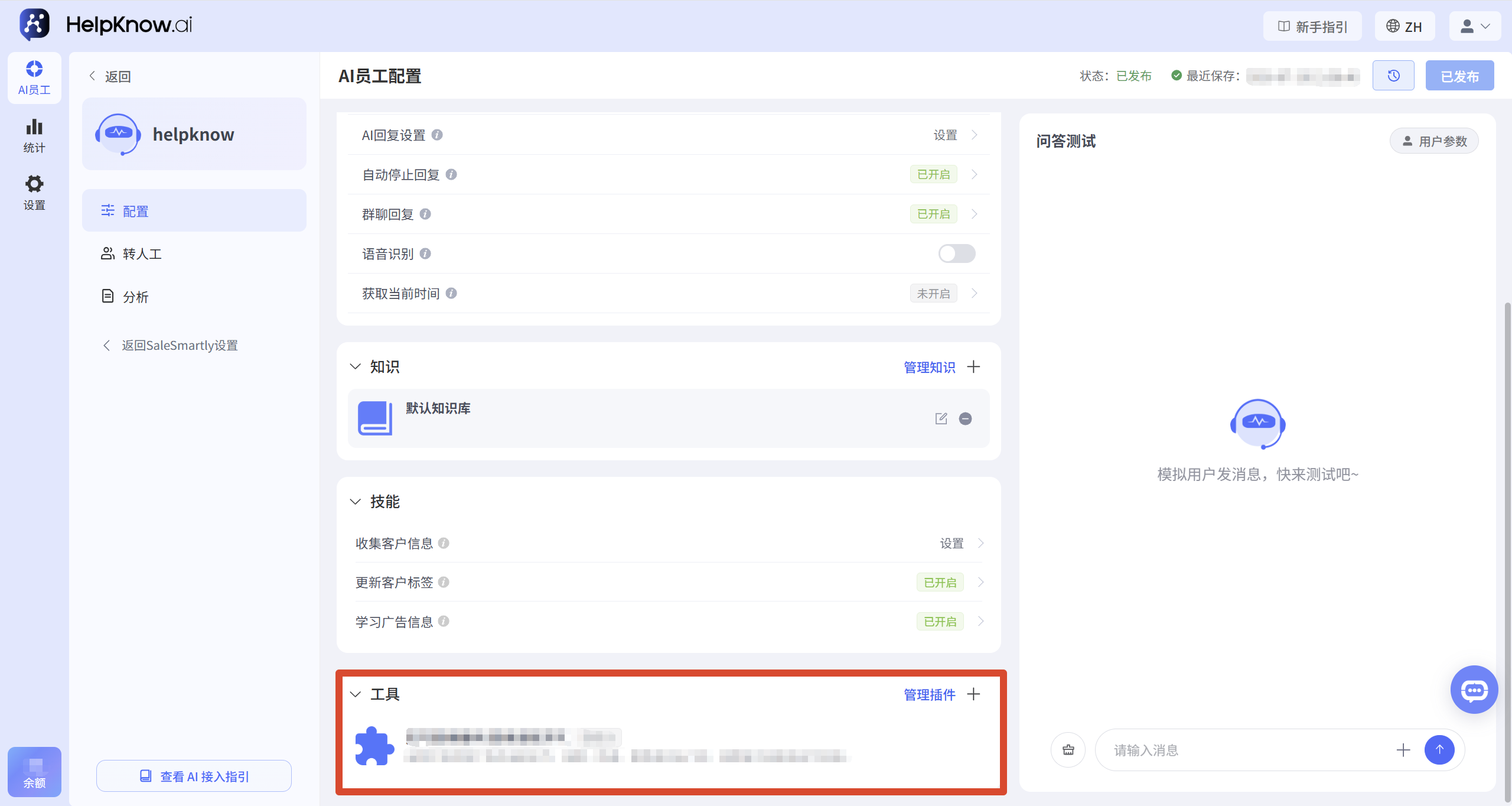
II. Inspection Tool Configuration and Scope of Application
Different types of tools have different adjustable configurations:
- The plugins provided by the platform have their tool names, descriptions, and parameters pre-configured and do not require manual modification.
- Custom plugins and tools : You can set the tool name, description, input parameters, and output parameters yourself.
1. Plugins provided by the platform
For plugins provided by platforms such as Shopify and WooCommerce, please confirm:
- The plugin has been authorized.
- The necessary tools have been added to the current AI staff.
- The added tools are consistent with the questions users have asked.
For example, Shopify plugins may include different tools such as product search and order search. When a user inquires about a product, a product search tool needs to be added; when a user inquires about the order status, an order search tool needs to be added.
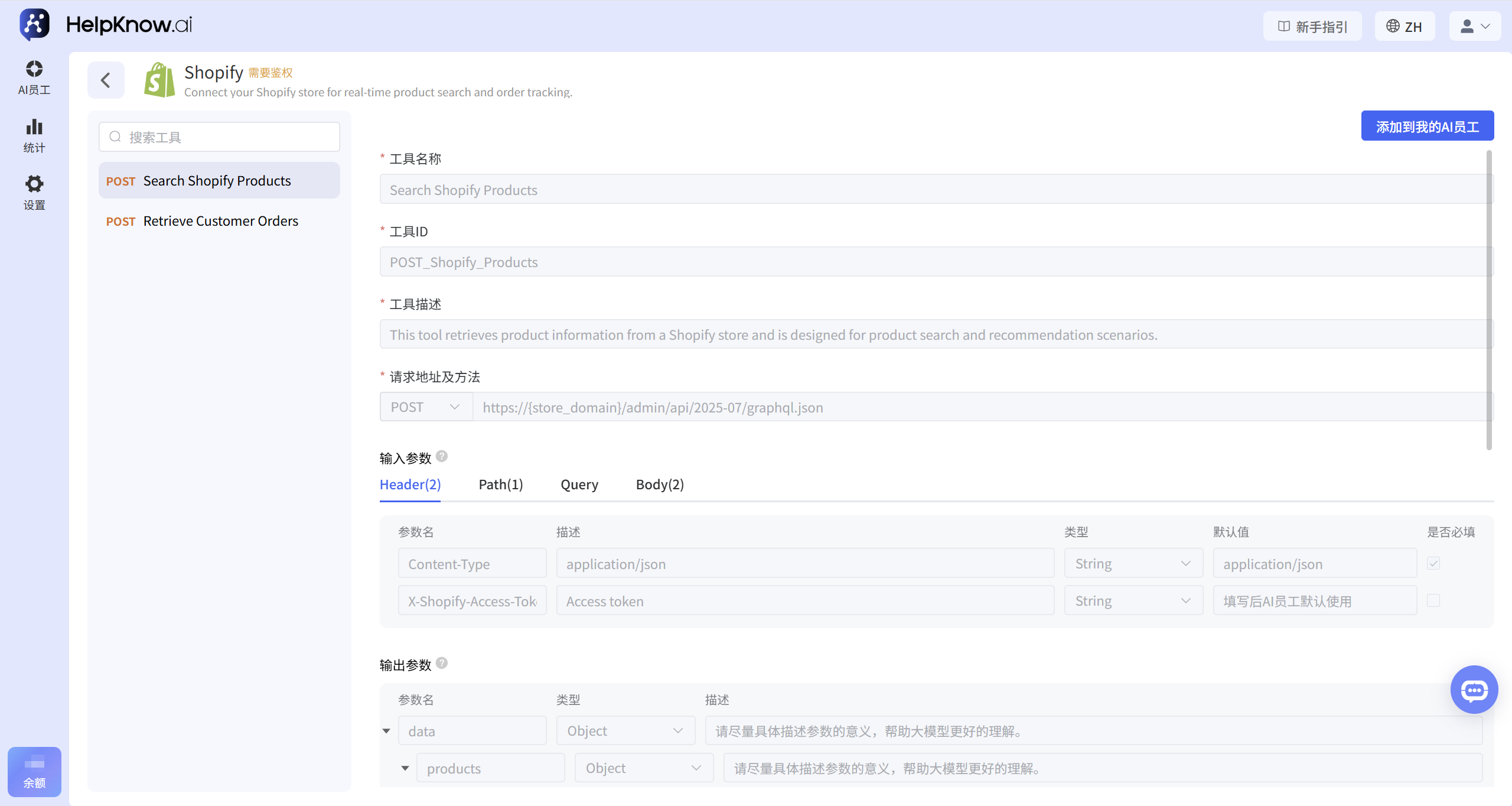
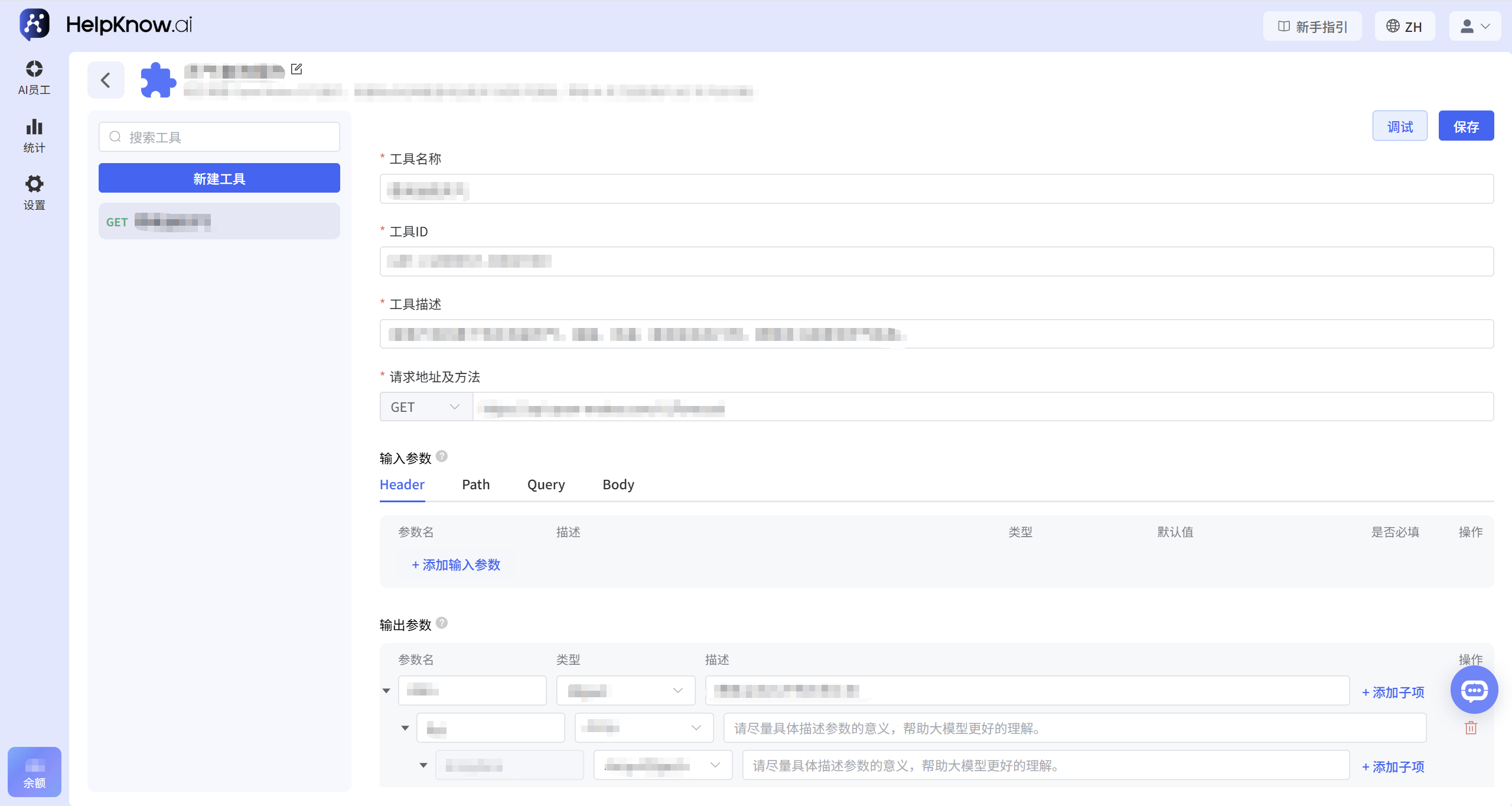
2. Custom plugins and tools
For tools you create yourself, ensure that the tool name and description clearly explain its purpose.
The tool name should reflect the specific query object and capability, and avoid using overly broad names such as "query information" or "get data".
For example:
- Not recommended: Checking orders
- Recommendation: Check order status by order number
The tool description should also explain the use cases, the information required, and the scope of application of the tool.
For example:
Use this tool when a user inquires about order status, payment status, or shipping progress. The user's order number is required before using it.
Input and output parameters should also have clear names and descriptions, and only the fields necessary to complete the query and answer should be retained.
For detailed configuration instructions on custom tools, please refer to: Custom Plugins and Tools .
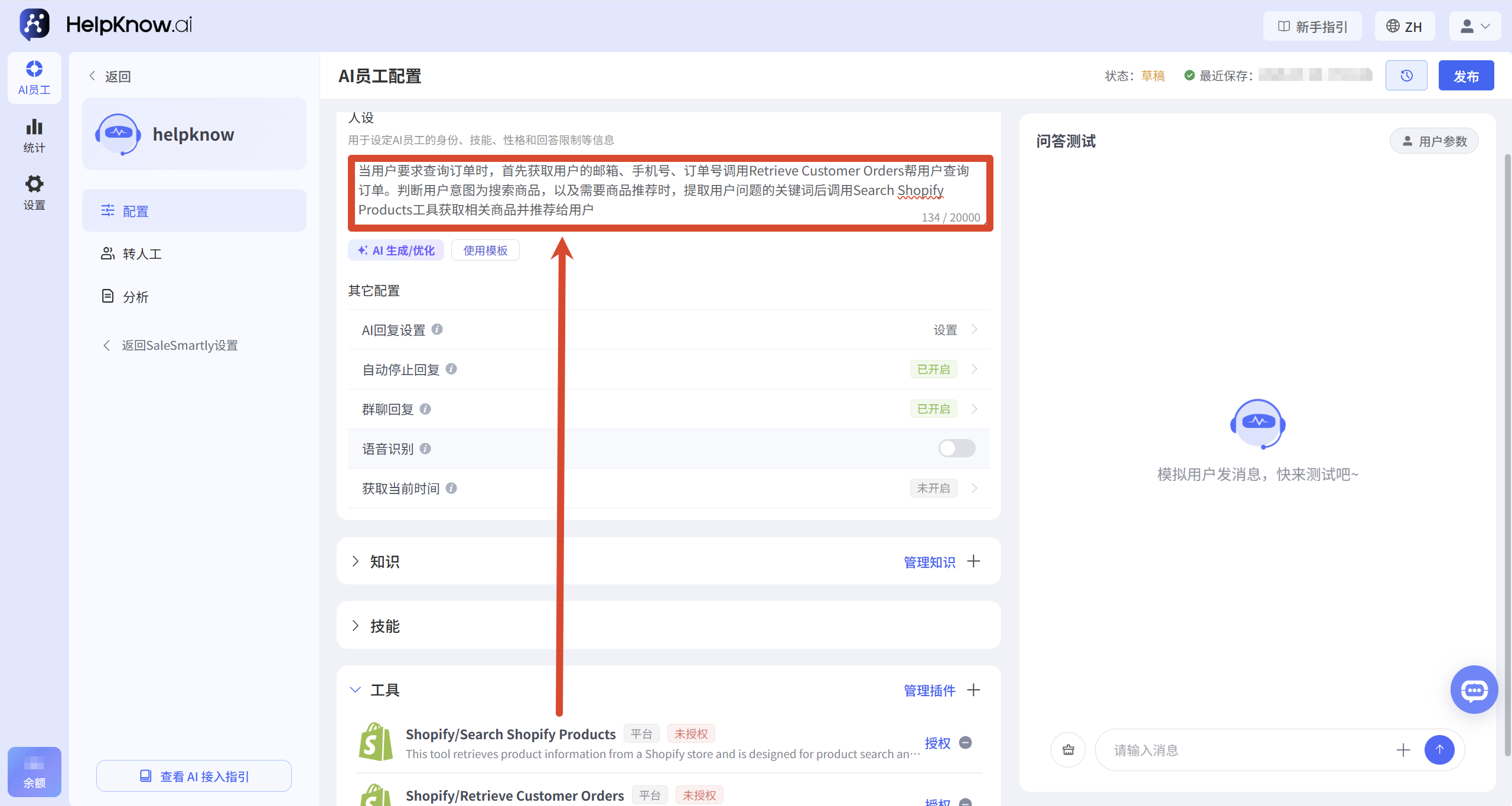
III. Supplementing the rules for calling characters
In addition to the description of the tool itself, the process of calling the tool can also be explained in the character design.
For example:
When a user requests to check their order, the system first retrieves the user's email address, phone number, and order number, then calls the "Retrieve Customer Orders" function to retrieve the order. If the system determines that the user's intent is to search for products or requires product recommendations, it extracts keywords from the user's query and uses the "Search Shopify Products" tool to retrieve relevant products and recommend them to the user.
It is recommended to clearly specify the calling rules:
- Under what circumstances should a tool be called?
- How to prompt the user when parameters are missing
- How to respond after the tool returns results
- How to handle query failures or no results?
For detailed instructions on configuring AI employee personas, please refer to: How to Configure Character Settings for an AI Employee?
IV. Retesting and Troubleshooting
After making the modifications, send questions in different formats in the "Q&A Test" section on the right to test whether the AI employee will use the correct tools. It is recommended to test both scenarios where the required information is provided and scenarios where the required information is missing.
If the answer still doesn't meet your expectations, you can click "Not good answer? Check the reason" below the answer to use the troubleshooting assistant to see the cause of the problem and optimization suggestions.
To review previous test records or answers from real channels such as websites and social media, you can go to "Analytics > Conversations" or "Analytics > Messages" to find the corresponding answer and review it.
For detailed usage instructions, please refer to: How to Troubleshoot When AI Employee Responses Do Not Meet Expectations?
V. Frequently Asked Questions
1. Why is the AI employee not being invoked even though the tool has been successfully debugged?
Successful tool debugging only means that the interface can run normally, and does not mean that the AI employee will definitely call the tool in the conversation.
For plugins provided by the platform, please ensure that the added tools match the user's inquiry and add the calling conditions in the user profile. For custom tools, please also check that the tool name, description, and parameter settings are clear.
Related tutorials: Custom plugins and tools
2. Why did the AI employee call the wrong tool?
If using plugins provided by the platform, please ensure that the correct tools have been added for the AI employee and that the usage scenarios for different tools are clearly distinguished in the persona.
If using custom tools, the names or descriptions of multiple tools may be too similar. It is recommended to specify the target query, purpose, and scope of application in the tool name and description.
Related tutorials: What are plugins? What are tools?
3. Why didn't the AI employee ask for the information it needed?
Please clearly state in the character design: if the order number, email address, phone number, or other necessary information is missing, you should first ask the user to obtain the required information before calling the tool.
If using a custom tool, you also need to confirm that the relevant parameters have been set as required and that a clear parameter description has been provided.
Related tutorial: How to Configure Character Settings for an AI Employee?
4. Why is the AI employee still giving incorrect answers even though the tool has returned data?
If using a custom tool, please check whether the output parameters contain the key fields needed to answer the question, and whether the field names and descriptions are clear.
For real-time data such as orders, prices, inventory, and logistics, the AI staff should be explicitly required in their persona to rely on the results returned by the tools and not to make their own guesses.
Related tutorials: Custom plugins and tools
5. Can you guarantee that the AI employee will use the specified tools every time?
AI employees will determine whether to use tools based on user expression, tool configuration, and personality rules, so there may be differences depending on the expression method.
Please ensure that the correct tools have been added, and clearly define the calling conditions, the handling method for insufficient information, and the response method for query failure in the character profile. After modification, you can test it using various real questions; if the answers do not meet expectations, you can use the troubleshooting assistant for further analysis.
Related tutorial: How to Troubleshoot When AI Employee Responses Do Not Meet Expectations?
VI. Related Recommendations
;}.cls-2{fill:%230868f7;}.cls-3{fill:url(%23未命名的渐变_44);}.cls-4{fill:%23333;}%3c/style%3e%3clinearGradient%20id='未命名的渐变_8'%20x1='33.73'%20y1='100.61'%20x2='-0.03'%20y2='-1.06'%20gradientUnits='userSpaceOnUse'%3e%3cstop%20offset='0'%20stop-color='%237ae9fb'/%3e%3cstop%20offset='0.67'%20stop-color='%232b90f8'/%3e%3cstop%20offset='1'%20stop-color='%230868f7'/%3e%3c/linearGradient%3e%3clinearGradient%20id='未命名的渐变_44'%20x1='27.86'%20y1='18.67'%20x2='68.36'%20y2='22.22'%20gradientUnits='userSpaceOnUse'%3e%3cstop%20offset='0'%20stop-color='%235ac7f2'/%3e%3cstop%20offset='1'%20stop-color='%230868f7'/%3e%3c/linearGradient%3e%3c/defs%3e%3cpath%20class='cls-1'%20d='M29,28.74V81.91l-9.51-3.68v0L8.52,74A7.17,7.17,0,0,1,4,67.32V24.54A3.76,3.76,0,0,1,9.08,21Z'/%3e%3cpath%20class='cls-2'%20d='M68.09,78.07a13.15,13.15,0,0,1-17.9,12.06L29,81.91h0V28.74L50.19,37A13.17,13.17,0,0,0,68.08,25.3h0Z'/%3e%3cpath%20class='cls-3'%20d='M68.08,25.3a13.19,13.19,0,0,1-6.73,10.87A13.09,13.09,0,0,1,50.19,37L29,28.74V6A3.76,3.76,0,0,1,34.1,2.52l25.59,9.91A13.22,13.22,0,0,1,68.08,25.3Z'/%3e%3cpath%20class='cls-4'%20d='M129.06,81.76a4.33,4.33,0,0,1-3.19-1.31,4.4,4.4,0,0,1-1.31-3.24V56.86H97.65V77.21a4.36,4.36,0,0,1-1.35,3.2A4.68,4.68,0,0,1,93,81.76a4.32,4.32,0,0,1-3.19-1.31,4.37,4.37,0,0,1-1.32-3.24V27.27A4.58,4.58,0,0,1,89.83,24a4.59,4.59,0,0,1,7.82,3.27V48.15h26.91V27.27A4.58,4.58,0,0,1,125.91,24a4.59,4.59,0,0,1,7.82,3.27V77.21a4.37,4.37,0,0,1-1.36,3.2A4.65,4.65,0,0,1,129.06,81.76Z'/%3e%3cpath%20class='cls-4'%20d='M163.77,81.66c-6.57,0-11.76-1.92-15.44-5.7s-5.54-9.07-5.54-15.74a26.76,26.76,0,0,1,2.09-10.43,17.72,17.72,0,0,1,6.67-8.06,19.15,19.15,0,0,1,10.68-2.95,19,19,0,0,1,10.46,2.8,18.7,18.7,0,0,1,6.55,7.36,22.53,22.53,0,0,1,2.36,10.28A4.51,4.51,0,0,1,177,63.77H152.23a10.8,10.8,0,0,0,3.49,6.65c2,1.68,4.88,2.52,8.66,2.52a22.25,22.25,0,0,0,7.54-1.21c.74-.3,1.55-.67,2.37-1.07a3.75,3.75,0,0,1,1.84-.4,4.09,4.09,0,0,1,3,1.15,4,4,0,0,1,1.12,3,4.38,4.38,0,0,1-2.58,3.82,32.34,32.34,0,0,1-6.36,2.61A28.67,28.67,0,0,1,163.77,81.66ZM172.4,55.9a9.72,9.72,0,0,0-1.63-4.56A9.9,9.9,0,0,0,167,48a10.38,10.38,0,0,0-4.64-1.14,12,12,0,0,0-4.77,1.06,9.54,9.54,0,0,0-4.89,5.66,11.78,11.78,0,0,0-.51,2.3Z'/%3e%3cpath%20class='cls-4'%20d='M193,81.64a4.49,4.49,0,0,1-4.51-4.55V27.28A4.58,4.58,0,0,1,189.84,24a4.48,4.48,0,0,1,3.28-1.36A4.36,4.36,0,0,1,196.35,24a4.46,4.46,0,0,1,1.31,3.31V77.09a4.34,4.34,0,0,1-1.35,3.2A4.67,4.67,0,0,1,193,81.64Z'/%3e%3cpath%20class='cls-4'%20d='M263.79,81.71a5.7,5.7,0,0,1-4.2-1.74,5.76,5.76,0,0,1-1.73-4.19V27.37a4.58,4.58,0,0,1,1.35-3.27A4.59,4.59,0,0,1,267,27.37V72.53h24a4.58,4.58,0,0,1,3.27,7.82A4.66,4.66,0,0,1,291,81.71Z'/%3e%3cpath%20class='cls-4'%20d='M424.48,81.74a4.71,4.71,0,0,1-2.71-.88,5.43,5.43,0,0,1-1-1l-.07-.09-12.41-17-5.41,5v9.44a4.31,4.31,0,0,1-1.36,3.19,4.66,4.66,0,0,1-3.3,1.36A4.29,4.29,0,0,1,395,80.42a4.36,4.36,0,0,1-1.32-3.23V27.37A4.58,4.58,0,0,1,395,24.1a4.52,4.52,0,0,1,6.58.12,4.54,4.54,0,0,1,1.24,3.15V56.31l17.72-16.38.05,0a4.8,4.8,0,0,1,2.94-1.11,4.4,4.4,0,0,1,3.27,1.2,4.57,4.57,0,0,1,1.2,3.27,4.44,4.44,0,0,1-.77,2.33,7.45,7.45,0,0,1-1.43,1.65l-11,9.64,13.34,17.68a5,5,0,0,1,1,2.71,4.12,4.12,0,0,1-1.36,3.24A4.64,4.64,0,0,1,424.48,81.74Z'/%3e%3cpath%20class='cls-4'%20d='M317.93,81.76a21.5,21.5,0,1,1,21.17-21.5A21.37,21.37,0,0,1,317.93,81.76Zm0-34.1a12.61,12.61,0,1,0,12.42,12.6A12.52,12.52,0,0,0,317.93,47.66Z'/%3e%3cpath%20class='cls-4'%20d='M212.18,101.22a4.12,4.12,0,0,1-3.05-1.26,4.17,4.17,0,0,1-1.26-3.1V43.34a4.37,4.37,0,0,1,1.3-3.14,4.26,4.26,0,0,1,3.13-1.3,4.19,4.19,0,0,1,3.1,1.26,4.32,4.32,0,0,1,1.26,3.16,20.77,20.77,0,0,1,13-4.54,21.51,21.51,0,0,1,0,43,20.51,20.51,0,0,1-13-4.57V96.86a4.15,4.15,0,0,1-1.3,3.06A4.5,4.5,0,0,1,212.18,101.22Zm17.43-53.63c-6.23,0-12.93,4.11-12.93,12.72a12.73,12.73,0,0,0,25.46,0A12.71,12.71,0,0,0,229.61,47.59Z'/%3e%3cpath%20class='cls-4'%20d='M365.76,81.76a21.5,21.5,0,1,1,21.18-21.5A21.37,21.37,0,0,1,365.76,81.76Zm0-34.1a12.61,12.61,0,1,0,12.42,12.6A12.52,12.52,0,0,0,365.76,47.66Z'/%3e%3c/svg%3e)